The quick answer
Open Assign Inspections and filter the queue to pending item receipts at the warehouse. Select the two inspections, set their assignee and 0-Urgent priority, then click Assign. Check both rows in the refreshed grid before you move on.
Before you start
You need the NetSuite Quality Management SuiteApp, a role with access to the inspection queue and assignment controls, and two inspection queue entries for incoming receipts. The names, receipt numbers and queue numbers below are fictional examples.
1. Filter to pending item receipts
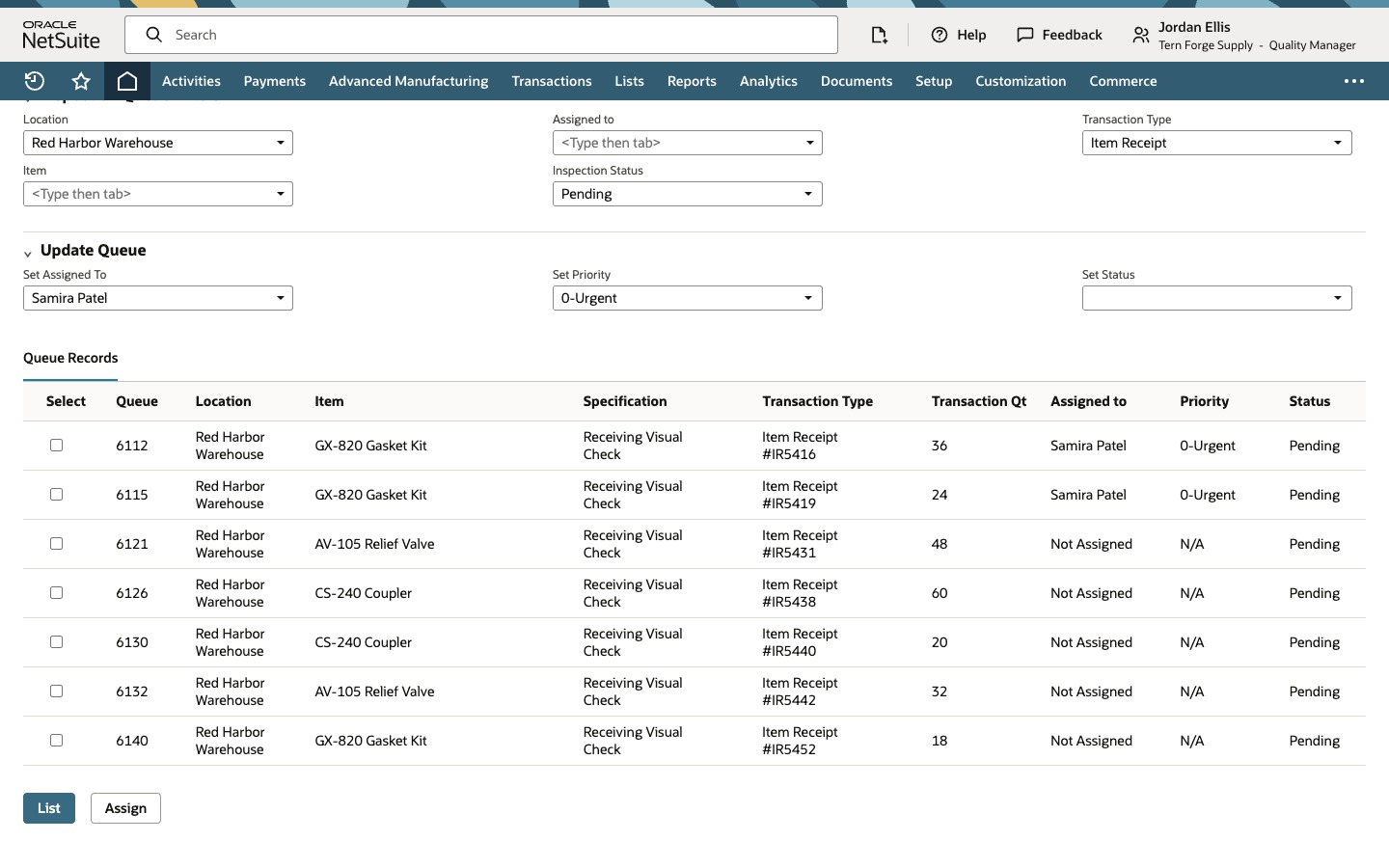
Open Quality > Setup > Assign Inspections, or use the Assign Inspections entry available to your role. Under Inspection Queue Filters, set Location to Red Harbor Warehouse, Inspection Status to Pending, and Transaction Type to Item Receipt. Click List. The form used in the example filters to item receipts. The older form in the demonstration uses Receipt From Purchase Order for incoming purchase order inspections.
2. Select the two receipt inspections
Match queue 6112 to item receipt IR5416, and queue 6115 to item receipt IR5419. Both are for the same gasket kit, so use the receipt numbers to tell them apart. Each row shows Not Assigned. Select those two rows and leave the other boxes clear.
3. Choose the inspector and priority
Under Update Queue, set Set Assigned To to Samira Patel.
Set Set Priority to 0-Urgent. Leave Set Status blank to keep both inspections Pending.
4. Assign and check the result
Click Assign. In the example the grid refreshes automatically. If it still shows the earlier values, click List again with the same filters. Verify that queues 6112 and 6115 show Samira Patel, 0-Urgent, and Pending. The next row still shows Not Assigned, N/A, and Pending.
Common questions
Can I assign rows from two receipts at once?
Yes. Select the entries you want before clicking Assign. The filled update values apply to each selected entry.
Does urgent priority start the inspection?
Priority marks which inspections need attention. Leave Set Status blank to preserve the current status. Both rows in the example stay Pending.
How do I verify the assignments if the grid still shows the old values?
Click List again with the same filters. Check the queue numbers and read Assigned to, Priority and Status on the updated rows.