The quick answer
Open Reports, Financial, Income Statement. Set Subsidiary Context to the parent marked (Consolidated), set Column to Subsidiary (Hierarchy) and select Refresh. In the demonstrated account the report then showed the parent's own column, a column for each subsidiary and a Total; the exact arrangement depends on your hierarchy, layout and permissions. To see what is behind one subsidiary's figure, select its amount: Income Statement Detail opens for that row. In the example, 4110 Revenue shows 219,800.00 for Canada, 699,800.00 for US East and 148,900.00 for US West against a Total of 1,068,500.00, and the Canada detail totals 219,800.00.
This guide needs a OneWorld account. The columns, group header and drill-down shown here come from the standard report in one account and release, so confirm the labels and layout in yours. In a consolidated report, amounts are generally presented in the selected context's currency, not each subsidiary's own currency, and an elimination subsidiary, if you have one, can appear as its own column. Person and operating-company names in the screenshots are fictional example data.
Before you start
You need a OneWorld account with a parent subsidiary and child subsidiaries that have posted income activity in the period, a role that can run the Income Statement and see those subsidiaries, and accounting periods for the dates you choose. The report also depends on your role's subsidiary restrictions, your accounting book and basis where those options exist, your Report by Period preference, the subsidiaries' currencies and consolidated exchange rates, and whether the report or its row layout is customized.
The example uses Jan 2026 to Apr 2026, the context Example Supply Co. (Consolidated) and three subsidiaries named Canada, US East and US West. The amounts are illustrative report amounts, not expected NetSuite values.
01. Open the Income Statement
Select Reports, then Financial, then Income Statement. In the footer, confirm From Jan 2026, To Apr 2026, Subsidiary Context Example Supply Co. (Consolidated) and Column Total. The report shows one Amount column. 4110 Revenue is 1,068,500.00 for the whole group.
02. Split the report by subsidiary
Open the Column list and select Subsidiary (Hierarchy), the hierarchy option in the demonstrated account (the plainer Subsidiary option is next to it). In this interface the report does not change yet. Select Refresh to rebuild it, and do the same after you change the period, the context or any other footer setting.
03. Read the subsidiary columns
In this example, an Example Supply Co. group header appears over the parent's own Amount column and the Canada, US East and US West columns, followed by Total. On 4110 Revenue, Canada shows 219,800.00, US East 699,800.00 and US West 148,900.00. The parent's own column shows no activity on that row, so the three add up to the Total of 1,068,500.00.
Do not assume the total always equals the visible columns. Elimination subsidiaries, intercompany eliminations, translation into the context's currency, consolidated exchange rates, rounding, report filters and a role that cannot see every subsidiary can make the consolidated total differ from a simple sum. Treat Total as the consolidated result, and look into a difference instead of forcing it to match.
04. Open the transactions behind an amount
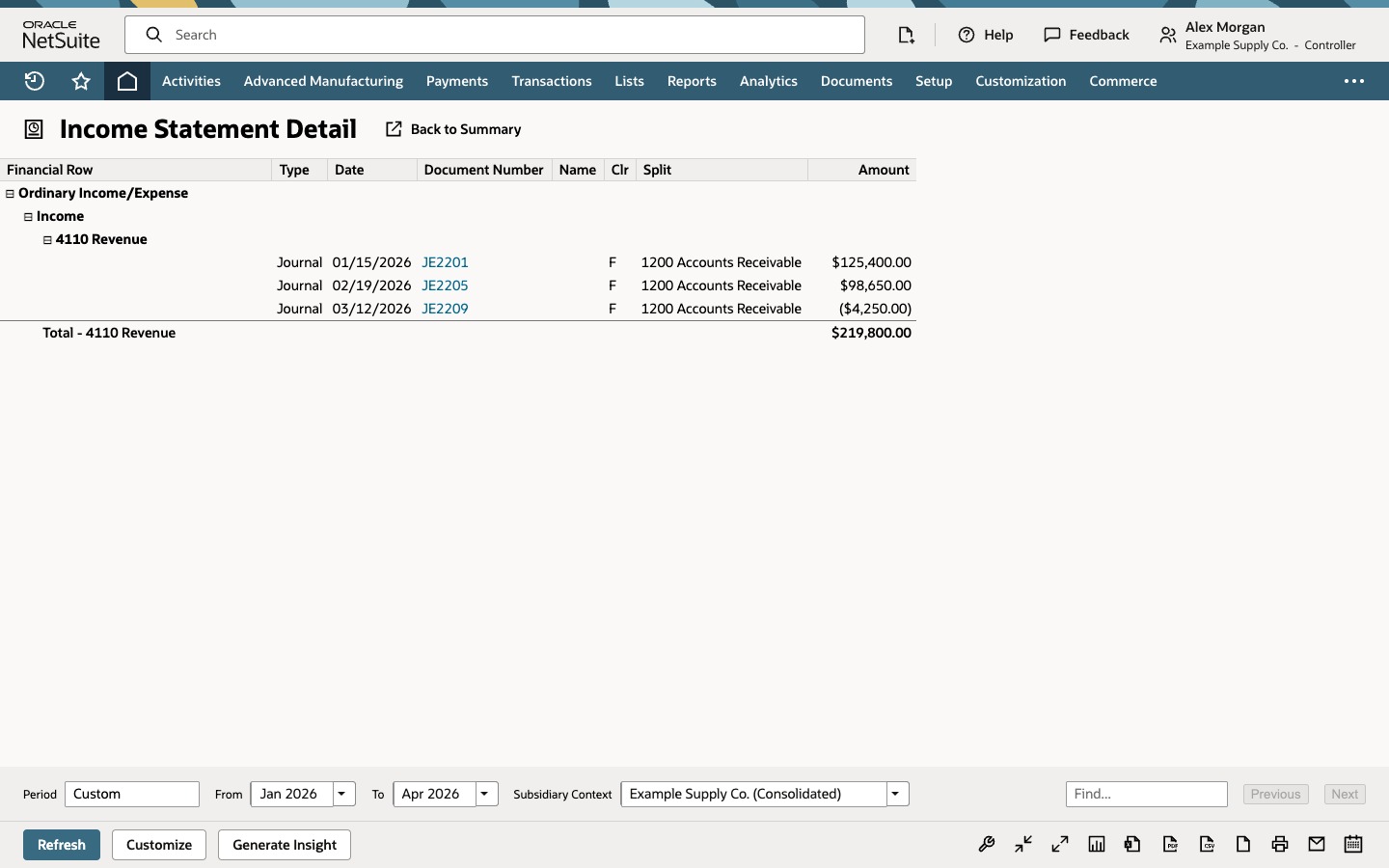
Select the Canada amount for 4110 Revenue. Income Statement Detail opens for that row and generally carries the period and subsidiary scope you came from. Verify its footer filters before you reconcile, because a customized report or different settings can change the result. It lists JE2201 for 125,400.00, JE2205 for 98,650.00 and JE2209 for (4,250.00). The Total - 4110 Revenue row is 219,800.00, the amount you selected. Use Back to Summary to return to the report.
The detail total should normally equal the amount you selected when the period or date mode, subsidiary scope, currency, accounting book, basis, filters and user access are the same. If it does not, compare those settings on both reports first. Selecting the account name opens the General Ledger instead, whose running balance can include activity from before the period. Account amounts are the most reliable drill targets. Header, formula and some summary rows, and customized columns, may not drill to transactions. If an amount is not clickable, run Income Statement Detail with the same filters or open the account's activity instead.
Common questions
How do I show an Income Statement by subsidiary?
Set Subsidiary Context to the parent marked (Consolidated), set Column to Subsidiary (Hierarchy) or Subsidiary, and select Refresh. Changing Column does not update the report until you refresh it.
What is the difference between Subsidiary and Subsidiary (Hierarchy)?
Subsidiary breaks the selected context into subsidiary amounts. In the demonstrated account, Subsidiary (Hierarchy) also kept the parent and child structure, with a group header and the parent's own column, followed by Total. The headers, parent column, any elimination column and the order depend on your hierarchy, report layout, permissions and release, so do not expect one fixed arrangement.
Why doesn't the Total equal the sum of my subsidiary columns?
Elimination subsidiaries, intercompany eliminations, translation into the context's currency, consolidated exchange rates, rounding, report filters, or subsidiaries your role cannot see can make the consolidated total differ from a simple sum. The example adds up because the parent's own column shows no activity on that row, and you should not assume that elsewhere. Compare your context, currency, book, basis and access before treating a difference as an error.
Does the drill-down keep the subsidiary I clicked?
It generally carries the period and subsidiary scope of the amount, but verify the footer filters on Income Statement Detail before you reconcile. A customized report, a different date or period preference, accounting book, basis, currency or a role restriction can change what you see.
Why can't I click some amounts?
Header rows, formula rows, some summary rows and customized columns may not open transaction detail. Account amounts in the standard report are the most reliable drill targets.