The quick answer
Build a Transaction search, set Main Line to Yes and group the results on Name. Then add one Formula (Currency) column per period, each with Summary Type Sum, using CASE WHEN {trandate} BETWEEN TRUNC({today}, 'MONTH') AND {today} THEN {amount} ELSE 0 END. Swap 'MONTH' for 'Q' or 'YEAR' for the quarter and the year. For the same stretch of last year, wrap both ends of the window in ADD_MONTHS({today}, -12).
The screenshots show sample data. The company, person, customers and amounts are fictional. The layout and wording were observed in one account and release, so check them against your own.
Before you start
Each column is a CASE expression that returns an invoice's amount when its date falls inside a window and 0 otherwise. A Summary Type of Sum then adds those values for each customer, so every invoice is split across the four periods in a single pass. TRUNC({today}, 'MONTH'), TRUNC({today}, 'Q') and TRUNC({today}, 'YEAR') return the first day of the current calendar month, quarter and year. These are calendar periods, not fiscal ones, so an account whose fiscal year starts on another date needs a different calculation.
You need a role that can create a search on transactions and read the amounts. Four things decide whether the totals mean what you expect:
- Which transactions are included. The criteria decide that before any formula runs. Do not add a date filter that keeps only this period, or the earlier windows will read 0.00. This walkthrough leaves Date unrestricted; in a large account, a broad range that starts before the earliest window you compare is the safer choice. A Transaction search covers every transaction type, and Name can be a customer, vendor or other entity, so for a sales report also add a Type filter such as Invoice, or Invoice and Cash Sale, and decide how credit memos and refunds should count. Consider Posting as well if only posting transactions should count. The sample data holds only invoices, so Main Line is its only filter. Invoiced amount is not the same as recognized revenue or net sales, and
{trandate}is the transaction date, not a posting, tax or revenue-recognition date. - One row per transaction. Main Line is Yes returns the main row of each transaction. Without it, a Transaction search also returns line rows (item, tax, shipping and similar), and the formulas can add the amount more than once. If you need line detail, set Main Line to No and read a line amount field instead. A join to a child record can still repeat a row, so test the totals.
- Currency and amount basis. Check which value
{amount}returns in your account: transaction currency, base currency or another converted value depends on the field, transaction type and context. In a multi-currency or OneWorld account, test a few invoices and use the amount field that matches the business meaning. - The run date.
{today}is evaluated each time the search runs, so the figures move every day, and the effective date can depend on the execution context and time zone settings. This example runs on 11/18/2026; the date is not shown on screen. A dashboard, scheduled email or export runs the search in its own context, so test each one. For a reproducible month-end report, put fixed dates in the formulas and criteria instead of{today}; a fixed period filter alone does not freeze a formula that still reads{today}.
01. Open a Transaction search and keep one row per invoice
Start a new Transaction search. The recording opens Reports > New Search and chooses Transaction in the Search Type list. The page is titled Transaction Search and has Submit, Export, Personalize Search and Create Saved Search at the top. Check Use Advanced Search so the Criteria and Results subtabs appear.
On Criteria, choose the filter Main Line, set it to Yes, click Set and click Add. The list now reads Main Line is true. Leave Date unrestricted.
02. Run the search to see the invoices
Click Submit. Transaction Search: Results opens with one row per transaction, which here means 24 invoices, because the sample data holds only invoices. Total: 24 is at the top right of the list. Nothing is saved yet: this runs the search ad hoc.
Look at the first customer, Alder Creek Outfitters. Its four invoices are 1,240.00 on 11/04/2026, 860.00 on 10/12/2026, 2,150.00 on 06/22/2026 and 1,980.00 on 03/09/2025. The next columns sort exactly these amounts into windows, which gives you something to check them against.
03. Group the results by customer
Click Return To Criteria and open the Results subtab. Click Remove all to clear the default columns, then click Add Row. For Field choose Name, set Summary Type to Group and click Add. Name is now the only column, so each customer becomes one row once the formula columns are added. Group on a plain field such as Name. Grouping on a formula would group by its result instead of adding the amounts.
04. Add the Current Month and Quarter to Date columns
Click Add Row. For Field choose Formula (Currency) and set Summary Type to Sum. Open the Formula popup, which has Function, Field and Formula fields. Type the formula below into Formula and click Set. Enter the Custom Label Current Month and click Add.
CASE WHEN {trandate}
  BETWEEN TRUNC({today}, 'MONTH')
  AND {today}
  THEN {amount} ELSE 0 END
The line breaks here are only for reading. Type it as one line, as the recording does.
Click Add Row again with Formula (Currency) and Sum. Type the same formula with 'Q' in place of 'MONTH', click Set, enter the Custom Label Quarter to Date and click Add. Both rows show their full formula in the Formula column.
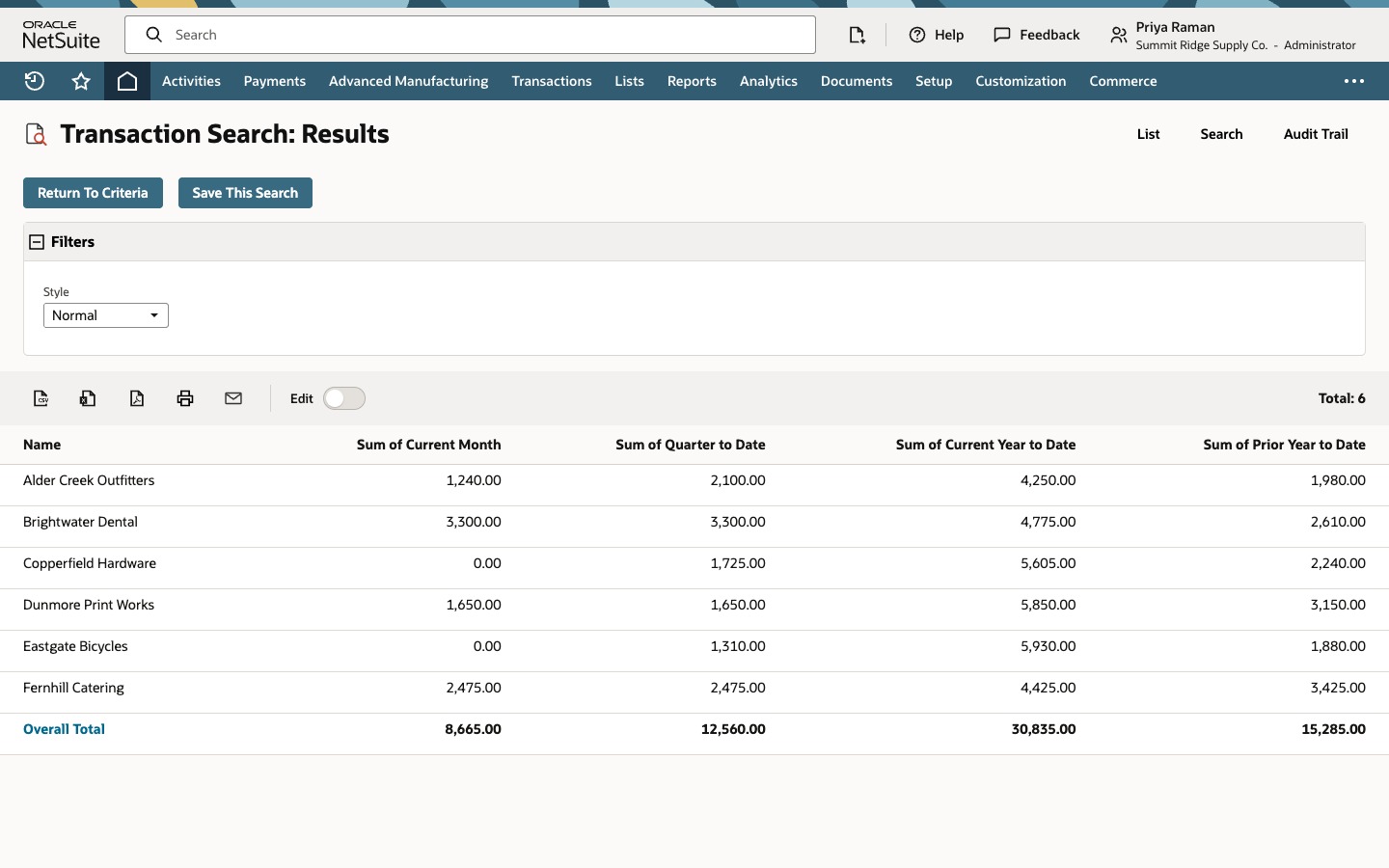
Click Submit. The results show one row per customer with Sum of Current Month and Sum of Quarter to Date. Alder Creek Outfitters is 1,240.00 for the month and 2,100.00 for the quarter, because its 10/12/2026 invoice joins the quarter. Copperfield Hardware is 0.00 for the month and 1,725.00 for the quarter. The Overall Total row reads 8,665.00 and 12,560.00.
05. Add the Current Year and Prior Year to Date columns
Click Return To Criteria, open the Results subtab and click Add Row. Choose Formula (Currency) and Sum, type the formula with 'YEAR' in place of 'MONTH', click Set, enter the Custom Label Current Year to Date and click Add.
For the last column, move both ends of the window back one year with ADD_MONTHS({today}, -12). TRUNC(ADD_MONTHS({today}, -12), 'YEAR') is January 1 of last year, and ADD_MONTHS({today}, -12) is the same calendar day a year earlier. That makes Prior Year to Date a like-for-like comparison with the year so far, not the whole of last year. Add one more Formula (Currency) row with Sum, type this formula, click Set, enter the Custom Label Prior Year to Date and click Add.
CASE WHEN {trandate} BETWEEN
  TRUNC(ADD_MONTHS({today}, -12),
    'YEAR')
  AND ADD_MONTHS({today}, -12)
  THEN {amount} ELSE 0 END
The Columns list now has the grouped Name and four formula rows, one for each period.
Click Submit. Alder Creek Outfitters shows 4,250.00 for the year so far, the sum of its 1,240.00, 860.00 and 2,150.00 invoices from this year, and 1,980.00 for the same stretch of last year, from its 03/09/2025 invoice. The Overall Total row reads 30,835.00 for the year so far and 15,285.00 for the same stretch of last year.
Check the result
- Each customer is one row, and the columns read Sum of Current Month, Sum of Quarter to Date, Sum of Current Year to Date and Sum of Prior Year to Date.
- Alder Creek Outfitters reads 1,240.00, 2,100.00, 4,250.00 and 1,980.00.
- The Overall Total row reads 8,665.00, 12,560.00, 30,835.00 and 15,285.00.
- In this sample, two of the 24 invoices are in no column: Brightwater Dental's 940.00 invoice from 12/05/2025 falls after the prior-year window, and Copperfield Hardware's 700.00 invoice dated 11/25/2026 is after today. Any invoice dated before 01/01/2025 would also be in no column.
The recording runs the search without saving it. Click Create Saved Search or Save This Search, enter a title and save to keep it, and use Edit on the saved search to change a column later. A saved search can also be started from Reports > Saved Searches > All Saved Searches > New, where you choose Transaction. The figures here are sample output and will differ in your account. Before anyone relies on the numbers, compare the totals with a report or a handful of invoices, and run the saved search where it will be used, such as a dashboard, scheduled email or export.
Common questions
How do I show month to date, quarter to date and year to date in one saved search?
Group the search on a plain field such as Name, restrict the Type to what you want to count, then add one Formula (Currency) column per period with Summary Type Sum. Each column uses CASE WHEN {trandate} BETWEEN <start> AND {today} THEN {amount} ELSE 0 END, with TRUNC({today}, 'MONTH'), TRUNC({today}, 'Q') or TRUNC({today}, 'YEAR') as the start.
How do I compare year to date with last year to date?
Move both ends of the window back with ADD_MONTHS({today}, -12): start at TRUNC(ADD_MONTHS({today}, -12), 'YEAR') and end at ADD_MONTHS({today}, -12). The result covers January 1 of last year to the same day last year, so it matches the year-to-date column. For the previous month to date, use TRUNC(ADD_MONTHS({today}, -1), 'MONTH') and ADD_MONTHS({today}, -1); for the prior quarter to date, use TRUNC(ADD_MONTHS({today}, -3), 'Q') and ADD_MONTHS({today}, -3). These are the comparable elapsed periods, not the last completed month or quarter. ADD_MONTHS can clamp a month end, so 29 February maps to 28 February.
Should the formula column use Summary Type Sum or Group?
Use Sum. The formula returns a number for each invoice and Sum adds them for each group. Group on a plain field such as Name. Grouping on the formula would group by its result, and writing SUM() inside the formula as well as using Summary Type Sum double-applies the aggregation.
Why do my prior period columns show 0.00?
0.00 means the customer has at least one transaction the criteria include but none inside that window. The usual cause is a Date criterion that keeps only the current period, which removes the earlier invoices before the formulas run. Leave Date unrestricted or wide enough to cover every comparison.
Why does a customer not appear at all?
A customer appears only when it has at least one transaction that the search criteria include. A customer with no matching transactions is not listed with zeros. To list every customer, start from a customer search instead.