The quick answer
Two settings have to line up. The closed accounting period needs Allow Non-G/L Changes checked, and the role that edits the bill needs the Setup permission Allow Non-G/L Changes at Full. Then that role can open a bill posted in the period and change fields that do not affect the general ledger, such as Reference No. and Memo. NetSuite evaluates the result when you save. If the edit would change the G/L impact, the save is refused while the period stays closed, as the amount change in the example is. You do not reopen the period, and its locks stay in place.
The example is a paid vendor bill for 7,500.00 posted in Aug 2026. January through September 2026 are closed and locked. Jul 2026 already allows non-G/L changes; Aug 2026 and Sep 2026 do not. The person and operating-company names in the screenshots are fictional example data.
Before you start
Whoever turns on the period setting needs Manage Accounting Periods at Edit or Full. The role that edits the bill needs the Allow Non-G/L Changes permission at Full, and normal access to edit vendor bills (the Bills transaction permission at Edit or Full). Where subsidiaries are used, the role also needs access to the bill's subsidiary. No separate unlock is needed for a qualifying edit. The period can stay closed with its A/P, A/R and All G/L locks. The Administrator role already holds the permission, but test the custom role you intend to use, not Administrator.
Get the accounting owner's approval first. The setting applies to every transaction in the period, so any role with the permission can then edit descriptive fields on all of them. The permission is not a field-level control. If only certain fields should be editable, use a form, script or workflow for that.
Also check for anything that could change or block the save: an approval routing, a workflow or script, a custom form rule, or tax, inventory or amortization behavior on the bill. In a Multi-Book account, check the accounting book and period status the bill posts to.
Allow non-G/L changes on the period
As an administrator, go to Setup > Accounting > Manage Accounting Periods and expand the fiscal year. The Allow Non-G/L Changes column shows a check for Jul 2026 and nothing for Aug 2026 or Sep 2026. Open Aug 2026, check Allow Non-G/L Changes, leave everything else alone, and save.
Back on the list, Aug 2026 now shows the check next to Jul 2026. Sep 2026 is still not flagged, and Aug 2026 keeps its closed status and locks.
Check the role permission
Go to Setup > Users/Roles > Manage Roles and edit the role that will make the correction. On Permissions, open the Setup subtab. Allow Non-G/L Changes should be listed with the level Full. Full is the level that enables it. If the permission is missing, add it at Full and save once the role owner approves. In the example nothing needs to change, so leave the role without saving.
Find the bill and open it for edit
Switch to the role from the account menu, then go to Transactions > Payables > Enter Bills > List. The Aug 2026 bill shows Edit | View because its period is flagged. The Sep 2026 bill shows only View. In the account the example follows, a bill in a closed period whose setting is off offers no Edit. Other restrictions can produce the same result, and the display can vary with the role, form, bill status and workflows, so check it in your own account.
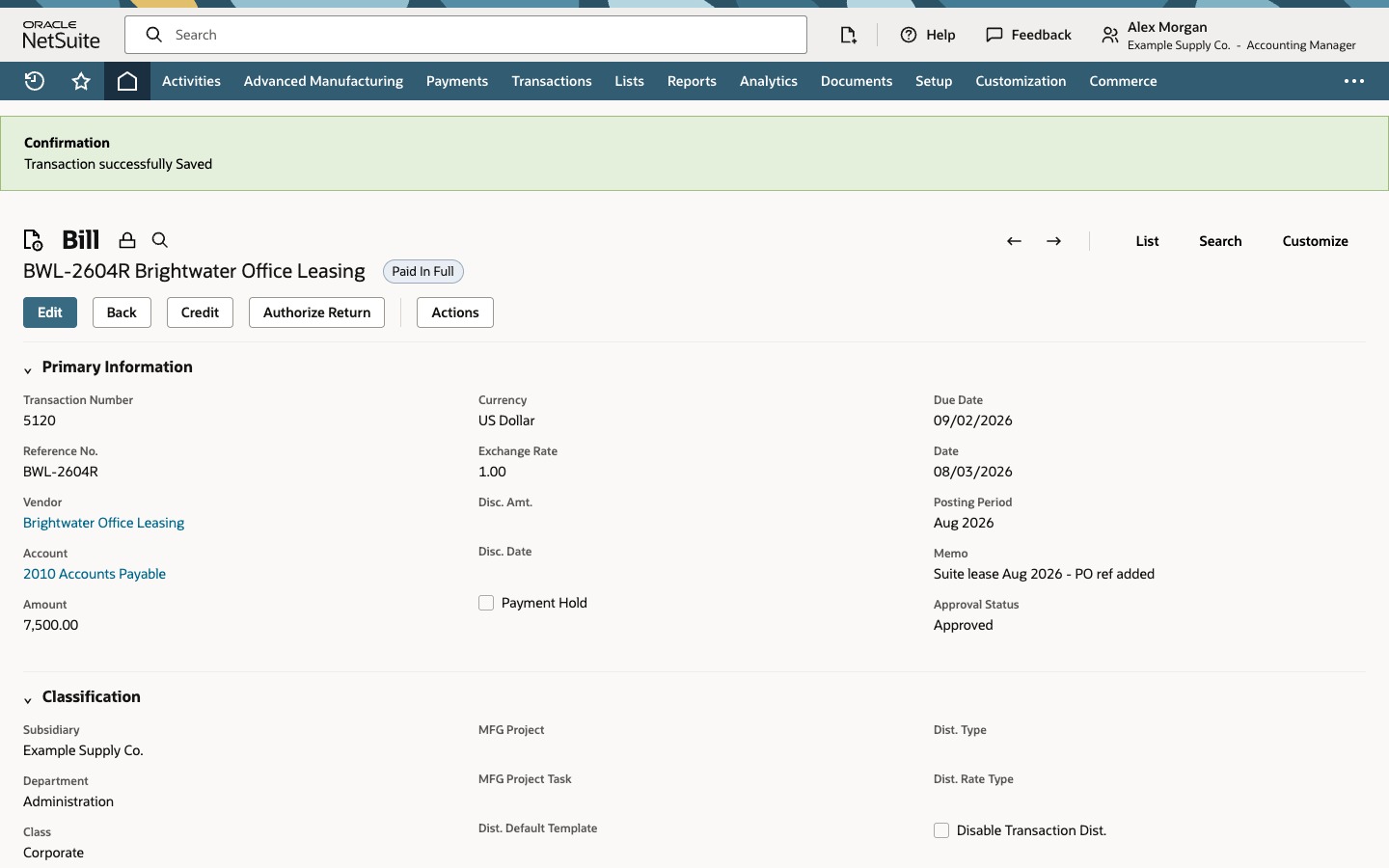
Open the Aug 2026 bill. It is Paid In Full and shows a lock icon beside its title. Choose Edit. A confirmation dialog asks whether you want to continue because the transaction is in a closed period. Choose OK to open the bill for edit.
See an amount change refused
On the Expenses subtab, change the line amount from 7,500.00 to 6,800.00 and save. Because payments are applied to the bill, a second confirmation dialog asks whether to edit it anyway. Choose OK. NetSuite stops the save with a Notice that the G/L impact of a transaction in a closed period cannot be changed. The summary shows the expense line down by 700.00 and Accounts Payable up by 700.00. Nothing was saved. Choose Go Back.
Correct only the reference and memo
Back on the form, edit the line and restore 7,500.00. Change Reference No. to BWL-2604R and Memo to Suite lease Aug 2026 - PO ref added. Leave the vendor, dates, posting period and lines alone. Save and confirm the payments-applied dialog. The bill saves with the confirmation Transaction successfully Saved. It is still in Aug 2026 for 7,500.00 and still Paid In Full, with the new reference and memo.
After a real change, review the bill's System Notes for the user, date, field and old and new values, and confirm the payment is still applied and the remaining balance is right. Dialog and Notice wording can differ by release and configuration, and workflows or scripts can add their own checks, so try one low-risk bill in a test period first.
Common questions
Do I have to reopen the period to change a memo on a closed-period bill?
Not for a qualifying non-G/L edit. With Allow Non-G/L Changes checked on the period and the matching permission on the role, the period can stay closed and its locks can stay in place. An edit that changes the G/L impact needs the period reopened.
Which fields count as non-G/L fields?
There is no universal list that guarantees a closed-period edit will save. Reference No. and Memo are common examples. Whether an edit saves depends on whether the whole edit changes the transaction's G/L impact. Tax, currency, inventory, amortization, approval, workflow, script and custom accounting behavior can all affect the result, so test the exact bill and role in a non-production account.
Why can't I change the amount?
An amount change normally changes the expense and Accounts Payable lines, so NetSuite rejects the save in a closed period and nothing is saved. The general rule is that an edit that changes G/L impact is refused. Use your approved correction process for amount changes.
What does the payments-applied dialog mean?
It confirms that the bill has payments applied and asks whether to continue. It is not a refusal, and it does not mean the edit will save. In the example the corrected bill stayed Paid In Full. After a real edit, check the payment applications and the bill's remaining balance.
Why does the Bills list show only View for some bills?
The View-only result can occur when the role cannot edit the transaction. In the example the Sep 2026 bill sits in a closed period whose Allow Non-G/L Changes box is off. Other restrictions can produce the same result, so also check the role, the bill status, the form and any automation.