The quick answer
Open the purchase order linked to the vendor prepayment and click Bill. Save the bill, then open Related Records > Payments and check the Vendor Prepayment Application. If the application covers the full amount, the bill shows Paid In Full.
Before you start
Under Setup > Accounting > Accounting Preferences > General, check that Auto-Apply Vendor Prepayments is enabled in Accounts Payable. The prepayment must have a balance available and link to the purchase order you’re billing. The bill must be eligible for payment.
1. Check the existing prepayment
Open Vendor Prepayment 5140 for Summit Office Equipment. The example shows Paid, a Payment Amount of 250.00 USD, and a link to purchase order PO6741.
2. Create the bill from the purchase order
Follow the Purchase Order link and click Bill. On the draft, verify the vendor, the printer line and the 250.00 amount. Enter the invoice number in Reference No. The example uses SOE-25061.
3. Save the bill and verify the application
Click Save. The bill shows Paid In Full because the available prepayment covers the whole balance. NetSuite processes automatic applications in the background. If the status has yet to update, wait briefly and refresh.
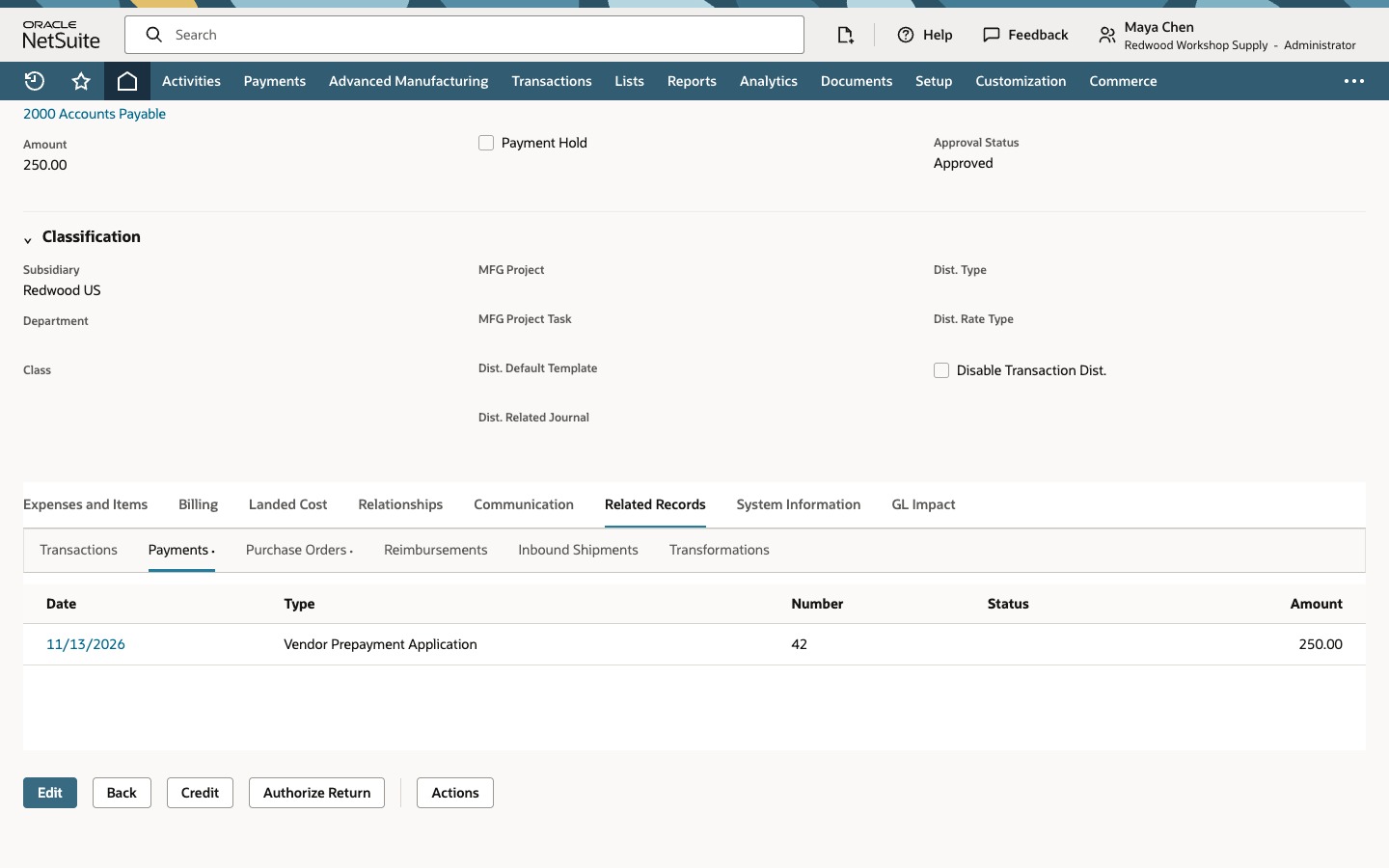
On the same bill, open Related Records > Payments. Check the type and amount. In this example, Vendor Prepayment Application 42 applied 250.00.
Common questions
Why did the prepayment stay unapplied?
Check that the prepayment has funds available and links to the same purchase order you billed. Use Bill on the order or Bill Purchase Orders. A standalone Enter Bills transaction is ineligible for automatic application. Also check the preference and whether the bill is on hold, pending approval or otherwise ineligible.
What if the prepayment covers part of the bill?
Check the application and the remaining amount due on the saved bill. For example, a 150.00 application against a 250.00 bill leaves 100.00 due if there are no other payments or credits.
Does the application send another payment?
The application uses money already recorded on the vendor prepayment. It reduces the bill’s balance without sending another bank payment.