The quick answer
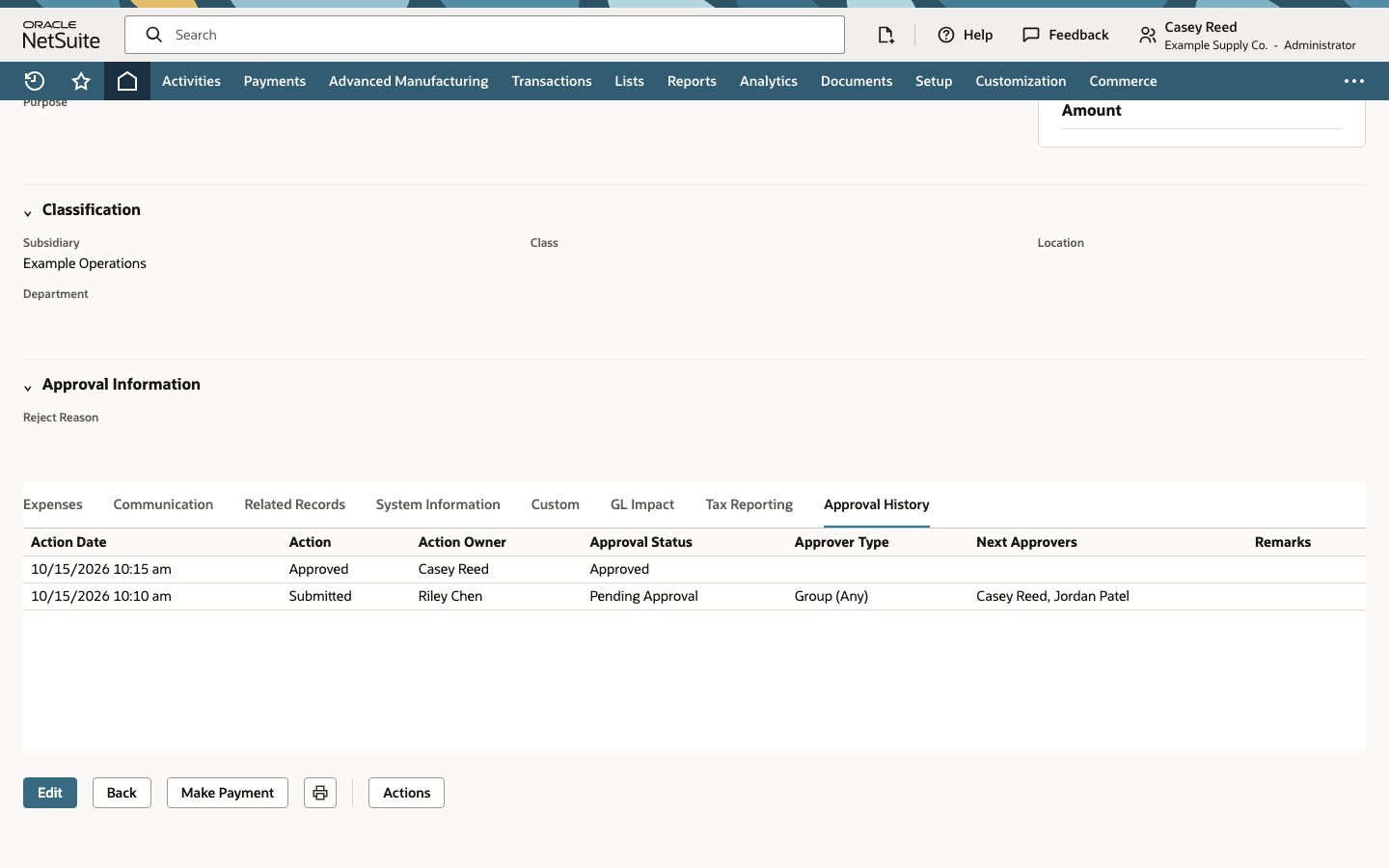
In this demonstrated Group (Any) configuration, Casey Reed is one of the expense report’s displayed Next Approvers. Casey approves once, the same report becomes Approved, and Approval History records Casey as the acting approver. No second approval by Jordan Patel is shown in this example. Verify the saved status and history together.
Before you start
Use an authorized test report already routed through the saved SuiteApprovals rule and group. This exercise follows a 2020.1 training-account configuration, with fictional employees and values. Current account features, permission arrangements and SuiteApp versions can differ.
The example is EXP48219 for Riley Chen, with a 1,000.00 US Dollar Accommodation expense. Casey Reed is the signed-in test approver. Rule setup, group maintenance and report submission are prerequisites. The walkthrough does not demonstrate email delivery, rejection, separate accounting approval, reimbursement or payment.
01. Read the saved rule
Open Expense Report Approval Group. Match Record Name: Expense Report, the custom approval chain and its Group (Any) matrix row. The selected group is Expense Report Approvers. The displayed amount-routing option is unchecked; no amount-threshold behavior is tested.
02. Compare group and report
Open the saved group and read the member rows in order: Casey Reed, Jordan Patel, Sam Rivera, then Taylor West.
In that same order, the displayed Access Level values are Full, Full, View, and View. The next crop isolates that column. Enlarge either image to see the names and access values together in the original full frame.
These are displayed configuration values. They do not establish a universal permission rule, and this exercise does not attempt approval as a View member.
Open saved report EXP48219. Match Riley Chen, the test expense and total. Confirm Approval Status: Pending Approval.
In Approval History, read the Submitted row. Its approver type is Group (Any), and its Next Approvers are Casey Reed, Jordan Patel. Compare this actual transaction route with the group configuration.
03. Approve once
Continue as Casey Reed, one of the report’s displayed next approvers. Click Approve once. Match the same report and confirm Approval Status: Approved.
No second approval by Jordan Patel is shown in this example. The demonstrated SuiteApprovals result does not by itself establish accounting completion, bill creation, reimbursement or payment. Make Payment being visible is not evidence that a payment occurred.
04. Reconcile the history
Open Approval History on EXP48219. The newest row shows Action Owner: Casey Reed and Approval Status: Approved. The earlier Submitted row retains the original Group (Any) route and its two next approvers.
Use this history together with the saved Approved status to identify what the single action accomplished. The exercise ends here.
Common questions
Did every group member approve?
No. One listed next approver acts in this Group (Any) example. Group (All), additional approval levels and different rule conditions require their own verification.
Does Full access always grant approval authority?
This walkthrough does not establish that. It shows the group’s displayed access values and which names this pending report listed. No View-member denial test is performed.
How do I verify which member acted?
Match the same expense report, then read the newest Approved row’s Action Owner in Approval History. Here it is Casey Reed.
Did approval pay the employee?
The source does not demonstrate that payment occurred. The saved Approved state records the demonstrated approval result; payment and separate accounting processing are outside this exercise.
Does this demonstrate current behavior in every account?
No. It documents one historical SuiteApprovals configuration from 2020.1 using synthetic values. Verify your current rules, actual next approvers, roles and record history before applying its conclusions to another account.