The quick answer
Put the invoice internal IDs in apply.items[].doc.id, with apply:true and an amount for each allocation. One customer payment can contain two invoice applications. Verify the returned payment and both allocations; a payment ID alone is not enough.
This walkthrough is a local REST simulation. It creates local teaching records and shows simulated requests and responses. It sends no request to a NetSuite account and submits no bank or processor instruction. The native payment view reconciles the same local data; it does not establish live account acceptance or settlement.
Before you start
The fictional customer is Harbor Equipment Supply, internal ID 800. Two eligible invoices are open in USD: 76001 for 600 and 76002 for 400. Both use Pacific Operations and 1200 Accounts Receivable. The example records one payment of 1,000 USD, fully allocated, with no credit, deposit, discount or payment adjustment.
In this fixture, currency 1 means USD and account 5 means 1020 Operating Checking. Those internal IDs are account-specific. A production request needs the intended endpoint, valid authentication, role access and all account-required fields. The customer-to-payment transform supplies the customer context; this body does not set a customer field separately.
The source discussion reported a successful request in 2020.2 and a later regression. Current Oracle documentation supports the Customer Payment record and its doc reference shape. Those sources do not prove that this exact transform works in every current account. Verify the intended account and release before using it.
01. Identify both invoice applications
The local workspace displays payment-bad.json. Its two entries deliberately use the wrong property, invoice, so the next step can expose the difference. The correct file uses:
"apply": {"items": [
  {"doc": {"id": "76001"},
   "apply": true, "amount": 600},
  {"doc": {"id": "76002"},
   "apply": true, "amount": 400}
]}
doc.id is the existing invoice's internal ID. apply:true selects it. amount is the allocation to that invoice. The payment total is a separate header value: 1,000 = 600 + 400.
This is one payment with two applications. It does not combine invoices into an Invoice Group, send an HTTP batch or create two independent payments. The example omits automatic application and does not invent apply-line indexes. Check the account's current metadata and eligible application rows when implementing a real request.
02. Reject the wrong reference property
The simulated request uses POST to the customer transform at customer/800/!transform/customerpayment, under the REST Record Service base URL.
The full command in the recording uses the REST_SERVICES and TOKEN placeholders with a JSON body. Sending payment-bad.json returns the simulator's own 400 validation message: apply.items[].doc.id is required. Local payment count stays 0.
This error is a custom local check. It is not a guaranteed NetSuite response shape and does not establish the cause of the historical thread's static-sublist error. The Apply sublist refers to invoices eligible in the payment's context; it is not a place to insert arbitrary invoice records.
03. Send doc references and retain the returned location
Send payment.json to the same customer transform. It contains the two doc.id references, payment 1000, currency and account references, toBeEmailed:false, and external ID RCPT-104.
The local model validates every line before persisting the payment and its applications. It checks the customer, currency, subsidiary, A/R account, open balance, duplicate references and allocation total. These are the simulation's rules, not a complete model of every NetSuite configuration.
The simulated response is 204 No Content, with Location ending in /customerpayment/76003. There is no response body. Retain the actual returned location rather than guessing the next internal ID. A real integration should confirm the response and record the resulting ID before retrying a timed-out POST.
04. Read back both allocations
GET the returned local customerpayment/76003 with ?expandSubResources=true.
Confirm payment ID 76003, customer 800, payment 1000, and both application entries:
| Invoice ID | Applied | USD |
|---|---|---|
| 76001 | true | 600 |
| 76002 | true | 400 |
The response and the visible local boundary belong together. This is a simulated expanded representation, not evidence that a production request authenticated or that a bank settled funds. In a real account, inspect the returned collection and any pagination rather than assuming that a record ID proves the applications are correct.
05. Reconcile the native payment view
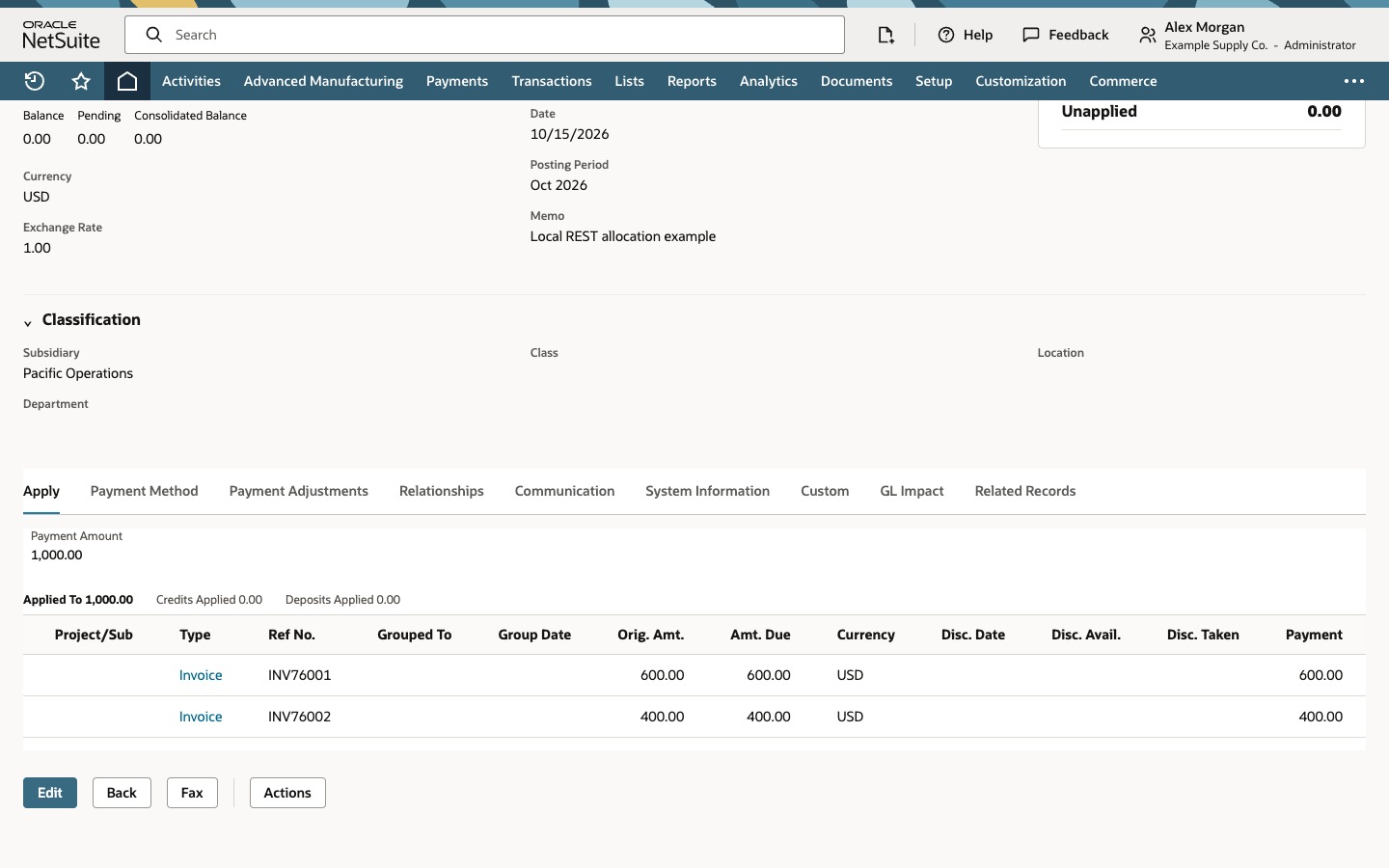
Open the local payment. The header shows Harbor Equipment Supply, PAY76003, USD, Applied 1,000.00 and Unapplied 0.00.
On Apply, verify Payment Amount 1,000.00, Applied To 1,000.00, and the two invoice rows with Payment 600.00 and 400.00. The table scrolls horizontally to expose the Payment column.
INV76001 and INV76002 are displayed reference numbers. They are separate from the internal IDs used in doc.id. Amt. Due shows the amount due before this payment in this view; it is not the remaining balance after the application. The local Deposited status and selected bank account do not prove external bank settlement or reconciliation.
Common questions
Does this batch multiple REST requests?
No. It models one customer-payment transaction with two application entries. HTTP request batching and Invoice Grouping are different operations.
Should doc.id be the invoice number or a line index?
Use the invoice internal ID. A displayed reference number and an apply-line index are different identifiers. Do not invent line values; use the supported keys and current account metadata for the request you are making.
Why might an invoice be unavailable in Apply?
Check customer scope, currency, subsidiary, A/R account, open balance, transaction status, role access and account validation. Consolidated Payments can change customer/subcustomer scope. These invoices were deliberately compatible in the local fixture.
Does 204 prove that both invoices were paid correctly?
It indicates a successful create/transform without a response body in the documented flow. Retain Location and read back the payment. Check the expected document references, applied flags and amounts. This guide's status and readback are simulated.
What if payment exceeds the amounts applied?
A payment can have an unapplied remainder. This local model deliberately requires equal totals for its no-adjustment example and rejects a mismatch. Credits, deposits, discounts, payment adjustments and partial applications need their own reconciliation rules.