The quick answer
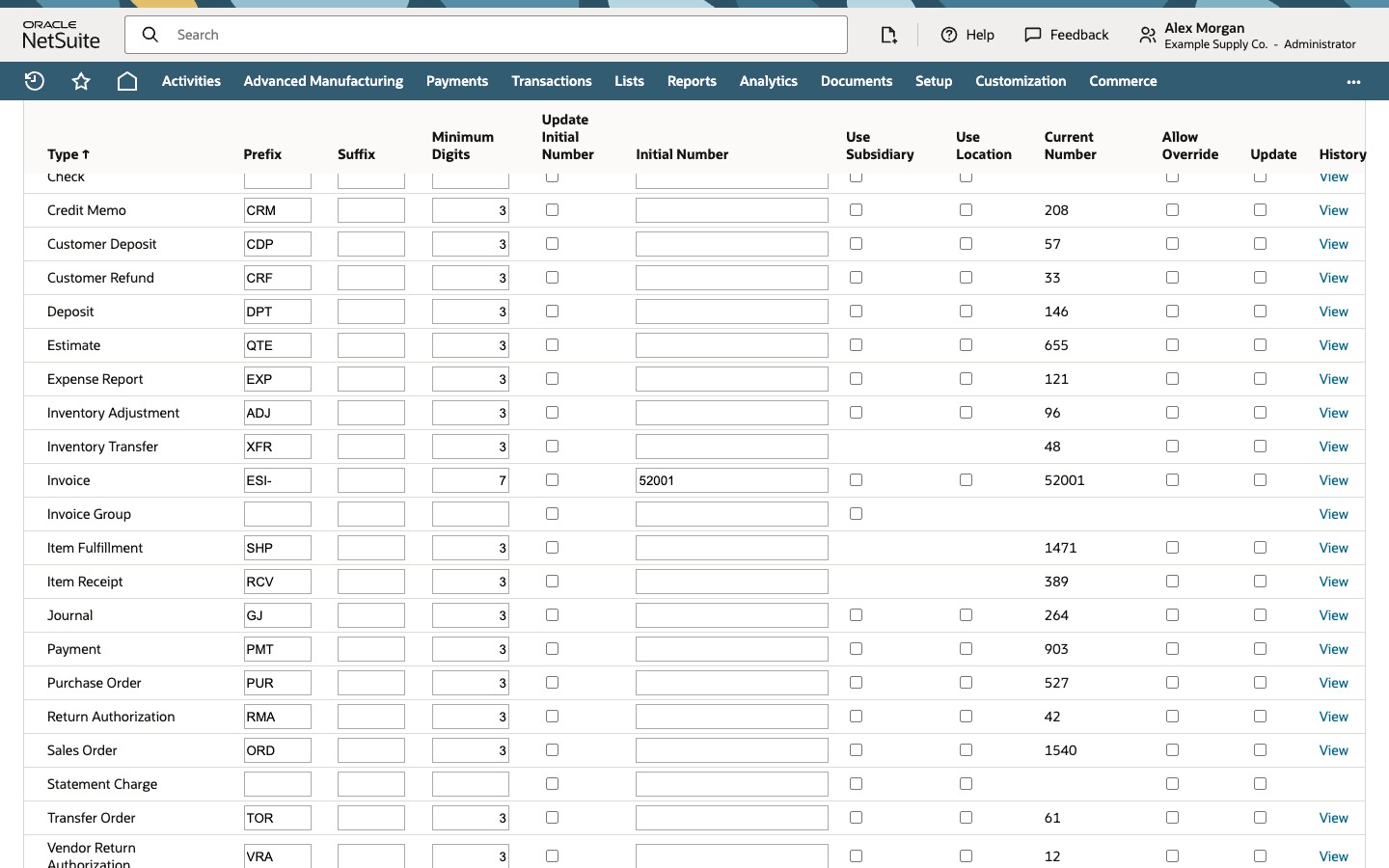
Go to Setup > Company > Auto-Generated Numbers and click the Document Numbers subtab. On the Invoice row, change Prefix and Minimum Digits, check Update Initial Number and enter the number the next invoice should get in Initial Number. Leave Allow Override and Update clear, then click Save. The next saved invoice uses the new format: with Prefix ESI-, Minimum Digits 7 and Initial Number 52001 it's ESI-0052001. Invoices you already have keep their numbers. Without Update Initial Number checked, NetSuite ignores a new Initial Number once a sequence already exists.
The example company, Example Supply Co., moved its billing into NetSuite from an older system whose last invoice was 52000. NetSuite has been numbering invoices IVC1186, IVC1187 and so on, which looks like a different, much younger series. Alex Morgan, an administrator, switches invoices to ESI- with seven digits and has them carry on from 52001. Every person, company and record in the screenshots is fictional example data.
Before you start
You need the Administrator role or another role that can open and edit the Auto-Generated Numbers page. Which roles can do that depends on your account. Each transaction type has its own row, so this changes invoices only. Invoice Group, Statement Charge and the rest keep their settings.
The walkthrough assumes Use Subsidiary and Use Location are clear on the Invoice row, Advanced Numbering isn't controlling invoices, and no script, workflow or integration rewrites Invoice #. If Use Subsidiary is checked in a OneWorld account, each subsidiary has its own sequence, the number can change once you choose the customer, and the row's Current Number no longer describes every invoice.
Pick an Initial Number above the row's Current Number. Going lower moves the sequence back into numbers it has already used, which means duplicates. Before you save, search invoices for the full new format, ESI-0052001 and up here, to make sure nothing already uses it, for example from an import. Hold off imports, integrations and invoice entry while you change the setting and save your first test invoice, so nothing else takes the first new number.
01. Check how invoices are numbered now
Go to Transactions > Sales > Create Invoices > List. The list sorts by date, oldest first. The newest invoice, at the bottom, is IVC1186 from 10/14/2026. That's the series the change moves on from.
Go to Setup > Company > Auto-Generated Numbers and click the Document Numbers subtab. Find the Invoice row. It has Prefix IVC, Suffix blank, Minimum Digits 3 and Current Number 1186. Update Initial Number, Initial Number, Use Subsidiary, Use Location, Allow Override and Update are clear or blank. Current Number is where the counter stands, normally the last number generated, so the next invoice would be IVC1187.
02. Set the new prefix, padding and starting number
On the Invoice row:
- Replace Prefix IVC with ESI-. NetSuite uses the prefix exactly as typed, so include the hyphen if you want one.
- Change Minimum Digits from 3 to 7. NetSuite pads the number with leading zeros to seven digits. The prefix doesn't count toward them.
- Check Update Initial Number and enter 52001 in Initial Number. The checkbox tells NetSuite to move the sequence to that number for the next invoice. It doesn't touch existing invoices. 52001 follows the old system's last invoice, 52000, and is above the current 1186.
- Leave Allow Override clear, so users can't type their own invoice number on the form. Leave Update clear, so existing invoices aren't renumbered. Leave Use Subsidiary and Use Location clear.
Update and Update Initial Number are different controls. The page warns that checking Update assigns a number to each existing record of that type. You don't need it to change the format of new invoices. Leave it clear unless you've tested in a sandbox exactly what it does to your existing invoices, because printed invoices, customers and integrations refer to the numbers already issued.
Click Save and go back to the Document Numbers subtab. The Invoice row keeps Prefix ESI-, Minimum Digits 7 and Initial Number 52001, and Update Initial Number shows clear again. It's a one-time instruction, not a setting. Current Number still reads 1186, because no invoice has used the new settings yet.
03. Create an invoice and see the new number
Go to Transactions > Sales > Create Invoices. Invoice # reads To Be Generated. With Allow Override clear, users can't type a number, and NetSuite assigns it when the invoice is saved. With Use Subsidiary on, or with Allow Override checked, the form can show a proposed number instead.
In Customer, choose Harbor Point Hardware and keep Date 10/20/2026. On the Items subtab, choose Shelving Bracket Kit, enter Quantity 40 and Rate 18.50, and click Add. Amount and Total show 740.00.
Click Save. The saved invoice is ESI-0052001 for Harbor Point Hardware, 740.00: the ESI- prefix, then 52001 padded to seven digits.
04. Confirm that only new invoices changed
Go back to Transactions > Sales > Create Invoices > List. ESI-0052001 is the newest invoice, in the last row, and IVC1186 is still listed with its original number. Leaving Update clear kept the history.
Now the list has two formats. Sorting by Document Number no longer gives date order, so sort by Date when order matters.
Go back to Setup > Company > Auto-Generated Numbers, Document Numbers subtab. The Invoice row's Current Number now reads 52001, the number just used. Unless another invoice is saved first, the next one will be ESI-0052002.
You're done when:
- the Invoice row shows the new Prefix, Minimum Digits and Initial Number, with Allow Override and Update clear;
- a new invoice shows To Be Generated and saves with the new format, ESI-0052001 here;
- older invoices still carry their original numbers;
- Current Number on the Invoice row matches the number the test invoice used.
An unsaved invoice doesn't use up a number while Allow Override is clear. Deleted or voided invoices, typed overrides and some failed or partly processed imports can still leave gaps, so check your legal requirements before you promise anyone a gap-free sequence.
Common questions
Why didn't my new Initial Number change the next invoice number?
NetSuite only moves an existing sequence when Update Initial Number is checked in the same save. Without it, the Initial Number is ignored and invoices carry on from Current Number. If it still doesn't take, check whether subsidiary numbering, location numbering, Advanced Numbering or a script controls the invoice number in your account.
What's the difference between Update Initial Number and Update?
Update Initial Number moves the sequence for new invoices and leaves existing ones alone. Update is a separate checkbox, and the page warns that it assigns a number to each existing record of that type. You don't need it to change the format of new invoices, so leave it clear unless you've tested what it does in a sandbox.
Will changing the prefix renumber my existing invoices?
No, as long as Update stays clear. IVC1186 kept its number in the walkthrough, so the invoice list shows both IVC and ESI- numbers from then on.
What does Minimum Digits do?
It pads the number part with leading zeros. With Minimum Digits 7, 52001 becomes 0052001, and the invoice is ESI-0052001. The prefix and any suffix don't count toward the seven.
Why does Invoice # say To Be Generated?
Allow Override is clear on the Invoice row, so nobody types the number on the form. NetSuite assigns it when you save, and the saved invoice shows it.