The quick answer
Open the reconciliation, go to the Items tab and choose Create Journal. In the Adjustment Journal dialog, enter the Amount, pick the offset Account, and change the Date to the last day of the period you are reconciling. NetClose adds an Adjustment Journal item linked to the journal. The balances do not move until you refresh them. After the refresh, the GL Ending Balance catches up with the Explained Balance and the Unexplained Balance is 0.00.
The example is the Accrued Payroll reconciliation for Mar 2026. Its natural balance is Credit. The GL Ending Balance is 6,318.42 and the Explained Balance is 6,543.42, so the Unexplained Balance is -225.00: the ledger holds 225.00 less accrued payroll than the supporting schedule. The person and operating-company names in the screenshots are fictional example data. This is one NetClose configuration. Field names, the adjustment transaction type, statuses, the refresh action and the balance calculation vary by SuiteApp release, role, subsidiary structure, accounting book and approval workflow. Treat the saved journal and its GL impact, not the creation dialog, as the proof of what posted.
Before you start
NetClose is a separately installed SuiteApp, so menu labels, dialog fields, the refresh action and approval behavior can differ by release and configuration. Check these first:
- The support is right. An adjusting journal fixes the ledger. If the explained items are wrong, correct them instead of posting a journal.
- You can create the journal. NetClose uses the adjustment transaction type set up for your account. The example uses a standard Journal Entry. Your role needs access to create it, to the accounts, and to the subsidiary and any required classifications.
- The period accepts the posting. The target period has to be open, or you need permission to post to it. If journal approval applies, the journal stays pending and does not change the GL balance until it is approved.
- The offset account is approved. Ask the accounting owner which offset account to use before you post.
- It is not already adjusted. Look for an existing adjustment item or a pending journal for the same reconciliation, account, period and amount, so you do not post the same fix twice.
- The scope matches. Confirm the reconciliation's subsidiary, currency, account, period and accounting book, and which classifications or entity your adjustment form requires.
Open the reconciliation with the difference
In NetClose, open the Reconciliations list with Period set to Mar 2026. The Accrued Payroll row shows a GL Ending Balance of 6,318.42, an Explained Balance of 6,543.42 and an Unexplained Balance of -225.00.
Choose the reconciliation name to open it. Under Balances, the same three figures appear. The Items tab holds one explained item for 6,543.42. Nothing there accounts for the 225.00 the ledger is short.
Create the adjusting journal
On the Items tab, choose Create Journal. The Adjustment Journal dialog opens for a Journal Entry. In the example, the Adjustment Line already carries the reconciled account, 2150 Accrued Payroll, and the Date defaults to today, 05/12/2026, which is outside Mar 2026. Do not create the journal with that date.
Type 225.00 in Amount, the size of the unexplained balance. On the Offset Line, open the Account list and choose 6110 Payroll Expense. The adjustment line credits Accrued Payroll, which raises its Credit balance, and the offset line debits Payroll Expense. The Entity, Department, Class, Location and Activity Code fields are left blank in the example. Fill the ones your form, account or close policy requires. They flow to the journal lines, so check that the values are valid for the subsidiary.
Replace the default date with 03/31/2026, the last day of Mar 2026. The accounting period normally follows the transaction date, so this is what keeps the journal in the period being reconciled. A closed or restricted period, an approval workflow or the account's preference for dates in closed periods can still change where it posts, so open the saved journal and verify its actual posting period.
Choose Create. The dialog closes and a new item of type Adjustment Journal appears on the Items tab for 225.00. Its name is the journal number followed by a unique key. In the example, the Balances have not moved: Credit Activity is still 0.00 and the Unexplained Balance is still -225.00. They may stay that way until the journal is approved and posted and the balances are refreshed.
Refresh the balances
Creating the journal, approving it, posting it and refreshing the reconciliation are separate events. Only a posted journal changes the GL balance, and the reconciliation reads the ledger again when you refresh.
In the documented flow, the refresh runs from the Reconciliations list, so close the reconciliation and go back to it. Check the Accrued Payroll row, open the three-dot menu and choose Refresh Balances. The menu also offers Mass Update, and both entries are available once a reconciliation is checked. NetClose shows Refreshing Balances and then Refresh Complete. Where the refresh is offered, the exact option names and whether the open record has its own refresh all depend on the NetClose release and your role, so look for the equivalent in your account and wait for it to finish.
The row now shows a GL Ending Balance of 6,543.42, the same as its Explained Balance, and an Unexplained Balance of 0.00.
Open the reconciliation again. Under Balances, Credit Activity is 225.00, the GL Ending Balance is 6,543.42 and equals the Explained Balance, and the Unexplained Balance is 0.00. In the example the Explained Balance did not change: the ledger caught up with the support, which is why this is an adjustment and not a new explanation. Confirm that in your own configuration.
Follow the item to the journal
On the Items tab, choose the Adjustment Journal item. The NetClose Reconciliation Item record opens with its Type, the Reconciliation it belongs to, the Amount of 225.00 and the Journal Entry link.
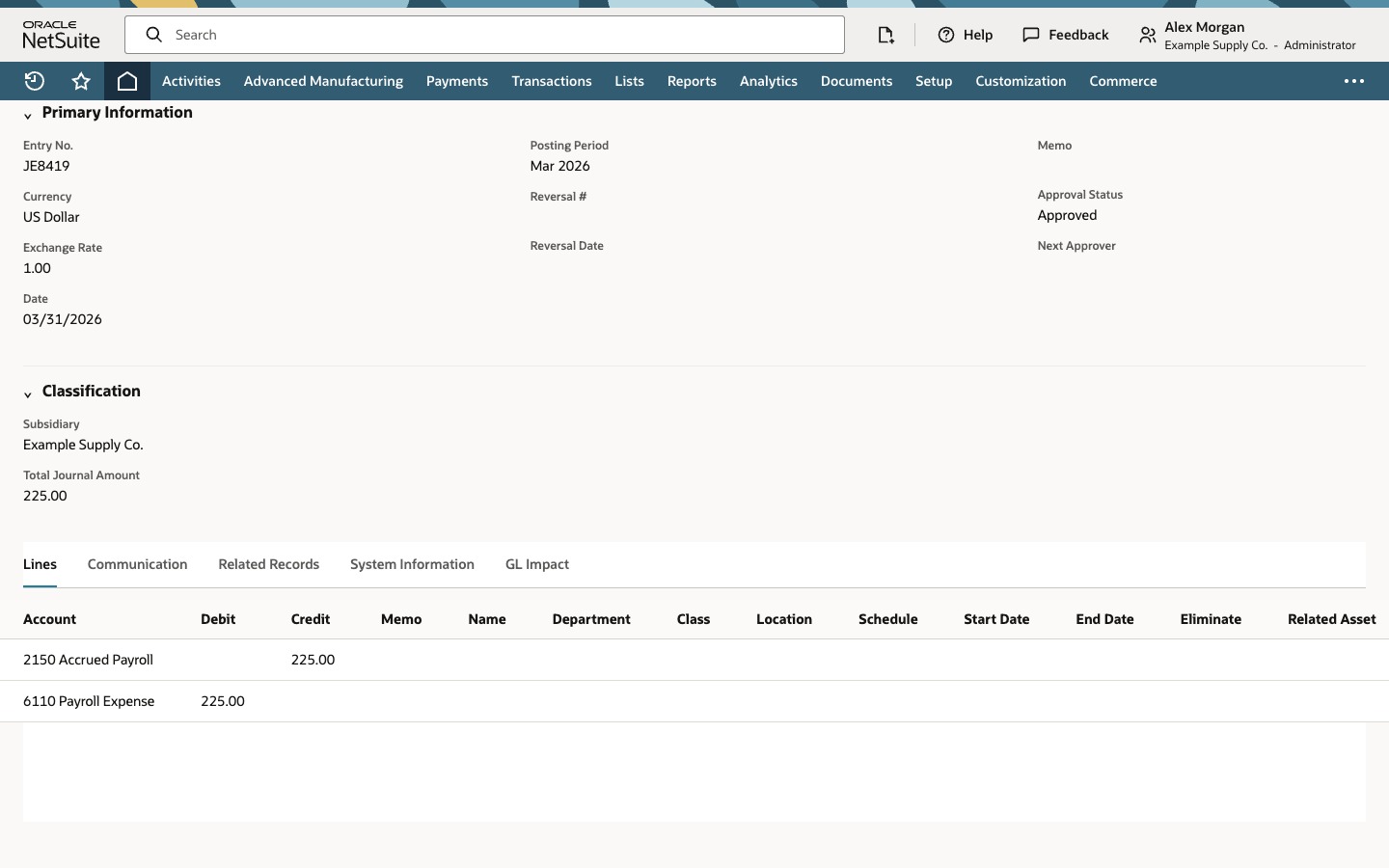
Choose the Journal Entry link. The journal is dated 03/31/2026 and its Posting Period is Mar 2026. That is the result to verify, not something the date guarantees.
On the Lines tab, the journal has two lines of 225.00: a credit to 2150 Accrued Payroll and a debit to 6110 Payroll Expense.
Before you mark the reconciliation complete, confirm the journal's posting period, approval status, subsidiary, currency and GL impact. In a OneWorld or Multi-Book account, make sure the subsidiary, accounting book and currency are valid for the reconciliation, or the journal may not be counted in it. Try one small adjustment in a test period first.
Common questions
Why does the unexplained balance stay at -225.00 right after I create the journal?
In the example, creating the adjustment adds the item and its link, and the reconciliation shows the ledger as of its last refresh. Check the journal's approval status, posting period and GL impact, then run the refresh once the journal has posted. If journal approval applies, the journal has to be approved first, and then the balances need another refresh.
Does an adjusting journal change the Explained Balance?
In the example it does not. The existing explained item still supports 6,543.42, and the GL Ending Balance rises to meet it. Whether the adjustment item is counted in the Explained Balance depends on how NetClose is configured, so read the values after the refresh.
Which date should I use on the adjustment journal?
Use the date your close policy requires, which in the example is the last day of the period you are reconciling, 03/31/2026, so the journal normally posts in that period. A journal that lands in a later period normally does not change the reconciled period's balance. The date alone does not prove the period, particularly when a period is restricted, locked, closed or subject to approval, so check the journal's Posting Period, approval status and GL impact after you create it.
Which account is credited and which is debited?
In the example the liability is short by 225.00, so the journal credits 2150 Accrued Payroll and debits 6110 Payroll Expense. Do not copy that direction to another reconciliation. Work it out from the sign of the difference, the account type and its natural balance, and confirm it with the accounting owner.
Can I use something other than a standard Journal Entry?
NetClose uses the adjustment transaction type configured for the account. That can be a standard Journal Entry or an enabled custom adjustment journal transaction type. Confirm which one your account uses and that your role can create it.