The quick answer
While both Fixed Assets Management proposals are still New, edit the line that should become a child and set Parent Proposal to the main-equipment proposal. Generate Assets from the parent alone, then open the asset to check that its Original Cost includes both proposal amounts.
The screenshots show a recorded demonstration with fictional person and company names. Use the proposal IDs and values from your account.
Before you start
This workflow begins with two New proposals from one posted bill. In the example, bill VB-1048 has an $11,500 machine line and a $1,610 installation line for the same physical equipment. Both lines must be eligible for the same asset type, subsidiary, and depreciation method. If the proposals are missing, open Fixed Assets → Transactions → Asset Proposal, set the bill-date range, subsidiary, and asset type, then choose Propose New Assets. Wait for its process to complete and check Manage Asset Proposal. If rows are still missing, inspect the posting account, child-subsidiary filter, prior processing, and approval setting. Do not generate either proposal separately.
01. Compare the proposals
Open Fixed Assets → Transactions → Manage Asset Proposal. Find the two rows from VB-1048. Proposal 6501 is the main machine at $11,500; 6601 is installation at $1,610. Compare asset type, quantity, subsidiary, method, and life. Keep the proposal whose description and depreciation defaults best describe the whole machine as the parent.
02. Set the parent proposal
Click Edit on the $1,610 installation proposal. Set Parent Proposal to 6501. Confirm Asset Description identifies the installation component; edit it if needed, then Save. This attaches the installation cost to the main proposal before either asset exists.
03. Check the parent and child
Back on Manage Proposals, 6501 remains the only top-level row for this machine. In this example the grid still shows its own $11,500 line cost; the final combined value is checked on the generated asset.
Open the parent and inspect Subproposals. The installation proposal remains attached with its $1,610 cost. Review the parent description and depreciation settings before generation.
04. Generate one asset
Return to Manage Proposals, select only 6501, and choose Generate Assets. The child contributes its cost when the parent is generated. Generate or clear a marked selection before leaving the page.
05. Confirm the process
On FAM Process Status, Refresh until Asset Generation is Completed. Open Details and confirm the stage reports one asset generated. A completed job is a process check; inspect the asset record for the actual cost.
06. Verify the asset
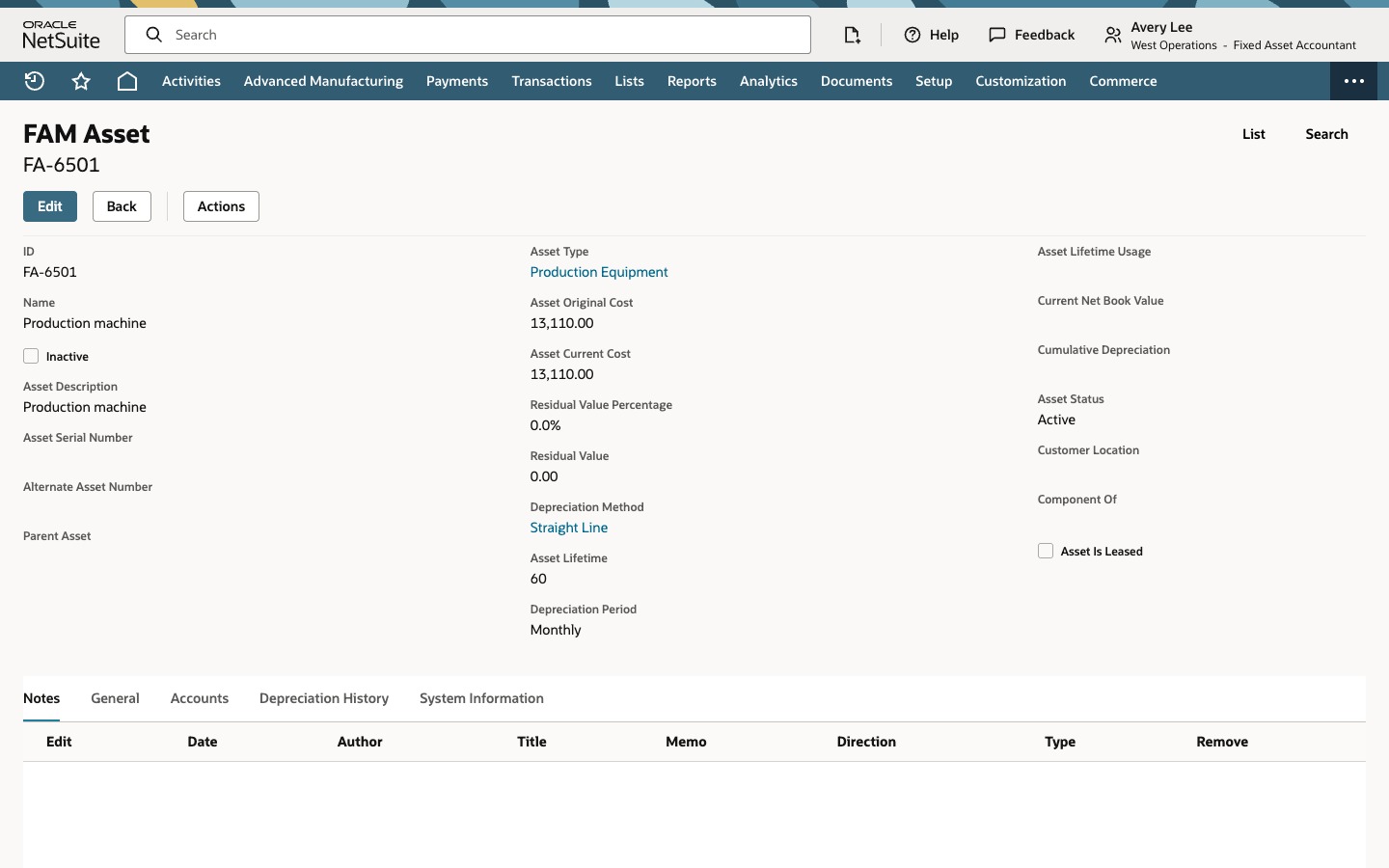
Open Fixed Assets → Lists → Assets, find the generated asset, and open it. FA-6501 shows Asset Original Cost of $13,110: $11,500 for the machine plus $1,610 for installation. Check that its name, type, subsidiary, source transaction, and depreciation defaults match the parent you reviewed. If your account has multiple accounting books, inspect those values separately. This workflow stops before depreciation posting; FAM may generate schedule values in background processing.
Check the result
- Only the parent was selected for generation.
- The process details report one asset generated.
- The asset Original Cost equals the sum of the two proposal lines.
Common questions
Why does one bill create two FAM proposals?
FAM evaluates eligible source lines. Two qualifying bill lines can become two proposed assets even when they represent one physical machine, depending on source accounts, filters, approvals, and prior processing. Review each line before deciding whether to link the proposals.
Can I combine proposals after I generate the assets?
Parent Proposal is used while the proposals are New, before asset generation. It does not merge two asset records that already exist. Build Compound Asset is a different workflow for grouping existing assets.
Why does the parent proposal still show $11,500?
In the demonstrated account, the Manage Proposals grid shows the parent line's own original cost. Check the resulting asset record for the combined value after generation; in this example it is $13,110.
Does Generate Assets repost the vendor bill or run depreciation?
No. The posted bill remains the source transaction. Asset generation creates the FAM asset record. FAM may generate depreciation schedule values in background processing, but depreciation journals require a separate later process.