The quick answer
Open Fixed Assets > Lists > Assets, choose New FAM Asset, select an existing asset type, enter the asset and its intended opening values, and save. Reopen the asset and compare its saved net book value, cumulative depreciation, and last depreciation period with your old register before you run depreciation.
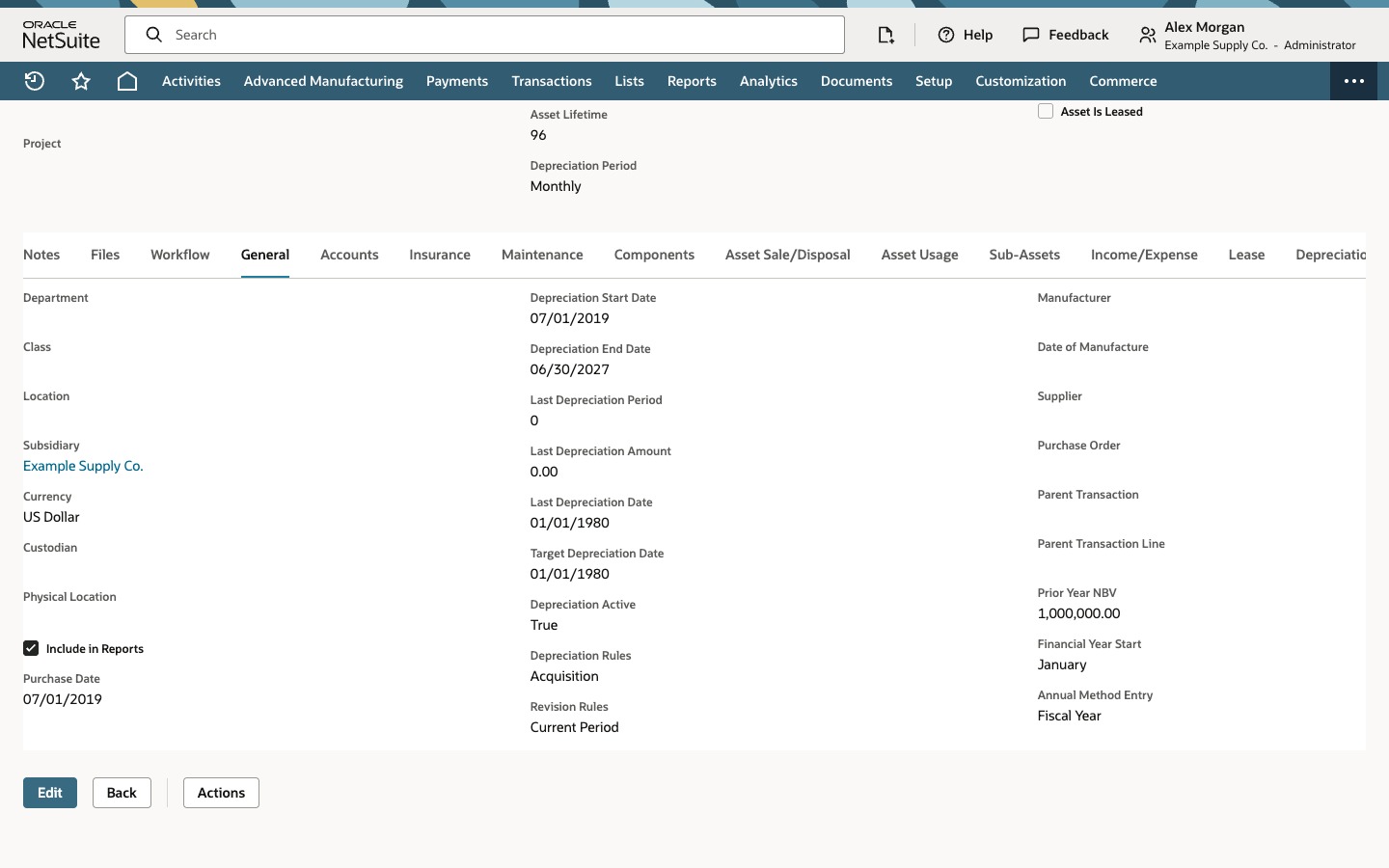
The example uses a fictional research analyzer at Example Supply Co. Its old register indicates a net book value of 887,500.00. The entry form shows that value before saving, but the saved example shows 1,000,000.00, cumulative depreciation 0.00, and last depreciation period 0. That is a discrepancy to investigate, not evidence that prior depreciation was migrated. The recording does not show why the values changed; do not assume this happens with every manually created asset.
Before you start
You need permission to view and create FAM assets and a configured asset type with the intended method, life, residual percentage, and accounts. Obtain the old register's cost, residual value, in-service date, periods already depreciated, accumulated depreciation, last depreciation date and amount, and net book value. Check the relevant subsidiary, accounting book, and general-ledger balances. This walkthrough shows a manual asset entry and read-back; it does not demonstrate a complete midlife migration or a posting of historical depreciation.
01. Check the old register
Search Fixed Assets > Lists > Assets for the asset first so you do not create a duplicate. In this example, the original cost is 1,000,000.00, residual value is 100,000.00 (10%), and the useful life is 96 monthly periods. Straight-line depreciation is 9,375.00 per month: (1,000,000.00 − 100,000.00) ÷ 96. Twelve prior periods total 112,500.00, leaving the old-register net book value at 887,500.00, before any other adjustments.
02. Start a manual FAM asset
Choose New FAM Asset. Enter Research Analyzer RA-48 as the name and RA-48 as the serial number. Select the existing Research Equipment asset type. Check its applicable defaults: 10.0% residual, Straight Line method, 96 lifetime periods, and Monthly depreciation period. Enter 1,000,000.00 as both original and current cost; the form shows 100,000.00 residual value. Defaults from an asset type still need review against the old register.
03. Enter the prior position shown on the form
Enter 887,500.00 in Current Net Book Value. On General, enter the depreciation start date 07/01/2019, last depreciation period 12, last depreciation amount 9,375.00, and last depreciation date 06/30/2020. Check the derived end date (06/30/2027 in this example), subsidiary, active setting, and rules. On Accounts, inspect the accounts filled from the asset type. These entries describe an intended opening position; the form alone cannot show that historical depreciation and posting references exist.
04. Save and read the asset back
Click Save, locate the new row in the FAM Asset List, and reopen it. Compare original cost, current cost, residual, net book value, cumulative depreciation, status, and last depreciation period with the old register. In this observed result, the list shows new asset FAM000901 at 1,000,000.00 net book value. The saved asset shows 1,000,000.00 net book value and 0.00 cumulative depreciation, despite the 887,500.00 entered on the form.
05. Reconcile before depreciation
The saved General tab shows Last Depreciation Period 0, instead of the entered 12. Stop before running Asset Depreciation. Where available in your FAM version, inspect the related FAM Asset Values record and Depreciation History, including any acquisition or opening rows and posting references. An acquisition history row alone does not prove a journal posted. Reconcile the asset and accumulated depreciation accounts to the general ledger at cutover. Check depreciation status and rules, subsidiary, accounting book, and accounting-period status. Use your organization's approved midlife migration process to correct the opening position and confirm the first forecast period before posting. Saving a FAM asset manually does not, by itself, prove that acquisition or historical-depreciation journals were posted.
Common questions
Does selecting an asset type migrate depreciation history?
No. The asset type copies applicable defaults such as the method, life, residual percentage, rules, and accounts. It does not, by itself, import prior depreciation or prior-period general-ledger activity. A start date may create an acquisition history row, which is different from migrated depreciation. Verify the saved asset's values and history separately.
Why did the net book value change after Save?
This recorded example shows 887,500.00 entered before Save and 1,000,000.00 on the saved asset. The available footage does not establish the cause. Review the FAM configuration, related values record, depreciation history, and applicable migration process in your account before correcting it.
Is the saved asset enough to post historical depreciation?
No. A manual FAM asset save does not prove that acquisition or historical depreciation journals posted. Check history rows for posting references, then verify the related journal and general-ledger impact. A history row without a posting reference is not proof of a posted journal.
What should I check before the first depreciation run?
Compare saved net book value, cumulative depreciation, last period and date, asset values, depreciation history, first forecast amount, and relevant general-ledger balances with the old register. Resolve any mismatch first.