The quick answer
In the demonstrated Avalara-enabled SuiteTax account, open Tax Codes and create a code named AVATAX with Avalara Tax Type. After its saved confirmation, open Nexuses, edit the Washington US nexus, and select AVATAX in Avalara Default Tax Codes > Default Tax Code. Save the nexus and check its separate confirmation.
The screenshots show sample data. Person and operating-company names are fictional. Use the codes and nexuses appropriate to your account.
Before you start
This procedure needs SuiteTax, the Avalara AvaTax for SuiteTax integration, and permission to edit tax codes and nexuses. The account must expose the Avalara tax type and nexus-default settings shown below. A legacy-tax account, or one without this Avalara configuration, may show neither. Do not substitute legacy tax-code fields for the fields in this walkthrough.
Check for an existing AVATAX code before making another one. The Washington US nexus already exists in the demonstration. Confirm the applicable subsidiary, tax registrations, nexus, tax agency and integration setup in your account. The menu path and required fields can vary by role and configuration.
The example saves configuration only. It does not show bundle authentication or a transaction tax calculation.
01. Create the tax code
Open Tax Codes from your account's Setup menu. Check for an existing AVATAX code, including its tax type, subsidiary availability, nexus use and integration references. If it is already configured for this purpose, use that record instead of making a duplicate. Otherwise choose New Tax Code.
On the demonstrated Tax Code form, enter AVATAX for Name and choose Avalara Tax Type for Tax Type. This form warns that Tax Type cannot be changed after saving. Confirm the warning and review any other fields required by your account; the walkthrough leaves the other authority and account fields empty.
02. Verify the code save
Choose Save. The Tax Codes list returns with a green Tax Code successfully Saved confirmation. Check that confirmation before moving to the nexus.
03. Assign the nexus default
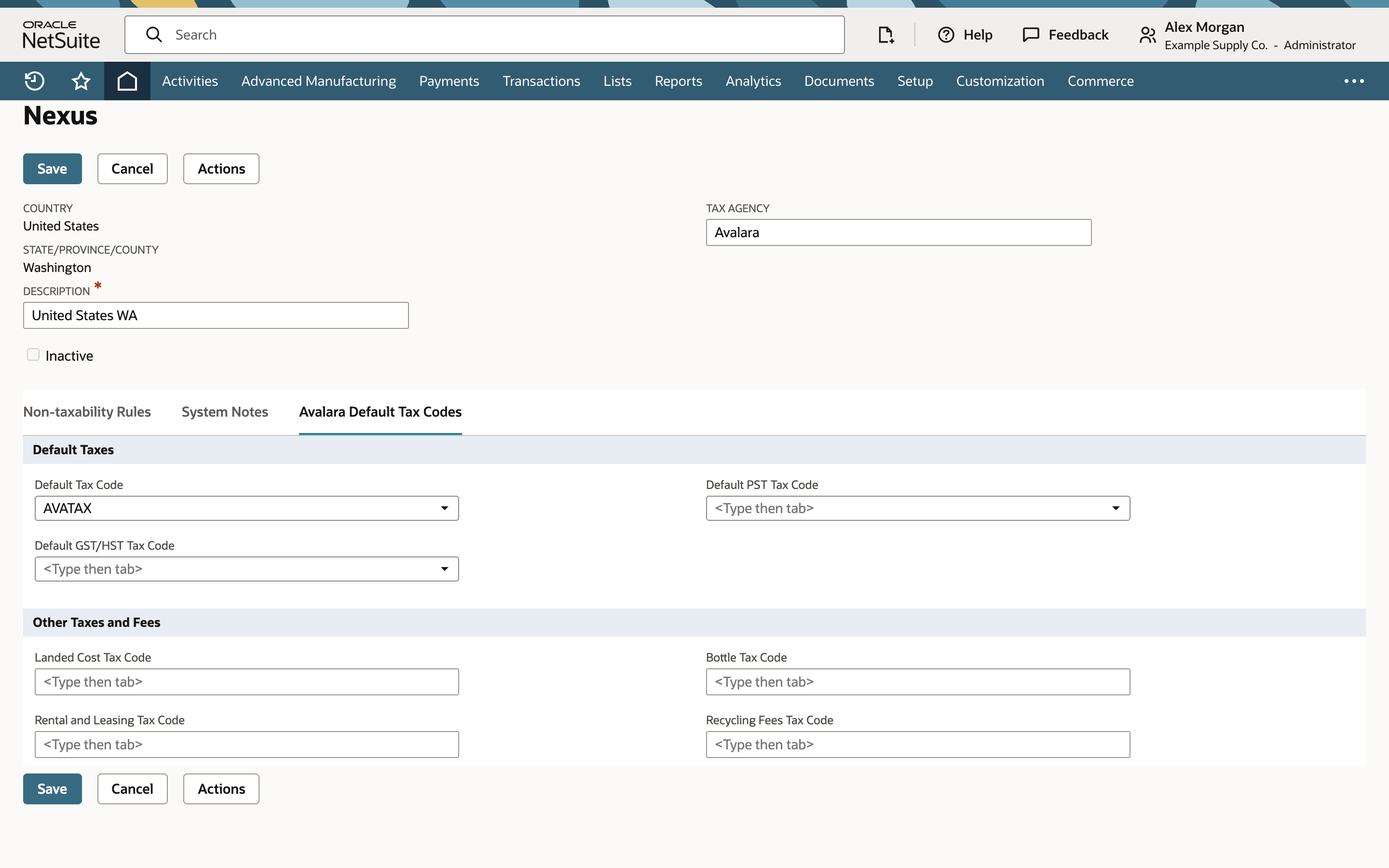
Open Nexuses from your account's Setup menu. In this example, choose Edit beside United States WA. Verify that the nexus applies to the relevant subsidiary or registration. Other nexuses may have different fields.
On the demonstrated Avalara Default Tax Codes tab, under Default Taxes, choose AVATAX for Default Tax Code only if it is the intended code for this nexus, subsidiary and integration. The walkthrough leaves specialized fields such as PST, GST/HST, landed cost and bottle tax unchanged. Those fields may still be required in your account; set them according to its obligations.
04. Verify the nexus save
Choose Save. The Nexuses list returns with a green Nexus successfully Saved confirmation. This confirms that the nexus record saved. It does not verify authentication, connectivity, tax-code mapping or a calculated transaction. Test those separately with a controlled transaction and inspect its tax details.
Common questions
What if AVATAX already exists?
Inspect its Tax Type, subsidiary availability, nexus behavior and integration references. Reuse it if it is the intended code for this configuration.
Why is Avalara Tax Type missing from the Tax Code form?
First confirm the intended SuiteTax integration and your role's access to its tax records. A legacy-tax form may show different fields, but its Rate, Tax Agency and Tax Account fields are not substitutes for the Avalara tax type.
Why is the Avalara Default Tax Codes tab missing?
The account may use legacy tax, lack the configured Avalara SuiteTax integration, have an ineligible nexus or subsidiary, or restrict the tab by role. Check those conditions before changing another field. The legacy form inspected for this guide did not have the tab.
Does saving the nexus prove AvaTax is calculating correctly?
No. The walkthrough verifies the two saved configuration records. It does not show connector authentication or a calculated transaction. Validate those in a separate test.