The quick answer
Open the FAM Depreciation Method List, create a new method, and enter its period, formula, optional next method, and final-period convention. Save it, then check the new list row. This creates a method definition; you still have to assign it to an asset or asset type before it can affect depreciation.
The screenshots show a recorded example with fictional person and company names. Your available methods and menu labels may differ by role and Fixed Assets Management setup.
Before you start
You need access to Fixed Assets Management setup. This example links to an existing 10% Declining Balance method, so confirm it is selectable before you begin. The method created here uses annual periods. If Annually is unavailable in your account or method context, check the account's FAM configuration rather than assuming a monthly method is equivalent.
01. Open Depreciation Methods
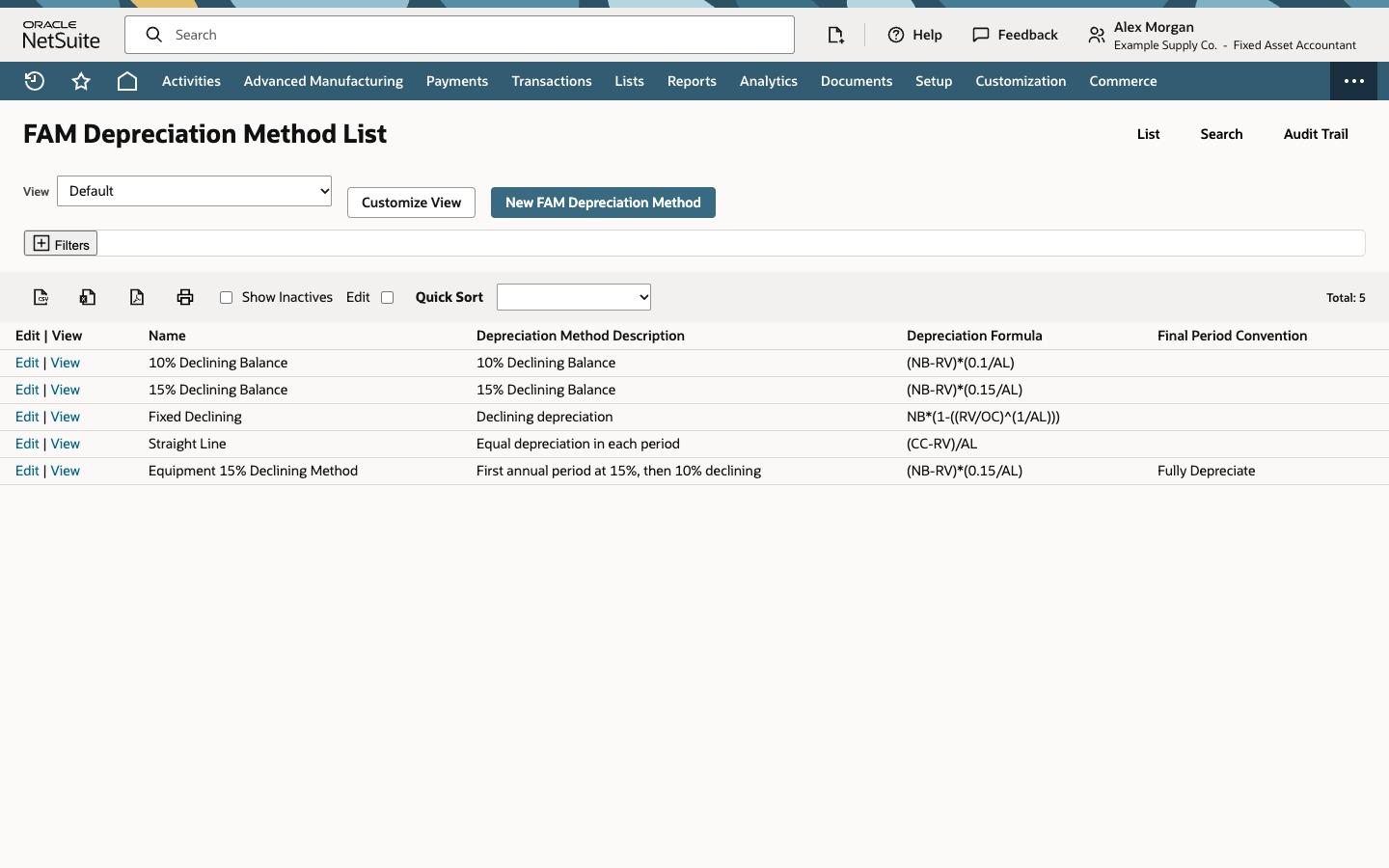
Go to Fixed Assets → Setup → Depreciation Methods and click New FAM Depreciation Method. The list shows existing method names, descriptions, formulas, and, in this recorded form, final conventions.
02. Enter the method
Enter Equipment 15% Declining Method in Name and First annual period at 15%, then 10% declining in Depreciation Method Description. Leave Inactive clear. Set Depreciation Period to Annually, End Period Number to 1, and Next Depreciation Method to the existing 10% Declining Balance record.
Enter (NB-RV)*(0.15/AL) in Depreciation Formula and check Formula Representation. Here, NB is net book value, RV residual value, and AL asset lifetime measured in the method's periods. Choose Fully Depreciate for Final Period Convention. The one-period limit and next-method selection configure a transition; this screen does not show a calculated asset schedule.
03. Save and check the result
Click Save. Find Equipment 15% Declining Method on the list and compare its description, (NB-RV)*(0.15/AL) formula, and Fully Depreciate convention with what you entered. This recorded list exposes all three. In another account, open the saved method if a column is hidden or the form differs.
Check the result
- The new name appears on the method list.
- The description and formula match the entry.
- The final convention reads Fully Depreciate.
Common questions
Does saving the method run depreciation?
No. Saving creates a method definition. It does not assign the method to an asset, calculate a schedule for one, or post a depreciation journal.
What does Next Depreciation Method do?
It names the method FAM should use after this method reaches its End Period Number. Here, the intended transition is after one annual period. The actual calculation depends on the asset and its setup.
What do NB, RV, and AL mean in the formula?
NB is the current net book value, RV is residual value, and AL is asset lifetime in the selected depreciation periods. With Annually, those periods are years.