The quick answer
Create an amortization template with the Method Straight-line, using exact days, choose it on the bill's expense line, and enter an Amort. Start and Amort. End date. NetSuite divides the amount by the number of calendar days from the start date through the end date, counting both, and gives each posting period the amount for the days that fall in it. A partial first month gets a small row, a partial last month gets one too, and a 28-day February gets less than a 31-day March. Read the saved schedule before you generate any journal, because saving the bill recognizes nothing.
The example is a 400.00 insurance premium that runs from 10/26/2026 through 04/25/2027, which is 182 days. That is about 2.1978 a day. October has six days left, so it gets 13.19. The seven rows add up to 400.00. The person and operating-company names in the screenshots are fictional example data.
Before you start
Confirm the Accounting Periods and Amortization features are enabled, that accounting periods exist for every month from October 2026 through April 2027, and that the periods you will post into are open under your account's close rules. The deferral account (here 1310 Prepaid Insurance) must exist as a Deferred Expense account. Your role needs access to amortization templates and schedules, to enter bills, to generate amortization journal entries, and to create or approve the generated journals where journal approval is on. The example is a single-subsidiary, single-book account; in OneWorld or Multi-Book accounts the subsidiary, accounting book, currency and account availability can change the fields, amounts and generated journals. Menu paths and the exact Method list can also differ by role and release, so use global search for Amortization Templates if the menu entry is missing.
Leave Residual and Initial Amount empty and both offsets at 0 while you learn the method. A residual stays deferred and is left out of the amount spread across the days, and an initial amount is recognized in the first amortization period, so either one changes the rows you see.
Create the exact-days template
Go to Lists > Accounting > Amortization Templates and choose New Amortization Templates. Name it, leave Type as Standard, and open the Method dropdown. It offers Straight-line, by even periods; Straight-line, prorate first & last period; Straight-line, prorate first & last period (period-rate); Straight-line, using exact days; and Custom. Pick the exact-days option.
Leave Term Source as Transaction Date. Set Deferral Account to 1310 Prepaid Insurance, and leave Target Account, Amortization Period, Residual and Initial Amount empty. The line's own dates define the term here, so there is no period count to enter. The saved template shows Target Account as Default, which uses the account on the bill line. Save the template.
Enter the bill and set the dates
Go to Transactions > Payables > Enter Bills. Choose the vendor, enter the reference INS-2041, and keep the 10/26/2026 date and the Oct 2026 posting period. On the Expenses sublist add a line for 6310 Insurance Expense with an amount of 400.00. On the same line set Amort. Schedule to the template, Amort. Start to 10/26/2026 and Amort. End to 04/25/2027, then add the line.
Save the bill. The line's Amort. Schedule column now shows a number instead of the template name. That number links to the schedule NetSuite created. The bill debits 1310 Prepaid Insurance and credits Accounts Payable, even though the line still shows the insurance expense account, so check the bill's GL Impact if you want to see where it posted. No expense has been recognized yet.
Read the schedule
Open the schedule link. Check that the line's schedule is the one you expect, then read the header: it shows the template, the method, the start and end dates, a Status of Not Started, and 400.00 as both the Amount and the Remaining Deferred Balance. Total Amortized is 0.00.
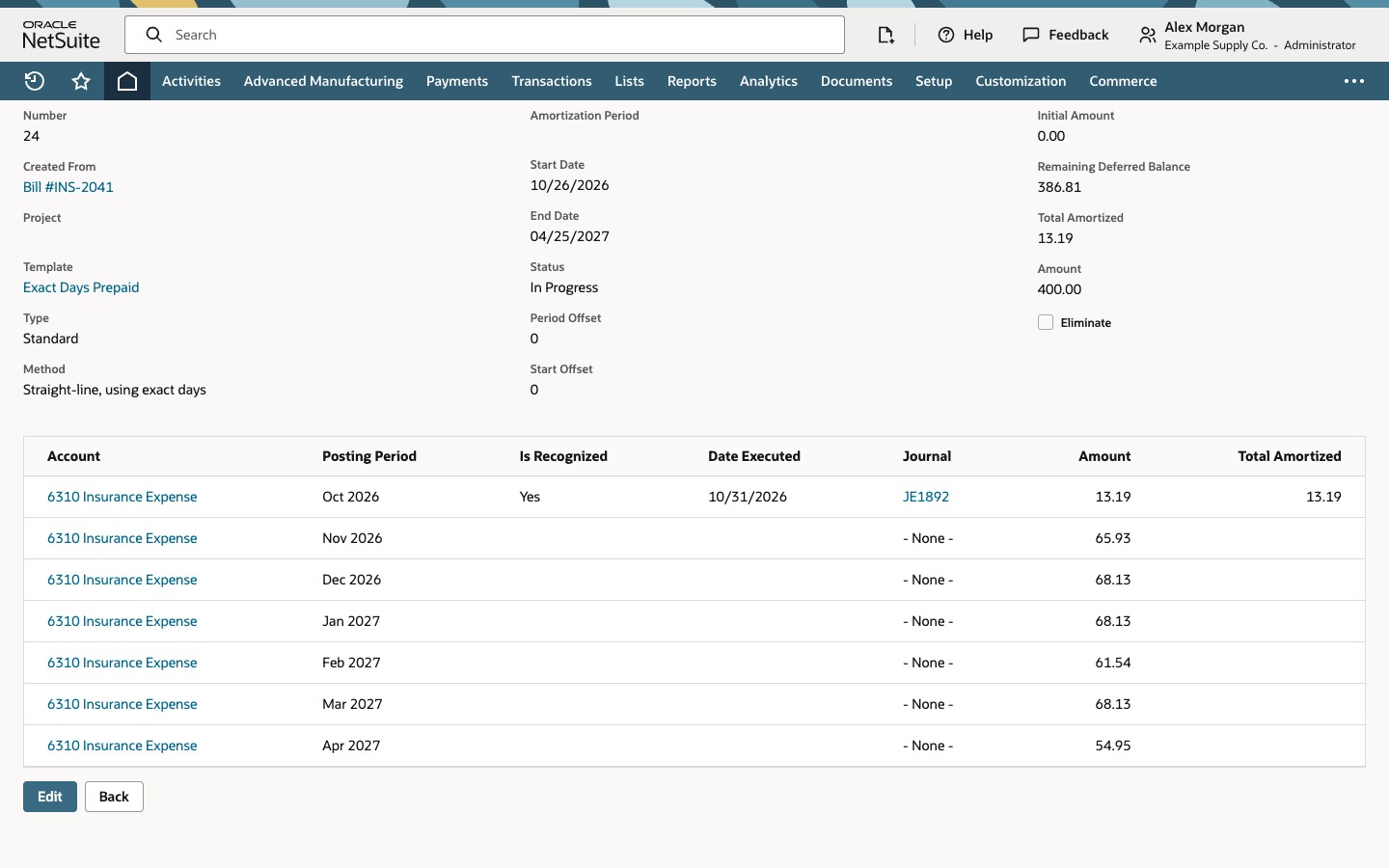
Then read the seven rows. October has 6 days and gets 13.19. November has 30 days and gets 65.93. December and January have 31 each and get 68.13 each. February has 28 days and gets 61.54. March has 31 and gets 68.13, and April has the last 25 days and gets 54.95. The days add up to 182 and the rows to 400.00. You can check any row by hand: 400.00 / 182 is about 2.1978, and six days of that is 13.19. NetSuite rounds each row to cents and keeps the total at the amount deferred. These seven rows add up to exactly 400.00. With other amounts and dates a row can be adjusted by a cent, so read your own schedule rather than assuming it from the arithmetic.
Generate the October journal
Go to Transactions > Financial > Create Amortization Journal Entries. Set Posting Period to Oct 2026. In this example the Journal Entry Date came out as 10/31/2026, the last day of the period; check both the date and the posting period before you submit, because the date can be controlled by your account, form or role. If an Approve Journal box is shown, leave it cleared so the journal follows approval. Check Select Individual Schedules so that only this schedule is processed, and mark the row for the INS-2041 bill. It shows 13.19 due in Oct 2026.
Choose Create Journal Entries. On the Create Journal Entries Status page, choose Refresh until the Status reads Complete. In this account the Complete status opened a list of the processed schedules with their journal numbers. Whatever your account shows, confirm the journal and the schedule row's Journal and Date Executed fields.
Open the journal. It debits 6310 Insurance Expense and credits 1310 Prepaid Insurance for 13.19, with the default Amortization Destination and Amortization Source memos. If journal approval is enabled for the generated journal, it can be saved as Pending Approval. It has been generated but not approved, so it does not post, and you shouldn't treat the 13.19 as recognized, until it is approved. Check the journal's approval and posting status.
Check the schedule afterward
Go back to the schedule from Lists > Accounting > Amortization Schedules. The October row now shows the journal and a Date Executed, Total Amortized is 13.19, Remaining Deferred Balance is 386.81 and Status is In Progress. The other six rows still show no journal. Only the partial first month was recognized, and 13.19 + 386.81 is the original 400.00. Residuals, initial amounts, offsets, closed periods, currency behavior and manual recognition can all change a schedule, so validate the rows NetSuite generates instead of relying on the projection alone.
Common questions
Why is the first month of my amortization schedule smaller than the others?
With Straight-line, using exact days, each posting period gets the amount for the days of the term that fall in it. A term that starts on the 26th has only the last six days of October in that period, so October gets six days' worth, not a full month's. The last month is partial for the same reason when the end date is not the last day of the month.
Does NetSuite count the start and end dates?
Yes. The term is counted from the start date through the end date, inclusive. 10/26/2026 through 04/25/2027 is 182 days, with 6 in October and 25 in April.
Do I have to enter an Amortization Period on an exact-days template?
Not when the transaction line has start and end dates, as in this example. The line's dates set the term, so the template's Amortization Period can stay empty. Term Source is a template setting too, but it is not what produces the daily split. Check the generated schedule instead of assuming it from the template.
How is exact days different from by even periods and the prorate methods?
By even periods divides the amount equally across the schedule periods whatever their length. The prorate first and last period methods prorate only the first and last periods and give the middle periods equal amounts. Only exact days changes every month with its length, so February comes out lower than March.
Does saving the vendor bill post any expense?
No. Saving creates the schedule, and the amortized line posts to the deferral account, while the line still displays the expense account that later recognition will use. Check the bill's GL Impact to see the actual posting. Expense is recognized only when you generate amortization journal entries, and then only for the posting period you choose.