The quick answer
Go to Reports > Financial > Balance Sheet, set Column in the footer to Location and click Refresh. The 1200 - Inventory row now shows one amount per warehouse plus a Total. Click a warehouse's amount to open Balance Sheet Detail, which lists the item receipts, item fulfillments and inventory adjustments that add up to it. Click a Document Number to open the source transaction.
The Balance Sheet shows one inventory total, but a close review or an audit usually asks which warehouse holds the value and what moved it. This example uses a Balance Sheet for Example Supply US as of Oct 2026. The 1200 - Inventory account shows $41,950.00, and the question is why Lakeside Warehouse carries $13,200.00 of it. This illustrated walkthrough uses synthetic example data. Person and operating-company names are fictional. Use your own subsidiary, account and locations.
Before you start
Your account must support location-based inventory and reporting, and the items and transactions you care about must be set up for those locations. To appear in a named location column, the general ledger line must carry that Location. Your role needs permission to run the Balance Sheet, drill into it and open the transactions behind it, and subsidiary or location restrictions on the role can hide some of them. The Column list depends on the features, role and report layout in your account, so Location may not appear in every account.
The figure for each warehouse is a general ledger amount: the net of postings to the inventory account that carry that location. It is a balance grouped by Location, not a count of units on hand. Postings with no location go to the - No Location - column, which is not a warehouse. For the same account, subsidiary context and book, the location columns plus that column add up to the Total. Use Inventory Valuation when you need quantities and item costs, and expect it to differ from the Balance Sheet for reasons that need their own investigation.
01 · Run the Balance Sheet
Go to Reports > Financial > Balance Sheet. In the footer, check that Subsidiary Context is Example Supply US and that As of is Oct 2026. Under Other Current Asset, 1200 - Inventory shows $41,950.00 in a single Amount column. That is the total across every warehouse.
02 · Pivot the report by Location
In the footer, set Column to Location and click Refresh. The report now has a column for each location, starting with - No Location - and ending with Total. In the 1200 - Inventory row, Harbor Depot shows $26,400.00, Lakeside Warehouse $13,200.00 and Riverside Storefront $2,350.00. Together they equal the $41,950.00 Total. In this example the bank and receivable rows carry no location, so their amounts sit in - No Location -. Your own accounts may post with a location, so do not read that column as a rule.
03 · Open the transactions behind one warehouse
Click $13,200.00 in the Lakeside Warehouse column of the 1200 - Inventory row. Balance Sheet Detail opens for that account and location. It lists the transactions in date order with Type, Date, Document Number, Name, Amount and a running Balance: two item receipts, two item fulfillments and two inventory adjustments. Receipts add to the balance, fulfillments reduce it, and adjustments move it either way. The last Balance is $13,200.00, the amount you clicked, and the Total - 1200 - Inventory line shows the same figure. It should reconcile when the detail keeps the same account, location, subsidiary context, book and date scope as the report, so check the footer. Back to Summary returns to the report. The detail covers the date range in its own footer, here Jan 2026 to Oct 2026, and a later or backdated posting changes the figures the next time the report runs.
04 · Trace a receipt to its purchase order
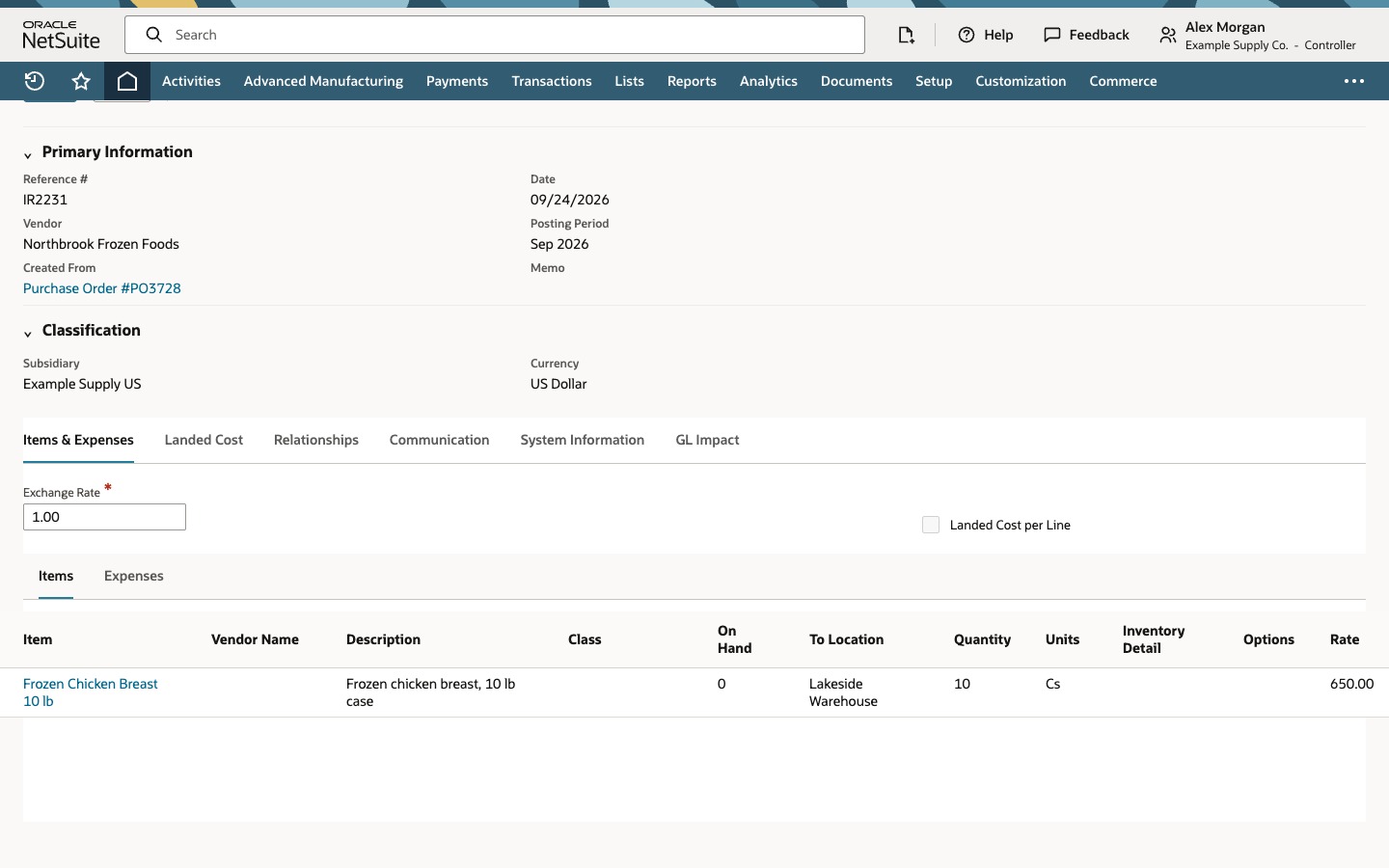
Click the Document Number IR2231, the item receipt dated 09/24/2026. The Item Receipt opens in view mode, so do not click Edit or any action button. Created From shows Purchase Order #PO3728, and the item line shows the To Location Lakeside Warehouse and a quantity of 10 cases. The balance now traces from the Balance Sheet to a warehouse, to a receipt, to the order that created it. The purchase order itself does not post to inventory; the receipt does, and GL Impact on the receipt shows what posted. One receipt line does not tell you where the rest of the order went, because an order can have several lines, locations and receipts.
Common questions
How do I see the inventory value of each warehouse on the NetSuite Balance Sheet?
Run Reports > Financial > Balance Sheet, set Column to Location in the footer and click Refresh. The 1200 - Inventory row then shows one amount per location and a Total.
What does the - No Location - column mean?
It holds general ledger lines that have no Location, so it is not a warehouse and does not mean stock held outside the named ones. The location columns plus - No Location - add up to the Total column for the same account, subsidiary context and book.
How do I see the transactions that make up one warehouse's balance?
Click the amount in that warehouse's column. Balance Sheet Detail opens for the account and location and lists the transactions with a running Balance that ends at the amount you clicked, for the same period and subsidiary context.
Which transaction types appear in Balance Sheet Detail?
Whatever posted to the inventory account at that location in the date range. In this example they are item receipts, item fulfillments and inventory adjustments. Depending on your features and costing, you may also see inventory transfers, vendor returns, assembly and work order transactions, revaluations and journal entries. The list is not exhaustive, and non-posting records such as purchase orders do not appear.
Is a warehouse's Balance Sheet amount the same as its Inventory Valuation?
Not necessarily. The Balance Sheet amount is a general ledger balance by posting location. Inventory Valuation reads item quantities and costing. Differences can come from period or date settings, landed cost, journals posted straight to the account, in-transit inventory or postings with no location, so investigate before changing anything.