The quick answer
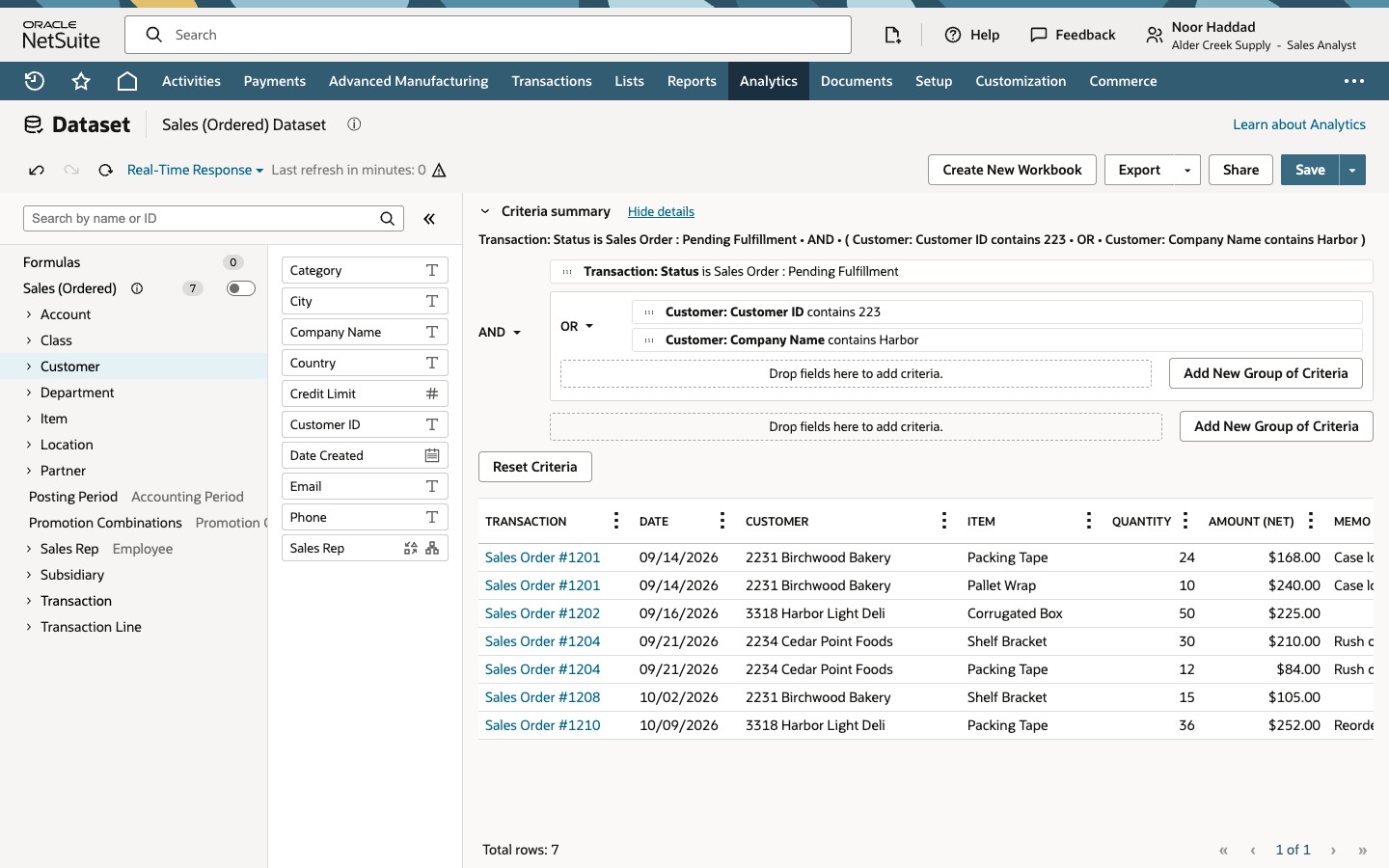
In the dataset editor, drag Transaction > Status into Drop fields here to add criteria. and keep Sales Order : Pending Fulfillment. Click Add New Group of Criteria and drag Customer > Customer ID into the new group with the condition contains 223. The customer fields come from the related Customer record, so they do not have to be columns of the grid. Add a second Customer criterion to the group and its own AND or OR control decides whether a line must match both criteria or either one. In the example, Total rows goes from 12 to 9, then to 5, then to 0 with AND, and to 7 with OR.
The example is a Sales Analyst who wants the pending-fulfillment sales order lines of a few customers. The screenshots use sample data, and the person, company, customers and amounts are fictional.
Before you start
You need the SuiteAnalytics Workbook feature and a role that can open Analytics and datasets and can view the records and fields you use, here Sales (Ordered), Transaction and Customer. The record tree lists only the related records and fields that the root record, the enabled features and your role make available.
Read a criteria group as an ordinary AND/OR condition in parentheses. The dataset in this guide reads as Status is Pending Fulfillment AND (Customer ID contains 223 OR Company Name contains Harbor). That is how the criteria builder presents the logic. Do not infer database EXISTS, UNION or deduplication behavior from the visual grouping, because the editor does not promise a particular query form.
Know the row grain before you trust a count. Total rows counts the result rows of the dataset query, not distinct orders. In the example those rows are sales order lines: Sales Order #1201 appears twice because it has two items. The grain can change when you add fields or joins, so confirm it in your own account by adding a transaction ID and a line identifier and checking whether an order with two items gives two rows. A related record with several lines per transaction, such as Transaction Line, can multiply rows, and so can other one-to-many records. Role and subsidiary restrictions can also lower the count without meaning that a criterion failed. The row counts, status values and labels in this walkthrough are sample results that will differ by account, role and release, so find each control by its label and function.
01. Start a new Sales (Ordered) dataset
Open Analytics, open the Datasets tab and click New Dataset. In the list of record types click Sales (Ordered). The editor opens as Sales (Ordered) Dataset. The criteria area reads Drop fields here to add criteria., nothing filters the rows yet, and Total rows reads 12. In this example the Customer column shows each customer's ID in front of its name, for example 2231 Birchwood Bakery. Treat that as the customer ID text shown in the account, not an internal numeric ID, and as display behavior that can differ by release and field.
02. Filter on the order status
In the field tree click Transaction, find Status in its field list and drag it into Drop fields here to add criteria. The Filter Status dialog opens with Field Values and the condition any of. Type pending fulfill in the search box. Two values match, Sales Order : Pending Fulfillment and Transfer Order : Pending Fulfillment. The status values you see depend on the root record, features, transaction types and release. Pick the sales order value, move it to the selected values with the arrow between the two lists, and click Apply.
The criteria summary now shows Transaction: Status is Sales Order : Pending Fulfillment and Total rows drops to 9. Status is not a column of the grid. It belongs to the related Transaction record and is used as a criteria field, so you can filter on it without adding it to the results. In the example account the count changed from 12 to 9. Yours depends on the records, subsidiaries and permissions you can access.
03. Add a group for the related Customer record
Click Add New Group of Criteria. In the example a nested group appears under the status criterion with its own Drop fields here to add criteria. area. Check where the group lands, because it counts as one item at the level where it sits. It is empty, so it does not change the result yet and Total rows is still 9. Click Customer in the field tree and drag Customer ID into the nested group, not into the outer area. In the Filter Customer ID dialog keep contains, type 223 and click Apply.
The group reads Customer: Customer ID contains 223 and Total rows is 5. Only the lines of 2231 Birchwood Bakery and 2234 Cedar Point Foods are left, and they are still pending fulfillment. The outer operator, AND, joins the status criterion and the nested group, so a line must meet the status and the group. Here Customer is one customer per order, so a matching customer leaves that order's lines, but the final row set still depends on the joins in the dataset. Contains generally matches the fragment anywhere in the text. Test case and spacing behavior in your own field before you rely on it.
04. Add a second Customer criterion
Drag Company Name from the same Customer field list into the nested group. In the Filter Company Name dialog keep contains, type Harbor and click Apply. In the example the group's own AND or OR control showed once the group held two criteria, and it starts as AND. AND needs both criteria in the group to be true. No customer in the example has an ID containing 223 and a company name containing Harbor, so Total rows is 0 and the grid is empty. The arrow marks the group's own AND, not the outer one.
05. Switch the group to OR and read the result
Open the group's AND control and choose OR. OR needs at least one criterion in the group to be true, and the grid recalculates at once. Total rows is 7. The lines are for 2231 Birchwood Bakery and 2234 Cedar Point Foods, whose IDs contain 223, and 3318 Harbor Light Deli, whose company name contains Harbor, and all of them are still pending fulfillment because the outer operator is AND. If the outer operator were OR, lines with other statuses could be included too, so check that operator as well.
Click Show details to read the whole condition on one line: Transaction: Status is Sales Order : Pending Fulfillment, AND, then in parentheses Customer: Customer ID contains 223, OR, Customer: Company Name contains Harbor. The line is a quick way to check the nesting and both operators. The criteria are only part of the dataset you are editing. Nothing is saved until you click Save, and saving a shared dataset can change the data that every workbook using it sees.
Common questions
How do I filter a NetSuite dataset by a field of a related record such as the customer's ID?
In the dataset editor, click the related record in the field tree, for example Customer, and drag the field into Drop fields here to add criteria. The Filter dialog for that field opens. For a text field such as Customer ID choose a condition such as contains, enter the text and click Apply. The field does not have to be a column of the result grid. Using it in a criterion joins that record to the dataset, so check whether the join can duplicate rows. The record tree lists only the related records and fields that your root record, features and role make available.
What does Add New Group of Criteria do in the dataset editor?
It adds a criteria group with its own drop area. The group counts as one item at the level where it sits, and it can hold several criteria and other groups. Criteria in the group are combined by the group's own AND or OR operator, and the group as a whole is combined with its sibling items by the parent operator. Check the level and placement of a new group in the criteria builder rather than assuming it sits under the criterion you last added.
What do AND and OR mean inside a criteria group?
AND requires every criterion in the group to be true for a row to match, and OR requires at least one. The parent operator combines the parent group's own criteria and nested groups. Nested groups behave like parenthesized expressions: the group's operator combines its members, and the result is then combined with the sibling items. Here the logic is Status is Pending Fulfillment AND (Customer ID contains 223 OR Company Name contains Harbor).
Are dataset criteria groups the same as SQL EXISTS or UNION?
Do not describe them that way. A group is a parenthesized AND/OR condition over fields of the root record and its related records. EXISTS and UNION are database ways of expressing similar ideas, but the editor does not promise a particular query form, and an OR group is not a union of two result sets. Join and row duplication behavior still apply, so check a small result against a unique transaction or line identifier.
Why did my dataset return no rows after I added a second criterion in a group?
Check the group's operator first. AND needs every criterion in the group to be true for the same row, so two conditions that no single customer meets, such as an ID containing 223 and a company name containing Harbor, return nothing. Switch the group to OR if either condition should be enough. Also check the outer operator and where each criterion sits in the criteria summary, whether the values match what the field displays, whether the criterion is on the join you expected, and whether role or subsidiary restrictions remove rows.