The quick answer
Open Fixed Assets > Background Processing > FAM Process List and find the depreciation process whose Status is Failed. Open it with View and read State Values: the stage that stopped carries an errors entry with an error name and message. In this example the entry is MAP_ERROR with a message about a blank Department on a BG Summary Record. Copy the message, search it in the NetSuite Help Center, and read the SuiteAnswers article for the scenario and the fix. Before you rerun depreciation, check whether the failed run created journals or partial updates.
This is a Fixed Assets Management (FAM) example. The page names, labels, status wording, stage names and numeric codes belong to the SuiteApp and can differ by version, account, role and enabled features. The background-processing page may be labeled FAM Process List, FAM Process Status or Background Processing Status, so use the equivalent page in your account. The error and the article shown are an example of what a failed process log can contain, not a statement that every failed depreciation run shows this error. Person and operating-company names in the screenshots are fictional example data.
Before you start
You need the Fixed Assets Management SuiteApp, a role that can open the Fixed Assets center and the FAM Process List (custom roles may also need access to FAM asset, summary and history records and to journals), and a depreciation run that has already been submitted. This guide starts after submission. It does not cover access, subsidiary or page permissions that stop a run from being submitted.
The example account lists twelve processes. Three are depreciation runs: two Completed runs created on 10/07/2026 and 10/19/2026, and one Failed run created on 10/23/2026 at 1:15 pm.
01. Open the FAM Process List
On the Fixed Assets center, expand Background Processing in the Fixed Assets Links portlet and select FAM Process List.
The list has one row for each FAM background process, with Date Created, Last Modified, Process ID, Triggered By, Status, Parameters and State Values.
02. Find the failed depreciation process
Scan the Process ID column for depreciation. The runs on 10/07/2026 and 10/19/2026 are Completed. The run created on 10/23/2026 at 1:15 pm is Failed. That is the run that did not post depreciation, and Triggered By names who submitted it.
03. Compare a completed run with the failed one
First open a completed depreciation run to see what a clean log looks like. Select View on the 10/19/2026 row. Status is Completed, Current Stage is 4 of 7 Total Stages, and State Values lists each stage with an empty errors list.
Return to the list with List and select View on the failed 10/23/2026 row. Status and Current Stage Status read Failed, and Current Stage is 2 of 7. In State Values, stage 2 carries an errors entry. The error name is MAP_ERROR, and the message asks for a value for Department because a BG Summary Record's Department is blank. In the demonstrated account, status 4 appeared on the stage that failed. Treat the numeric codes as an implementation detail and rely on the displayed status and error entry.
04. Search the error message
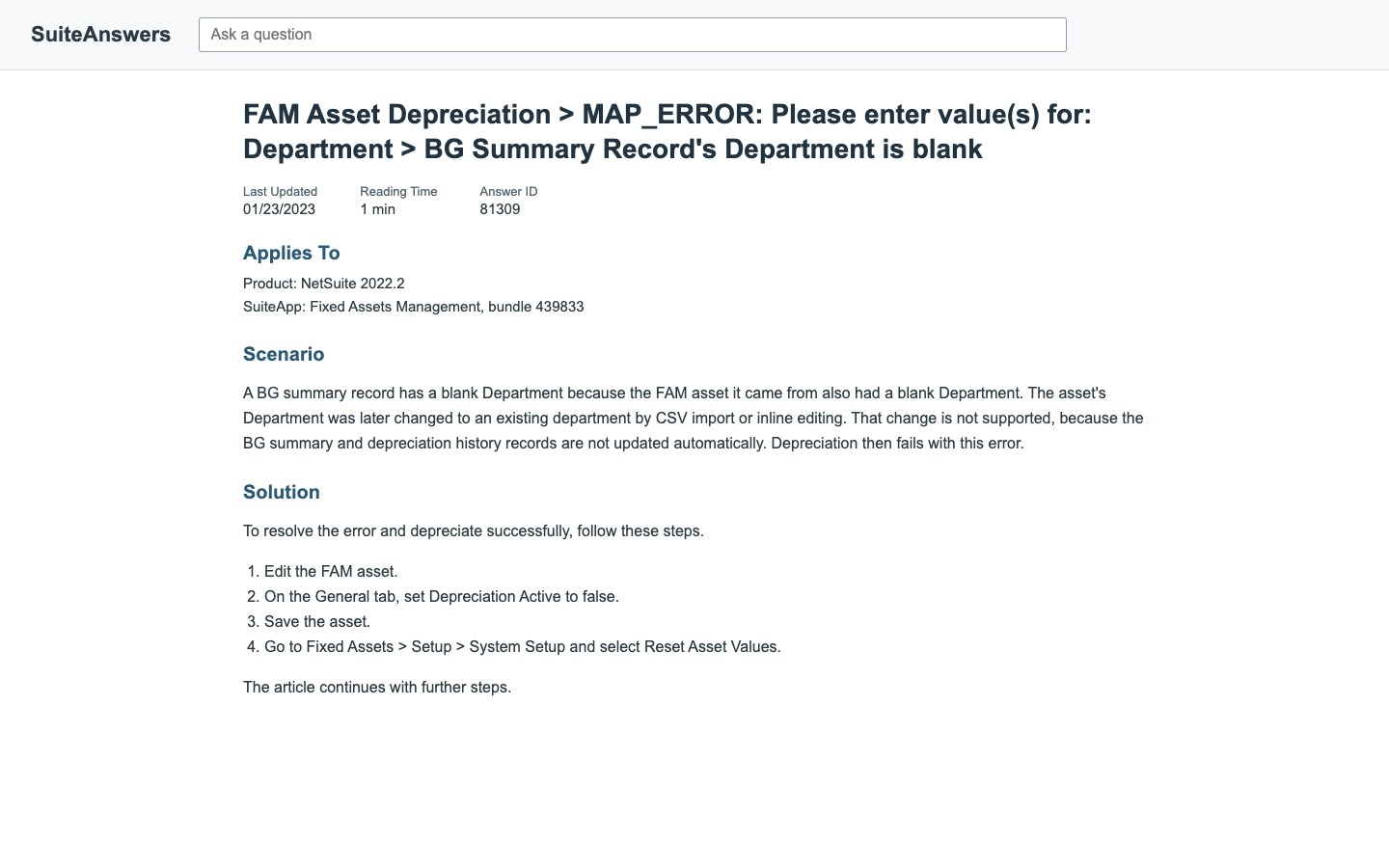
Copy the complete error message, including any field name or record reference. Open the NetSuite Help Center and type the message in its Search box, then search. In the demonstrated help site the matching SuiteAnswers article is listed for the message.
05. Read the cause and the fix
Open the article whose title names the FAM depreciation error. Applies To gives the NetSuite release and the Fixed Assets Management SuiteApp the article covers. Check that both match your account.
The Scenario describes one known cause: a summary record had a blank Department, and the asset's Department was later changed by CSV import or inline editing in a way the summary and depreciation history records did not follow. The Solution begins by editing the asset, setting Depreciation Active to false and saving it, and then running Reset Asset Values from Fixed Assets > Setup > System Setup. The article continues with more steps.
Treat the article as one known cause, not proof of the cause in your account, and confirm the affected asset and its related records first. Reset Asset Values can remove forecast and depreciation history rows after the last depreciation boundary, and it can unlink history rows from journals that already exist without reversing those journals, so involve your accounting owner and reconcile FAM to the general ledger afterwards. Before you rerun depreciation, review the failed process, the depreciation history and posting references of the affected assets, and the journals for the period, because a failed run does not prove that nothing was posted. If the underlying need was to move an asset to another department, use an asset transfer rather than editing the Department field directly. If you do use the reset, wait until it is Completed, reactivate the asset, run the schedule generation your version requires, and check the new forecast rows, the Department and the last depreciation values before you continue. Then rerun for a reviewed scope and period, and confirm that the new process is Completed with empty errors lists, that the affected assets show the intended Department, that there are no duplicate depreciation journals for the scope, and that the depreciation history rows carry the expected posting references. Resetting does not automatically reverse or correct the general ledger.
Common questions
Why are my fixed assets not depreciating in NetSuite?
One common reason in a FAM account is that the depreciation process failed in the background. Open the FAM Process List, find the depreciation process for the run you expected, and check its Status. If it is Failed, open it and read the error in State Values. Other causes, such as inactive assets, missing schedules, invalid dates or classifications, closed periods, permissions, or assets outside the run's scope, can also leave assets undepreciated without producing the same failed-process entry, and some setup problems do produce process errors, so do not rule them out because an asset did not post. Review both the process status and the individual asset before you conclude that the failure is global.
What does State Values show on a FAM Process record?
It lists the process's stages, one entry per stage, each with a numeric status and an errors list. An empty list means that stage logged no error. A failed stage carries an entry with an error name and message. The meaning of the numeric status and the number of stages can differ by version, so rely on the displayed status and the error text.
Where do I search a FAM error message?
Copy the complete message, including the error name and field name, from State Values and search it in the NetSuite Help Center, where SuiteAnswers articles are included in the results. Match the article's release and SuiteApp version to your account, and confirm that the proposed fix matches the actual data condition rather than applying it only because the message looks similar.
Do I just rerun depreciation after a failed run?
No. Fix the cause first, and check whether the failed run created journals or partially updated asset records. Review the process details, the depreciation history and posting references of the affected assets, and the journals for the period. A depreciation date can also catch up earlier eligible periods, so rerun only a reviewed scope and confirm the result afterwards.
Is Reset Asset Values a safe fix?
Not by default. It is not a general-purpose repair button: it can remove unposted forecast rows and depreciation history after the last depreciation date, and it can unlink history rows from journals without reversing them. Use it only with your accounting owner's approval, ideally tested on a sample, and reconcile FAM to the general ledger afterwards. The exact behavior depends on the FAM release.