The quick answer
Go to Setup > Integration > OAuth 2.0 Client Credentials (M2M) Setup and click Create New. Choose the integration Entity, its Role and the Application, upload the public X.509 certificate and click Save. A bare public key fails with Unable to parse provided x509 certificate. After a successful save, the Certificate ID in the new row is what the integration puts in its JWT header.
The screenshots show sample data. The company, person, integration and certificate values are fictional. The page layout, limits and error text described here were observed in one account and release, so check them against your own.
Before you start
You need an integration record with the Client Credentials (Machine To Machine) Grant and the RESTlets or REST Web Services scope turned on, a dedicated employee for the integration, and a role for that employee. The application appears in the mapping dialog only when its integration record has the machine-to-machine grant. The role needs the REST Web Services and Log in using OAuth 2.0 Access Tokens permissions under Setup, plus the record permissions the calls use, and should not be a Web Services Only role. Creating or revoking a mapping needs the OAuth 2.0 Authorized Applications Management permission or Administrator.
Generate the key pair and an X.509 certificate outside NetSuite. Upload only the public certificate, with a .cer, .crt or .pem extension, and keep the private key with the integration. NetSuite supports RSA keys of 3072 or 4096 bits and EC keys of 256, 384 or 521 bits, and a certificate is valid for at most two years.
01. Open the setup page
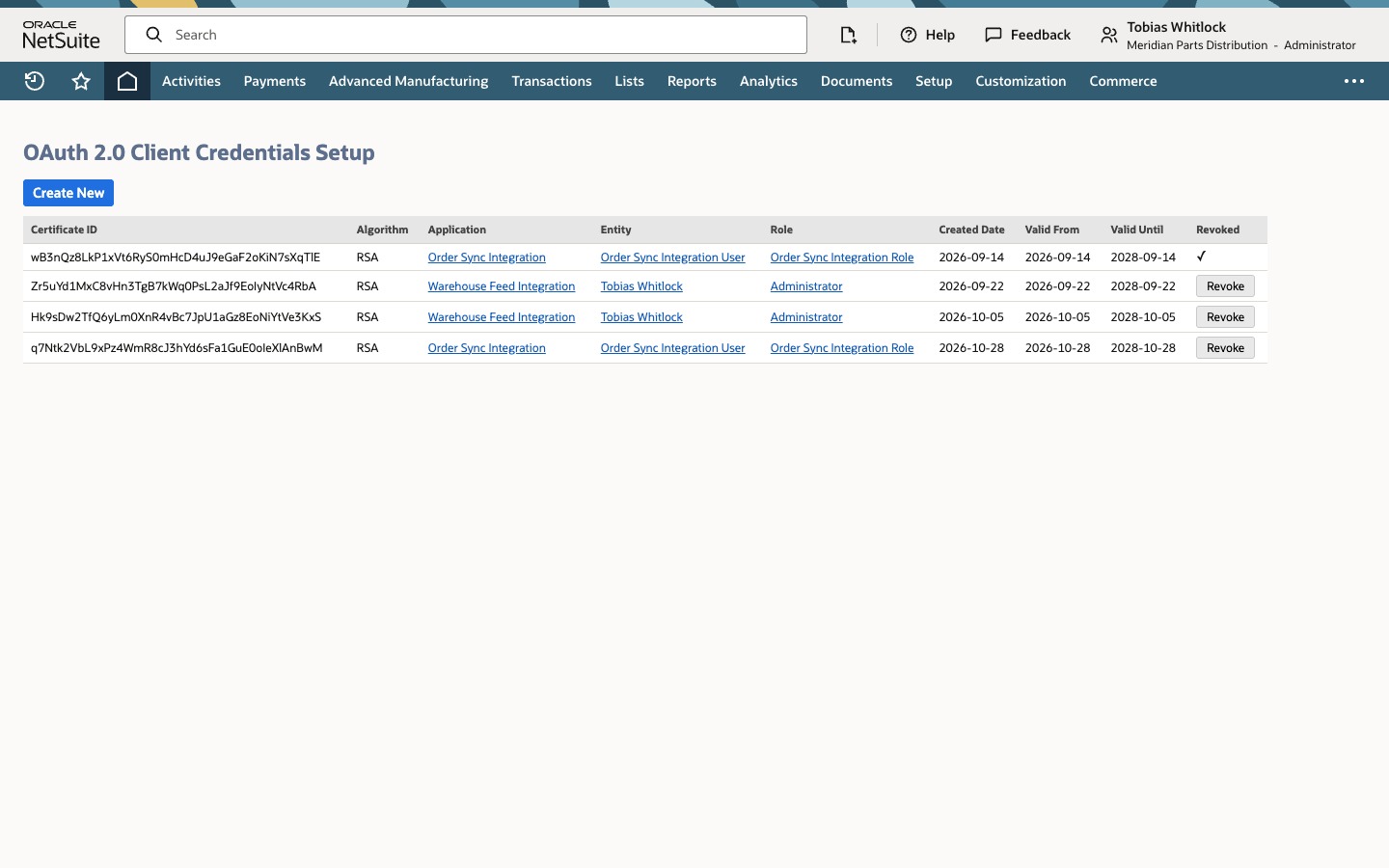
Go to Setup > Integration > OAuth 2.0 Client Credentials (M2M) Setup. The page lists the existing mappings with their Certificate ID, Algorithm, Application, Entity, Role, Created Date, Valid From, Valid Until and Revoked status. Here the first mapping is revoked and shows a check mark, and the others show a Revoke button.
02. A bare public key fails
Click Create New. In Create a New Client Credentials Mapping choose the Entity Order Sync Integration User, the Role Order Sync Integration Role and the Application Order Sync Integration.
Under Certificate click Choose a file, choose order-sync-public-key.pem, a bare public key, and click Save. NetSuite shows Unable to parse provided x509 certificate. and the dialog stays open. The upload has to be an X.509 certificate.
03. Upload the certificate
Click Choose a file again, choose order-sync-public-cert.pem, the public X.509 certificate, and click Save. The dialog closes and the mapping is added at the bottom of the list.
04. Read the mapping
The new row shows the Certificate ID, a 43-character value that here begins q7Ntk2, the algorithm RSA, the application, entity and role you chose, a created date and valid from date of 2026-10-28 and a valid until date of 2028-10-28, two years later, with a Revoke button. Give the Certificate ID to the developer: the integration puts it in the header of each signed JWT as the key ID.
Check the result
- In this sample, the bare public key is rejected with an x509 parse error.
- The X.509 certificate is saved as a new mapping row with a Certificate ID and a Valid Until two years after the created date.
- The row shows the application, entity and role you chose, and a Revoke button.
Common questions
Where is OAuth 2.0 Client Credentials Setup in NetSuite?
Under Setup > Integration, as OAuth 2.0 Client Credentials (M2M) Setup. The Create New button opens the mapping dialog.
Why do I get Unable to parse provided x509 certificate?
The uploaded file is not an X.509 certificate. A bare public key causes it. Upload the public certificate in .cer, .crt or .pem format, never the private key.
What is the Certificate ID used for?
The integration puts the Certificate ID in the JWT header as the key ID, so NetSuite knows which mapped certificate verifies the signature. It is not the integration's client ID or the file name.
Why does my integration not appear in the Application list?
Its integration record must have the Client Credentials (Machine To Machine) Grant enabled.
How long is the certificate valid, and what does Revoke do?
A certificate is valid for at most two years, shown in Valid Until. Revoke is permanent, so after revoking or expiry create a new mapping and update the integration with the new Certificate ID and its matching private key.