The quick answer
Go to Setup > Accounting > Global Account Mappings and click New Global Account Mapping. Set the Effective Date, Accounting Book, Subsidiary and Source Account, choose the Destination Account the secondary book should use, and click Save. Then enter a new journal that uses the source account, open its GL Impact subtab and compare the Primary Accounting Book rows with the secondary book rows.
The screenshots show sample data. Person and company names are fictional. Use your own books, subsidiary and accounts when following the steps.
Before you start
In this example, Alex Morgan at Example Supply Co. keeps one chart of accounts for management reporting. The Ireland subsidiary also reports in a secondary book called Local Statutory Book, which uses its own statutory accounts. Alex wants cloud software costs, entered once as 6420 Cloud Software Subscriptions, to land in the statutory account S-6310 IT and Software Services in that book.
- Your account is OneWorld with Full Multi-Book Accounting and Chart of Accounts Mapping enabled. An adjustment-only book doesn't work this way.
- The secondary book is a full book whose subsidiary scope includes the subsidiary, and your role can see the book and the subsidiary and can create mapping records, not only journals.
- Both accounts are active and valid for the subsidiary and the secondary book. For the test journal, the accounting period for its date must be open.
- Class, Department and Location appear on the mapping only when your account configures them for mapping, and custom dimensions can appear too.
- Menu names and the Class, Department and Location labels can differ by release, role and account. This guide uses the labels in the example account.
- The example shows dates as MM/DD/YYYY. Enter dates in your account's format.
- Try it in a sandbox or with a test journal first. A mapping affects every new transaction that matches it.
01. Open the Global Account Mappings
Go to Setup > Accounting > Global Account Mappings. In the example account the menu lists it under a Multi-Book Accounting heading, next to Accounting Books and Item Account Mappings. The list shows one rule per source account, with the Effective Date, Subsidiary, Class, Department and Location filters, the Accounting Book and the Destination Account.
Here the Local Statutory Book already has five rules for Meridian Trade Ireland, for 1100, 1200, 2100, 6410 and 6430. None has the source account 6420 Cloud Software Subscriptions, so a journal that uses 6420 would post the same account in both books.
02. Add the mapping
Click New Global Account Mapping. In General, enter Effective Date 10/01/2026, leave End Date blank, and set Accounting Book to Local Statutory Book and Subsidiary to Meridian Trade Ireland. In Source, set Source Account to 6420 Cloud Software Subscriptions and leave Class, Department and Location at - Any -. In Target, set Destination Account to S-6310 IT and Software Services, then click Save.
The Effective Date is the first date the rule applies, and an End Date, if you set one, closes it. A rule with all three filters at - Any - matches the eligible lines that use the source account in that book and subsidiary within its dates. If you name a class, department or location, only lines with that value match. Avoid overlapping rules unless you've tested which one applies, because it isn't safe to assume the more specific one wins.
03. Check the saved mapping
NetSuite opens the saved Global Account Mapping. It shows the Effective Date 10/01/2026, the Accounting Book, the Subsidiary, the Source Account 6420 Cloud Software Subscriptions and the Destination Account S-6310 IT and Software Services. Saving a rule doesn't change transactions that already exist. It applies to postings made from now on, so test with a new journal. Put mappings in place before any historical transactions are processed for a book, and reprocess earlier history only through your account's approved procedure.
04. Enter a journal that uses the source account
Go to Transactions > Financial > Make Journal Entries. In the example, Subsidiary is already Meridian Trade Ireland, which can default from the user's role or context, and Date is 10/14/2026. Confirm or choose the subsidiary, and use a date on or after the rule's Effective Date in an open period. On the first line choose 6420 Cloud Software Subscriptions and enter a Debit of 4,850.00. On the second line choose 2250 Accrued Operating Costs and enter a Credit of 4,850.00. Click Add after each line, then Save.
2250 has no mapping rule in this example. That's deliberate, because it shows what an unmapped account does.
The saved journal shows the two lines exactly as you entered them. They're the entry as made. GL Impact shows what posted in each book.
05. Compare the books in GL Impact
Open the GL Impact subtab and leave Accounting Book blank so every book shows. The example shows four rows in euros, because both books use euros here. Amounts and currencies depend on each book's base currency, the transaction currency and the exchange rates, so check the Accounting Book, Subsidiary, account, amounts and currency on every row of your own result. The Primary Accounting Book has a debit to 6420 Cloud Software Subscriptions and a credit to 2250 Accrued Operating Costs. The Local Statutory Book has a debit to S-6310 IT and Software Services and a credit to 2250 Accrued Operating Costs.
The new rule translated the debit. The credit stayed the same, because no rule covers 2250, so the statutory book used the same account. Other accounts can behave differently. Receivable, payable, tax and intercompany accounts, and accounts that come from an item, can be controlled by transaction or item-specific accounting logic, so a Global Account Mapping may not change them. A journal test proves only the journal, so test each transaction type you depend on.
06. Filter to the statutory book
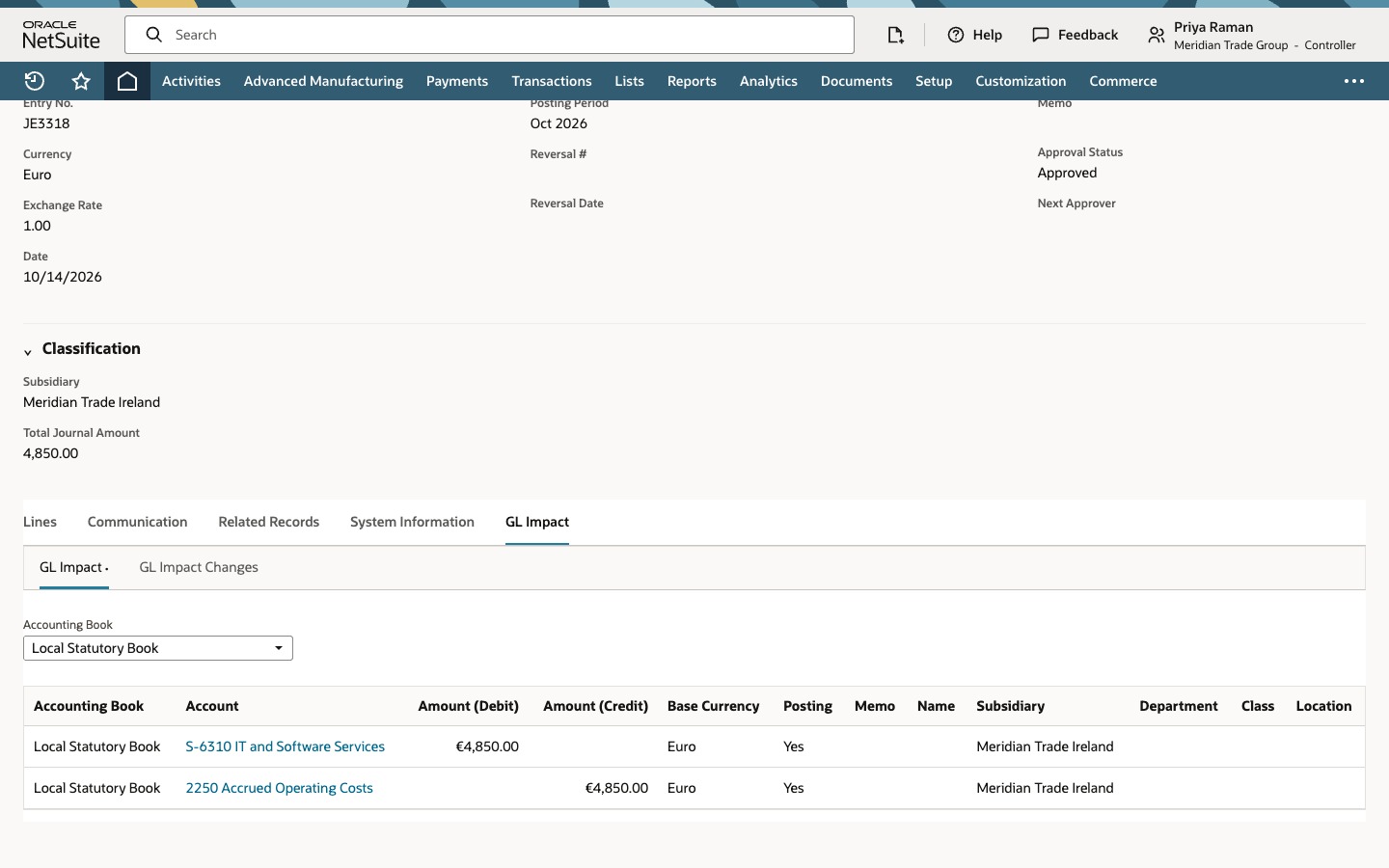
Set the Accounting Book filter to Local Statutory Book. Only its two rows remain. The debit is S-6310 IT and Software Services, so the rule worked, and the credit is still 2250 Accrued Operating Costs. Set the filter back to blank, or to the Primary Accounting Book, to compare the same lines again.
Check the result
- The Global Account Mappings list had no rule for 6420 Cloud Software Subscriptions in the Local Statutory Book.
- The saved mapping shows 6420 as the Source Account and S-6310 IT and Software Services as the Destination Account.
- The new journal shows 6420 debited and 2250 credited for 4,850.00.
- GL Impact shows the Primary Accounting Book on 6420 and 2250, and the Local Statutory Book on S-6310 and 2250.
Common questions
How do I make a secondary accounting book post to a different account in NetSuite?
Create a Global Account Mapping for that book and subsidiary. Go to Setup > Accounting > Global Account Mappings, click New Global Account Mapping, set the Effective Date, Accounting Book, Subsidiary, Source Account and Destination Account, and save. New transactions that use the source account then post the destination account in the secondary book, while the primary book keeps the account that was entered.
What does a Global Account Mapping do, and what fields does it have?
It tells a secondary accounting book to use a different account when a transaction line uses a given source account. The record has an Effective Date, an optional End Date, an Accounting Book, a Subsidiary, a Source Account and a Destination Account, plus the Class, Department and Location filters, and any other mapping dimensions, that your account has configured.
Why does my secondary book show the same account as the primary book?
Usually no rule matches the line. Check that the mapping is for the right book and subsidiary, that the Effective Date is on or before the transaction date, that any End Date hasn't passed, and that its filters match the line. Also check that the account was chosen directly on the line and not taken from an item or another record, that the transaction was posted after the rule existed, and that the destination account is valid for the book and subsidiary. An account without an applicable rule generally posts to the same account in the secondary book.
Does adding a mapping change journals I already posted?
No. Saving a mapping doesn't rewrite the postings of existing transactions, so test with a new transaction. Catching up earlier history for a newly activated book is a separate Multi-Book implementation task that depends on the book's status. Put mappings in place first, and reprocess history only through your account's approved procedure.
What's the difference between a Global Account Mapping and an Item Account Mapping?
A Global Account Mapping is meant for accounts chosen directly on a transaction line, such as the lines of a journal. An Item Account Mapping covers accounts NetSuite takes from an item, and it matches an item account type and a source account instead. Don't assume a journal result applies to an invoice or a bill. Test each transaction type you rely on.