The quick answer
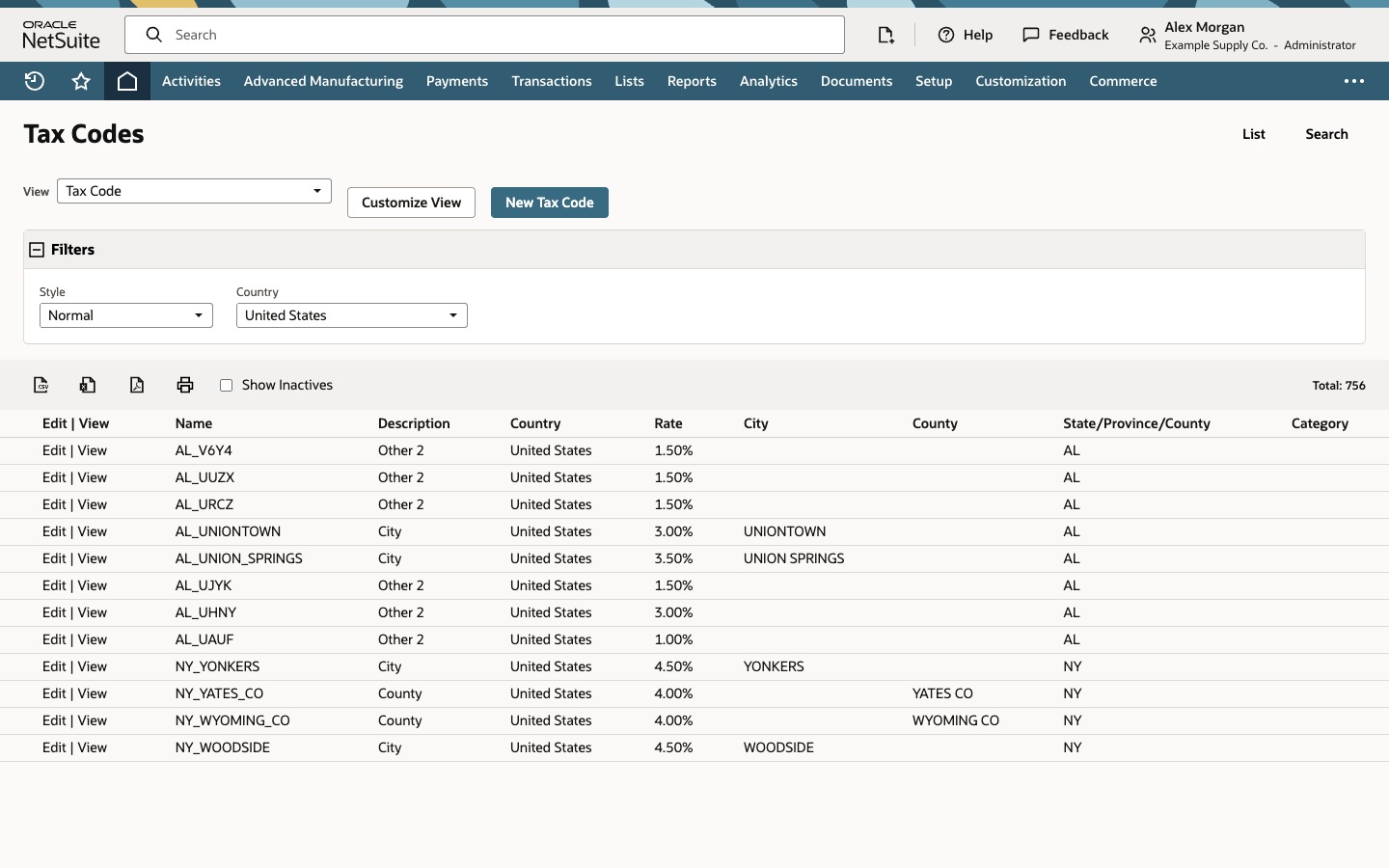
In an account using legacy United States sales tax, open Setup > Accounting > Use State Sales Tax Tables, choose AL on State Tax Import, review the tax agency and tax account for each tax type, and save. Return to Tax Codes and check for Alabama rows. In the demonstrated account, the displayed total changes from 606 to 756.
The screenshots use fictional person and operating-company names. The counts, table version, and account mappings belong to the demonstrated account; yours can differ.
Before you start
You need access to the legacy US tax setup and permission to import a state sales tax table. Confirm the state you mean to import and that the tax agency and tax control account your organization uses for each tax type are available. If Alabama was imported before, the form says an import updates existing tax tables. Reimporting may overwrite manual tax-code changes and agency or account assignments. Check any customizations you need to preserve before saving.
This walkthrough does not cover SuiteTax or a transaction tax calculation. The current account inspected for visual comparison had this form but offered only California and New York; the Alabama values below come from the source walkthrough.
01. Check the starting Tax Codes list
Open Tax Codes and set Country to United States if needed. Note the current list total and whether Alabama codes already exist. The source account begins at Total: 606, with New York rows visible.
02. Choose Alabama
Open Setup → Accounting → Use State Sales Tax Tables. The State Tax Import notice explains that an existing state's tax tables will be updated and that an email notification is sent when an import completes. Check the version shown on your form; the source account shows 3/1/2024.
Choose AL in State. In the source, States Already Imported lists AZ, NY, and CA. If AL is missing from your dropdown, use the page's guidance on adding a state and checking Tax Code Lists Include. Do not substitute another state's table.
03. Review mappings and save
With AL selected, the form shows eight tax types: State, Transit, County, City, and Other 1 through Other 4. The demonstrated values are Tax Agency AL and Sales Taxes Payable AL in each visible row. These are example account values, so choose the tax agency and tax control account approved for your organization. Check the mapping even for codes whose rates may stay the same. The source leaves Force override of inactive tax items and reactivate them unchecked.
Select Save. The source returns to Home with a green Confirmation heading. Its smaller message is blurred in the video, so the next Tax Codes check is the useful result check.
04. Verify Alabama codes
Return to Tax Codes with Country set to United States. Look for rows beginning AL_ and compare the list total with the starting count. The source's later list shows Total: 756 and Alabama rows including AL_V6Y4 and AL_UNIONTOWN. That total is 150 higher than its earlier 606; it does not establish how many Alabama records were created. The narration gives a different number, so use the displayed list and your own account's result instead of expecting a fixed code count.
Common questions
What if AL does not appear in State?
Read the form's state-availability guidance. It points to adding the state and changing Tax Code Lists Include to Tax Groups and Tax Codes or Tax Groups. Check whether Alabama is present in the account's legacy-tax nexus setup, then reopen State Tax Import. The exact controls depend on the account and your role.
Will importing a state again leave its existing codes alone?
The form warns that importing taxes for a previously imported state updates its existing tax tables. A reimport can overwrite manual tax-code changes and update agency or tax-control-account assignments. Review existing customizations, mappings and the force-override checkbox before saving.
Should I turn on force override?
Only if you intend to update and reactivate inactive tax codes or tax groups as part of this import. The demonstrated import leaves the checkbox clear.
Why is my Tax Codes count different from 756?
The counts in this walkthrough belong to one source account and table version. Check for the expected AL_ rows and compare your own before and after lists; a different count alone does not establish failure.