The quick answer
Open the Balance Sheet, click Customize and open the More Options tab of the Financial Report Builder. Name the report, set Drill Down Report to your custom detail report and click Save. When someone clicks an amount on the saved report, NetSuite now opens that detail report. Left unchanged, a customized Balance Sheet opens the standard Balance Sheet Detail.
Inline images show the field or area used in each step. Select Enlarge to see the complete recorded screen and its surrounding context.
The example is an outfitters company. Its controller wants a custom Balance Sheet whose drill-down shows a Memo column. The saved custom detail report, Balance Sheet Detail with Memo, already exists. The screenshots use sample data, and the person and company names are fictional.
Before you start
The summary and the detail are separate reports, and the link between them is a setting on the summary, under More Options. A detail report's own More Options tab has no Drill Down Report field. Build the custom detail first: start from the standard Balance Sheet Detail, add the columns you need on Edit Columns, give it a name and save it. It then appears in the Drill Down Report list.
Keep the original Amount column in the custom summary. Removing it and adding another Amount column can leave the replacement column without the drill-down, so test every amount column people are expected to click. Audience decides who finds a custom report, but it does not by itself grant permission to run it or to see the data. Whoever clicks an amount has to be able to run both the custom summary and the chosen detail, with access to the subsidiary and other report scope, and to sensitive columns such as Memo. Test the drill-down with a representative viewer role, not only the role that built the reports. The columns of the standard detail and the entries in the Drill Down Report list depend on your account, role and release.
01. Drill into the standard Balance Sheet
Go to Reports > Financial > Balance Sheet. The report runs for Wexford Ridge US. Click the 1010 - Operating Checking amount, $26,514.50.
The standard Balance Sheet Detail opens. It shows Type, Date, Document Number, Name, Amount and Balance, and no Memo column. Click Back to Summary.
02. Open More Options
Click Customize. The Financial Report Builder opens, named Custom Balance Sheet, with the tabs Edit Layout, Edit Columns, Filters, Sorting (Optional) and More Options. Open More Options. Drill Down Report shows Balance Sheet Detail, the standard detail report.
03. Name the report and choose its Drill Down Report
Enter Balance Sheet with Memo Drill-Down as the Name. Open the Drill Down Report list. It offers Balance Sheet, Balance Sheet Detail, Comparative Balance Sheet and the saved custom detail report, Balance Sheet Detail with Memo. Choose Balance Sheet Detail with Memo.
04. Save the custom Balance Sheet
Click Save. The custom Balance Sheet runs under its new name, Balance Sheet with Memo Drill-Down, with the same balances. To change the setting later, open the saved report, click Customize, change Drill Down Report and save. Editing a saved custom report changes that report, so use a copy if you want to keep the current version.
05. Drill in again
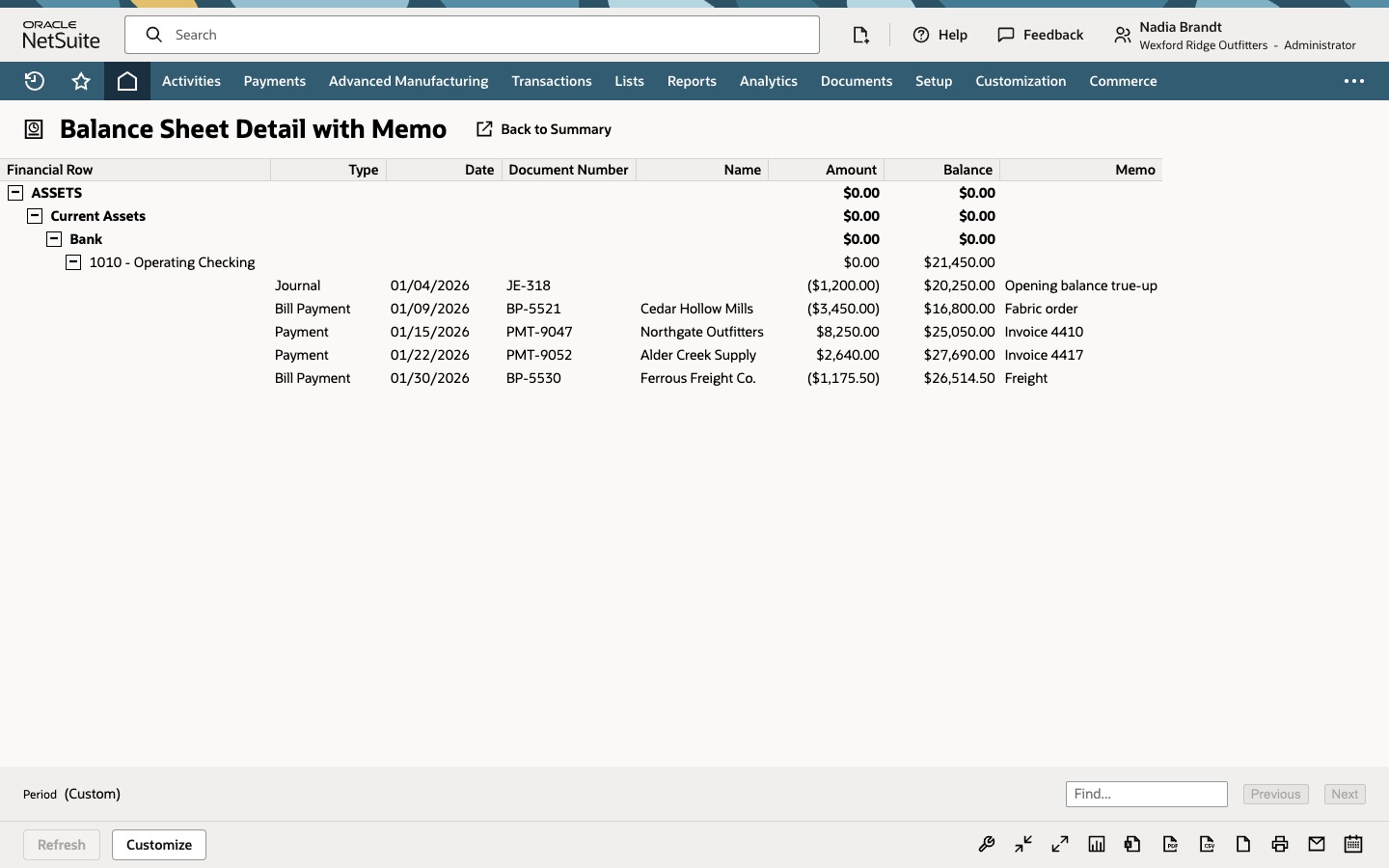
Click the same 1010 - Operating Checking amount, $26,514.50. Balance Sheet Detail with Memo opens in place of the standard detail. It has the same five transactions, starting with JE-318, and a Memo column that reads Opening balance true-up on that first line. Back to Summary returns to the custom Balance Sheet.
A last check the walkthrough does not show: repeat the click as a viewer role that will use the report, with the intended period, subsidiary and currency, to confirm it can open the custom detail. The same approach can pair other financial summary and detail reports when the summary's Drill Down Report list offers the detail you want. Confirm that it appears in the list: this is not available for every report.
Common questions
How do I make a custom Balance Sheet open my custom detail report?
Customize the Balance Sheet, open the More Options tab, set Drill Down Report to your custom detail report and save. Clicking an amount on the saved report then opens that detail report.
Where is the Drill Down Report setting in NetSuite?
On the More Options tab of the Financial Report Builder, next to Show Zeros, Activity Only, Show on Reports Page, Show Currency Symbol, ID and Expand Level. It belongs to the summary report. A detail report has no Drill Down Report field of its own.
Why does my custom Balance Sheet drill down to the standard Balance Sheet Detail?
Because Drill Down Report was never changed. Unchanged, a customized summary opens the standard detail report, even if you saved a custom detail separately.
How do I add a Memo column to the drill-down detail?
Customize the standard Balance Sheet Detail, add the field you need on Edit Columns, name the report and save it. Then choose that report as the Drill Down Report on your custom summary.
What happens if I edit a saved custom Balance Sheet?
Saving changes that custom report. The standard Balance Sheet is not affected, and customizing it again creates a new custom copy. Use a copy if you want to keep the current version.