The quick answer
In an account with this configured solution, open Reports Links → Africa VAT Report → Mauritius VAT Report. Check the company and period, then inspect the tax code beside each return line. A code change can recalculate an amount, but you still need to check whether that code belongs on the line. Save the reviewed mapping, inspect the linked saved search and its own date criteria, and compare the print preview with the saved record.
This is a synthetic reconstruction of a 2024 partner walkthrough. The current US account used for read-only review did not expose the custom Africa VAT Report group. The screenshots illustrate that older configured workflow; they don't verify that the same objects, calculations, or report form exist in another account today. Company and person names are fictional.
Before you start
You need access to the installed Africa VAT Report group, its Mauritius VAT Report custom record, supporting saved search, and print action. The relevant tax codes and calculation script or workflow must also be active for your role. Your account may use different code names or calculations. If the group is missing, ask the account administrator which localization or customization supplies it. Don't assume Tax Reports (International) is the same report.
The prepared record uses Example Supply Co., 01/07/2026–30/09/2026, and FY 2026: Q3 2026: Sep 2026. The line and search amounts are exercise data. Confirm your account's actual fiscal calendar, tax-code definitions, transaction population, and current Mauritius Revenue Authority requirements before relying on any output.
01. Open the custom report
Go to Reports → Reports. In Reports Links, expand Africa VAT Report and open Mauritius VAT Report. The record has Company Information, Period, Output, and Input sections. Check that the company identifiers are for the entity you're reviewing.
02. Test and restore a mapping
Open Edit on a controlled test record and compare From, To, and Period. Confirm whether the custom form uses transaction dates, an accounting period, a tax period, or more than one of these. A period label alone doesn't validate the date range or prove those dates feed the calculation. In Output, line 1.1 Zero-rated supplies (exports) starts with VATExp and 0.00 in this example.
Temporarily choose VAT15 for line 1.1. Its calculated value changes to 365,000.00. That shows this custom calculation responds to the selected code. It doesn't establish what the account-defined VAT15 code means or make it appropriate for exports. Restore VATExp, check that the value returns to 0.00, then Save.
The saved view again shows VATExp on line 1.1. Verify the 0.00 result, company and period before opening the supporting search or print action.
03. Inspect the supporting search
Select Output Saved Search. Its summary groups results by tax item. The example shows VATExempt, VAT0, and VAT15; the VAT15 row has 2,673,042.04 in Amount and 400,956.31 in Tax Amount. Those totals are not the same measure as the 365,000.00 return-line calculation. Check the saved search's criteria and filters before trying to reconcile them.
Open the VAT15 row to inspect the transactions. Read Date, Tax Period, Type, Tax Item, Amount, and Tax Amount. This example's detail includes February, April, and May 2026 rows even though the return record shows July through September. That is a finding about this configured search, not every linked search. Inspect its criteria, date field, and any parameters passed from the record before treating a row as support for this return.
04. Preview the report
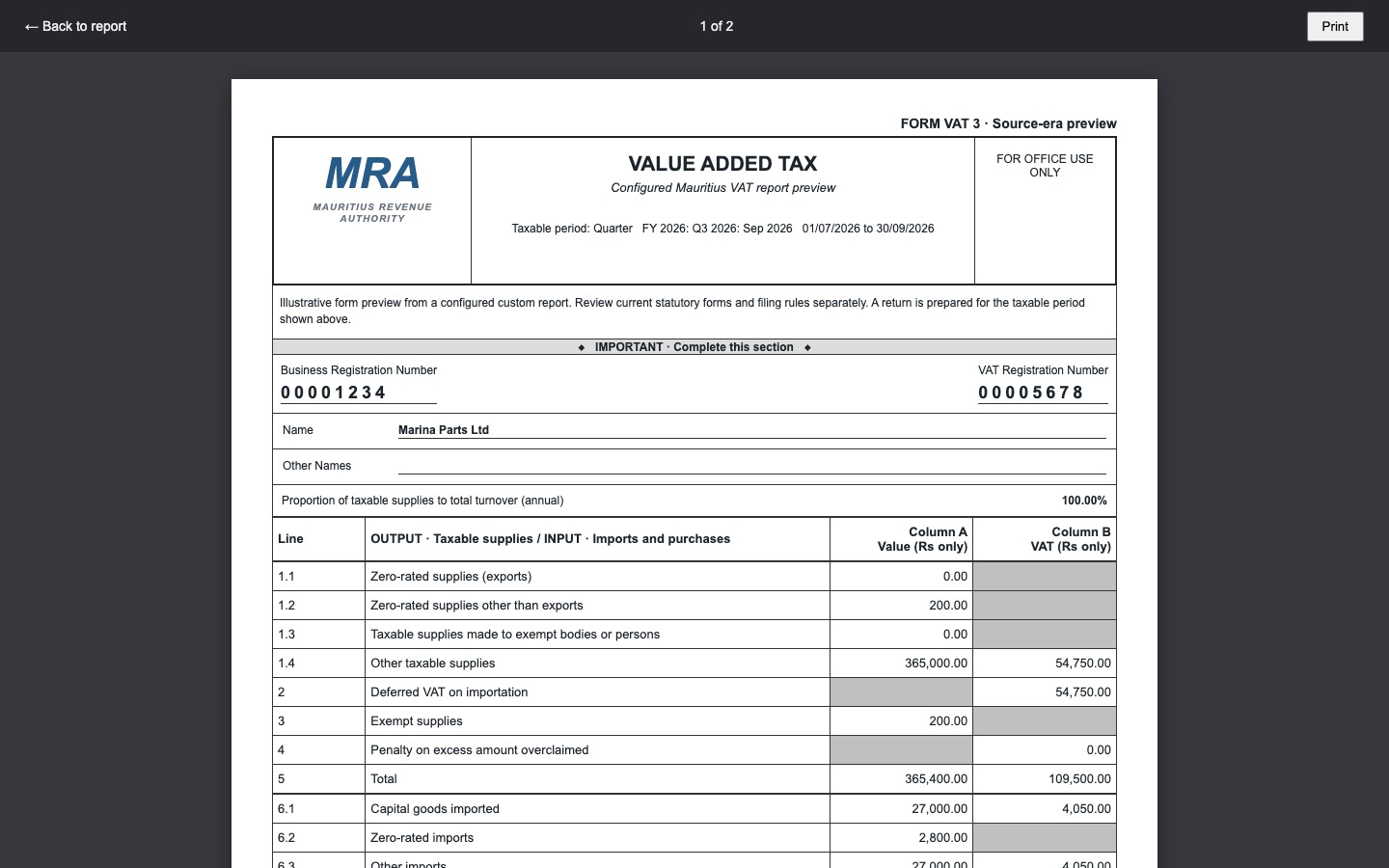
Return to the saved record and choose Print MRA Vat Report. Compare the company identifiers, period, output and input lines, and totals with the reviewed mapping and underlying transactions. The illustrated preview follows a source-era custom output. It is not a current statutory form and this walkthrough doesn't file a return.
Common questions
Is this Mauritius VAT report a standard NetSuite page?
No. The report link, custom record, searches, calculations, and print action come from an account-specific solution. NetSuite supports the underlying customization tools, but another account may have a different localization or no such report.
Why did the value change when I chose VAT15?
This custom form uses the selected tax code to calculate the line value. The example changes from 0.00 under VATExp to 365,000.00 under VAT15. Check what each code represents before saving; an amount appearing on a line doesn't confirm its classification.
Does Output Saved Search use the record's From and To dates?
Don't assume it does. The demonstrated detail includes dates outside the record's visible range. Open the search criteria or ask the report owner how dates and tax periods are passed to the search before reconciling it to the return.
Can I file from the generated preview?
The preview shows what this configured solution produced. Confirm the current form, figures, identifiers, period, and submission rules with the responsible tax professional before any filing decision. No submission is shown here.
Does a zero export-line value prove the transactions were classified correctly?
No. A zero can reflect the selected code, missing transactions, date criteria, or the custom calculation. Review the underlying transactions and code setup before drawing a tax conclusion.