The quick answer
In the demonstrated NetLease lessee account, open the commenced lease and select Modify Lease. On Lease Modification, keep Standard Modification (LL Remeasure) and describe the new payments in the Adjusted Payment Schedule: a 0.00 payment from the effective modification date, then each higher payment from the date it starts. Submit with Modify Lease, then select Refresh until the lease reports that it was modified. The Operating Schedule gains a modification row, and periods 8.2 to 10 show 0.00 payments. In this example the generated modification journal debited Lease Liability and credited ROU Asset for 10,255.80, with no income statement line on that journal. Review every journal the process creates, because other facts or modification types can produce different lines.
This is an account-specific example of the NetLease lessee SuiteApp. The names of its records, subtabs, buttons, modification types, processing messages and journal design are configuration of that SuiteApp and can differ by version, account, role, accounting book and enabled features. It is separate from native NetSuite Fixed Assets Management leases. The research account used for this guide did not have NetLease installed, so the screens follow a vendor demonstration of the workflow and are not a confirmed reproduction in your account. The example is single-book and uses one specific SuiteApp version, payment convention and chart of accounts. Person and operating-company names in the screenshots are fictional example data.
Before you start
You need the NetLease SuiteApp with lessee leases, modification types, journal accounts and background processing working, a commenced lease with a calculated schedule and booked amortization journals, and a role that can modify leases and open the resulting transactions. You also need the signed amendment, an open accounting period for the generated journals, and your accounting policy's discount rate for the modification. If the effective date falls in a closed or restricted period, processing may fail or post to a different period, so check the result and the journal's posting period. In a OneWorld or Multi-Book account, confirm separately whether the lease is kept by subsidiary, whether the modification is copied to or calculated independently in secondary books, and whether rates, accounts, currencies and posting periods differ by book. The example shows one book only.
The example is LA6048 Distribution Annex Lease, an operating real estate lease with Ridgeline Property Partners. It runs 36 months from 4/1/2024 to 3/31/2027, with payments in advance of 6,800.00 and then 7,200.00 from 10/1/2025, at an incremental borrowing rate of 6.5%. Amortization journals are booked through period 7, 10/1/2024. The landlord grants a three-month rent holiday starting 11/1/2024, then 7,050.00 from 2/1/2025 and 7,700.00 from 10/1/2025. The term and end date do not change.
Under ASC 842, a change to the consideration of an existing lease that does not add a separate right of use is normally accounted for as a modification: the lease liability is remeasured at the modification date and the right-of-use asset is adjusted by the same amount. A rent holiday on its own is not a decrease in scope. Whether your concession qualifies depends on the signed amendment and your policy, so reach that conclusion first: is it a separate contract, does it add or reduce the right of use, is it only a change in consideration, and are there incentives, prepaid or accrued rent, initial direct costs or impairment balances to consider.
Before you submit, check that the journals through the effective date are posted or intentionally pending, that no journal exists for a period the modification will rewrite, that the lease schedule agrees to the general ledger, and that the lease and the amendment are retained for audit support.
01. Open the lease and read its booked balances
Open lease LA6048. Confirm Status is Commenced, Lease Term (Months) is 36 and Incremental Borrowing Rate % is 6.5%.
Under Current Balance Information, read Asset Balance 188,105.51, Liability Balance 189,505.51 and Net Balance -1,400.00. They are the balances after the last booked period.
On the Operating Schedule subtab of Amortization Schedules, periods 1 to 7 link to amortization journals and period 8 onward has none yet. Period 7 shows a Lease Liability Balance of 189,505.51 and a Right of Use Asset Balance of 188,105.51. The pager reads 1 to 25 of 37.
02. Open the Lease Modification page
Select Modify Lease in the button bar. The Lease Modification page opens with Current Lease Information: the lease, Initial Payment 6,800.00, Incremental Borrowing Rate 6.5%, Commencement Date 4/1/2024, Lease Term (Months) 36, End Date 3/31/2027, and the same Liability Balance, Asset Balance and Net Balance you just read.
03. Choose the Standard Modification type
Open Modification Type and choose Standard Modification (LL Remeasure). The list also offers Decrease In Scope (LL Remeasure & Gain/Loss) and ROU Impairment. These labels and their resulting accounting are NetLease controls: choose the type from your accounting conclusion, not from the visible payment change. A payment reduction without a reduction in the right of use is not automatically a decrease in scope.
Effective Modification Date is read-only. In the demonstrated version it showed 11/1/2024, which was also the first period without a booked journal and the start of the rent holiday. The date the modified terms become enforceable comes from the signed amendment, so compare the two before you submit and do not choose a date from the posting history alone. Leave Modified Lease End Date at 3/31/2027. A modification that is not a separate contract is normally remeasured at a discount rate determined at the modification date, so keep Incremental Borrowing Rate at 6.5% only if your policy and the facts support it, and document the rate you use. The example kept it.
04. Enter the adjusted payment schedule
The Adjusted Payment Schedule lists the dates from which each payment applies. It starts with the existing step-up row, 10/1/2025 at 7,200.00.
Select that row, change Effective Date to 11/1/2024 and Payment Amount to 0.00, then select OK. This begins the three-month rent holiday.
Add a row with 2/1/2025 and 7,050.00, then select Add. Add a row with 10/1/2025 and 7,700.00, then select Add. In the demonstrated version each row applied from its date until the next row, which the rebuilt schedule confirmed: the 0.00 row on 11/1/2024 covered the payments due on 11/1, 12/1 and 1/1, and the 7,050.00 row took over on 2/1/2025. Confirm in your version whether rows are breakpoints or individual payment dates, and check the resulting schedule rather than only the rows you entered.
05. Submit the modification and refresh the lease
Select Modify Lease. NetLease processes the modification as a background job. The lease opens with a confirmation that the job has been scheduled, and Refresh replaces Terminate Lease and Modify Lease in the button bar.
Processing Status reads Processing Modification... and the schedule has not changed. A scheduled message does not prove the journal posted, so keep refreshing and then check the result.
Select Refresh. The confirmation changes to say that the lease has been modified successfully, and Terminate Lease and Reverse Modification are available.
06. Read the revised amortization schedule
On the Operating Schedule subtab, find modification row 8.1 dated 11/1/2024. Its Lease Liability Balance is 179,249.71 and its Right of Use Asset Balance is 177,849.71, down from 189,505.51 and 188,105.51 in period 7. Both fell by 10,255.80, so the Net Balance stayed at -1,400.00.
Periods 8.2, 9 and 10 show a Payment of 0.00. Period 11 starts the 7,050.00 payments and the schedule reaches 7,700.00 from period 19. Lease Expense for the remaining periods is 6,675.86 instead of 7,000.00. In this operating-lease example that is the remaining payments of 195,000.00 plus the net balance of -1,400.00, which is 193,600.00, divided by the 29 remaining periods (period 8 to period 36). Treat that as this example's reconciliation, not a general formula; incentives, direct costs, impairments and rounding can change it. The pager reads 1 to 25 of 38, because the modification adds row 8.1 while period 8 continues as 8.2.
07. Open the modification journal
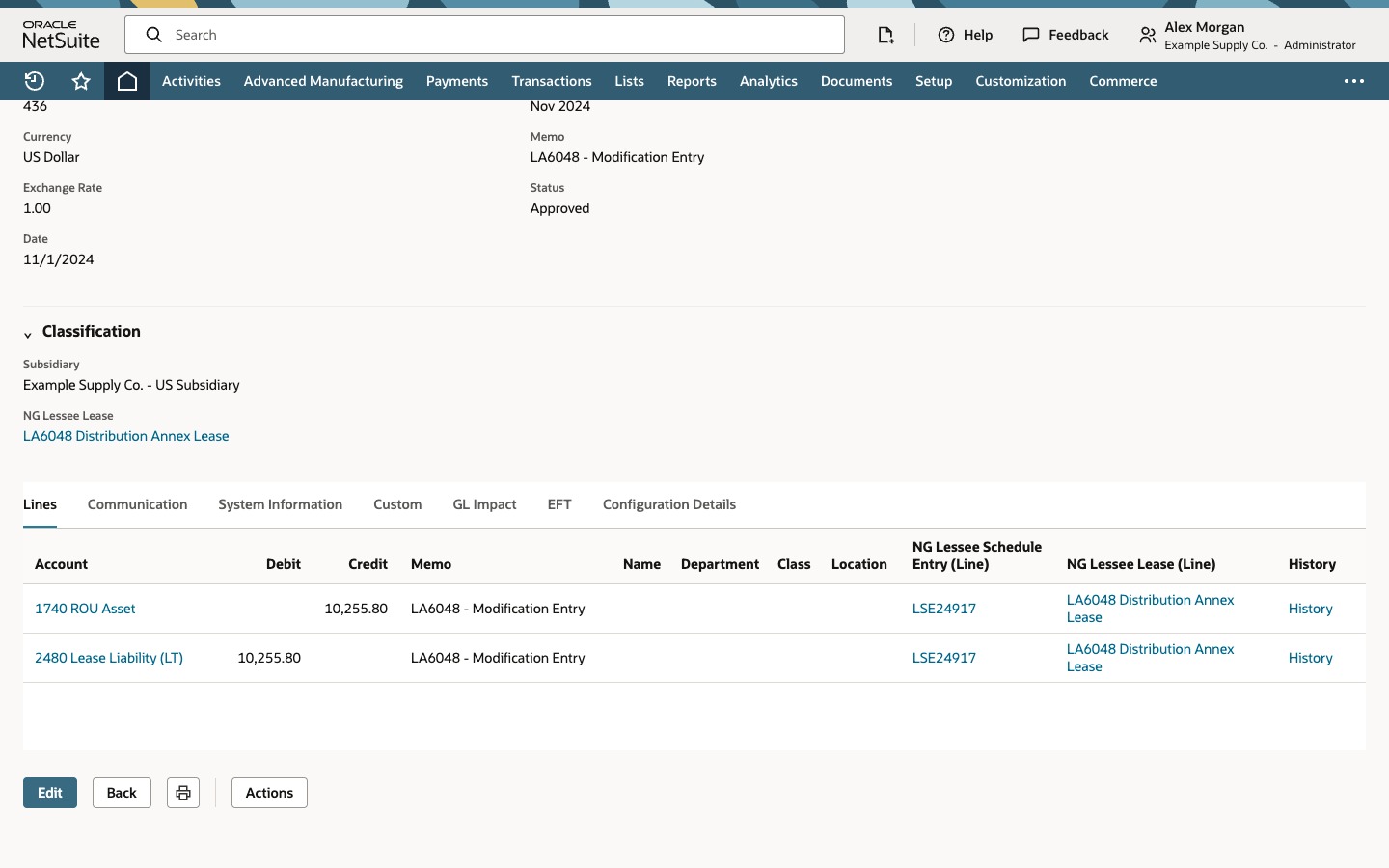
Select the NG Lessee Modification link in row 8.1 to open the modification entry. It is dated 11/1/2024, shows posting period Nov 2024 with the memo LA6048 - Modification Entry, and has status Approved. A confirmation that the lease was modified is a processing message, not proof that the accounting is right, so also open the journal and check its approval, posting status, accounting period and GL impact.
On the Lines subtab, 2480 Lease Liability (LT) is debited 10,255.80 and 1740 ROU Asset is credited 10,255.80. Those account numbers belong to the example chart of accounts. The amount equals the liability before (189,505.51) less the liability after (179,249.71), and no income statement account is on this entry. A decrease in scope, an impairment, incentives or initial direct costs can add other lines, and the process may create other entries as well, so review every journal it creates, its approval status and its posting period.
Finally, check that the modified schedule has the dates and amounts you expect, that the lease balances reconcile to the schedule and the general ledger, and that later interest and expense processing will not duplicate or skip rows.
Common questions
Is a rent holiday an ASC 842 lease modification?
Often, if a signed amendment changes the enforceable lease payments and does not add a separate right of use. A temporary zero payment is not automatically a decrease in scope. Decide whether the change is a separate contract, a scope reduction or another kind of modification under your accounting policy, and document the conclusion before you enter it.
What does Standard Modification (LL Remeasure) do?
In the demonstrated NetLease version it replaced the remaining payment schedule with the Adjusted Payment Schedule, remeasured the lease liability and recorded an equal right-of-use adjustment through one modification entry. The label is a NetLease processing option, not an ASC 842 classification on its own. The rate, the journal lines and any reversal or catch-up entries depend on the facts, the lease classification, the SuiteApp version and the account setup.
Why did the liability and the ROU asset fall by the same amount?
In this example the revised remaining payments reduced the lease liability by 10,255.80 and NetLease recorded an equal reduction of the right-of-use asset, so the net balance stayed at -1,400.00. Equal adjustments are not universal. A scope reduction, an impairment, incentives or direct costs can give different results and possibly a gain or loss.
Which discount rate should I use?
Use the rate required by the modification guidance and your documented policy. A modification that is not a separate contract is normally remeasured at a rate determined at the modification date, either a revised incremental borrowing rate or the rate implicit in the lease when it is readily determinable. The example left 6.5% in place. Do not assume the original rate always carries forward, and confirm whether NetLease carries it forward, recalculates it or expects you to enter it.
Why does the lease say the job has been scheduled?
It means the request was submitted to background processing. It does not prove that the schedule, the journal, its approval or its posting finished. Refresh the lease until Processing Status clears, then check the modified schedule, the linked journal, its approval status and its posting period.