The quick answer
Find the withholding liability credited by the posted vendor bill. In the saved agency cheque, confirm that the expense line uses that same liability account, then inspect its GL Impact for a liability debit and bank credit. Finally, reconcile both entries in the liability account register. The withholding report tells you what was withheld; it does not by itself prove payment to the agency.
The screens use sample data. Person and operating-company names are fictional; use your own records and values.
Before you start
This example follows a 2020 legacy withholding or localization workflow that recognizes tax on the vendor bill (on accrual), with an approved, posted bill and a configured tax agency. The source does not establish a specific country, SuiteApp, or current release behavior. The saved bill for Northline Consulting has a $1,280.00 service cost, 7.5% withholding ($96.00), and $1,184.00 payable to the supplier. A saved $96.00 cheque to Regional Revenue Office clears the withheld amount. Confirm your installed localization, tax point, role access, subsidiary, currency, accounting book, posting period, and prescribed remittance transaction before making a new payment. SuiteTax alone does not guarantee these menus or a direct-cheque process; field labels and forms can differ.
01. Check the posted bill
Open the saved vendor bill and its Withholding Tax detail. Confirm the tax code, $1,280.00 base, 7.5% rate, and $96.00 withheld. The supplier amount is $1,184.00 in this isolated example.
Open GL Impact. The prepared bill debits professional services $1,280.00, credits supplier accounts payable $1,184.00, and credits WHT Payable $96.00. Record the exact liability account. If it has no withholding credit, check whether your configuration recognizes withholding when the supplier is paid instead.
02. Review withholding activity
If your account exposes Reports → Withholding Tax → Purchases by Withholding Tax Code (Summary), set criteria for the bill's period and find its code. The prepared summary shows a $1,280.00 base, 7.5% rate, and $96.00 withheld. Reconcile the report to posted bills and open liabilities; its $96.00 is activity, not a paid-status flag or an automatic cheque amount. Another localization may use a different report.
03. Check the saved agency cheque
Open the saved $96.00 cheque to Regional Revenue Office. Confirm its date, bank account, subsidiary, currency, and amount. In Expenses & Items, the sole $96.00 line uses the same WHT Payable account credited on the bill and adds no second withholding charge. Its placement on that subtab classifies the liability settlement; it is not a new operating expense. The demonstrated source shows a saved cheque, not its blank entry form. Follow your installed localization's prescribed payment process for any new remittance; a direct cheque may not be appropriate in another account.
04. Verify the cheque posting
Open the cheque's GL Impact. It should debit WHT Payable $96.00 and credit Operating Bank $96.00. There is no new professional-services debit. A $96.00 cheque amount alone does not prove the liability was cleared; the posting accounts do.
05. Reconcile the payable account
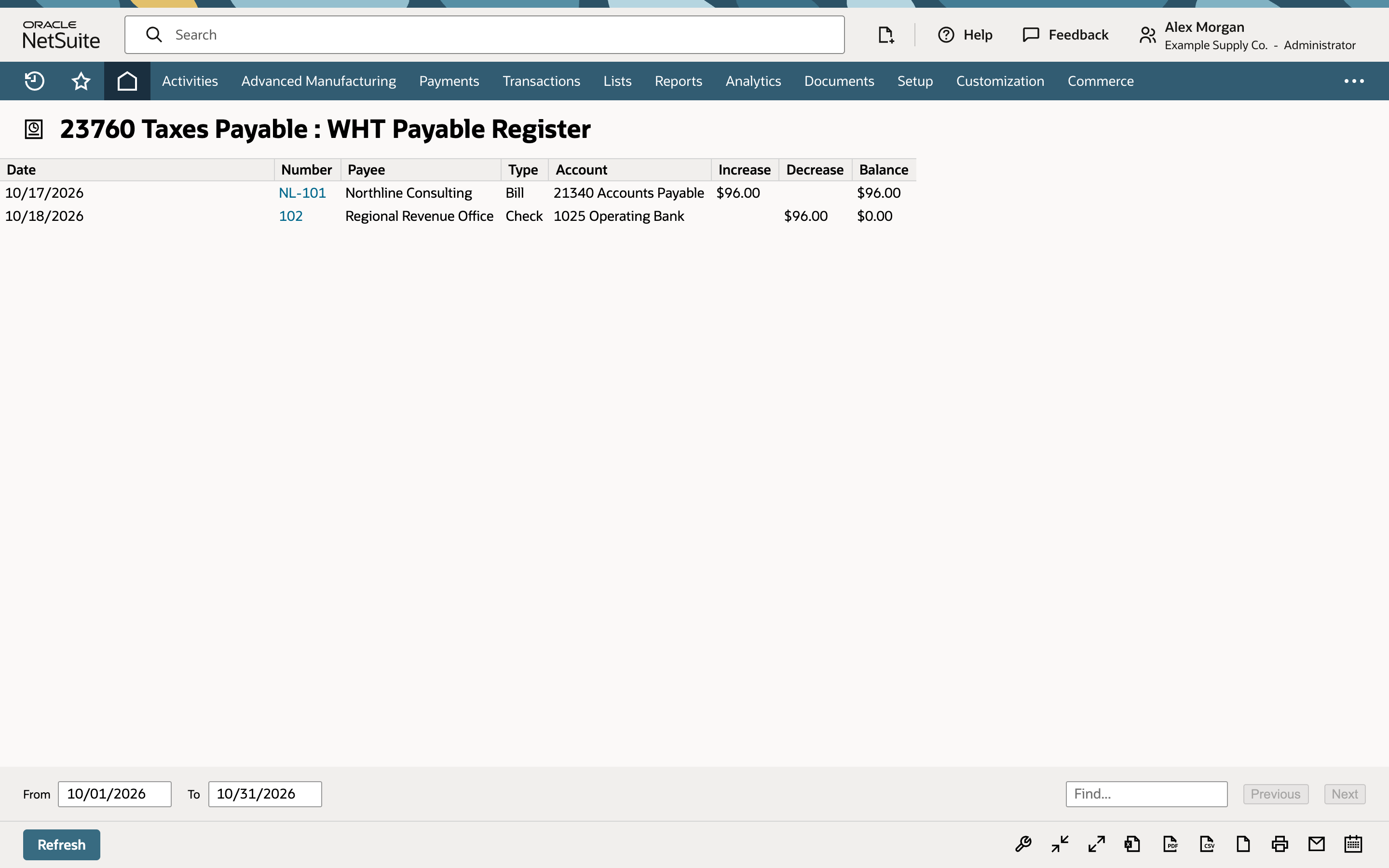
Open the WHT Payable account register for the matching period, subsidiary, currency, and book. In this isolated example, the bill increases the liability by $96.00 and the cheque decreases it by $96.00, ending at zero. Other bills, agencies, credits, opening balances, FX or rounding differences, or timing differences can leave a real account nonzero; reconcile its entries before treating the balance as an error. Confirm agency receipt separately. A saved cheque and zero register balance prove the accounting movement, not delivery or acceptance.
Common questions
Which account should the agency cheque use?
In this accrual-point example, it uses the exact withholding-payable account credited by the posted bill. Check the bill's GL Impact rather than selecting a new expense account by name alone.
Why does the withholding summary still show tax after payment?
The summary reports withholding activity for the selected criteria. Inspect the saved payment's GL Impact and the liability register to verify clearance.
Does every SuiteTax account use a direct cheque for withholding remittance?
No. The demonstrated 2020 account used a saved agency cheque in a legacy or localization workflow. Confirm the tax point and the remittance transaction required by your installed feature or localization.
Does a zero payable balance prove the agency received the money?
No. It shows the recorded liability was offset in the selected register scope. Confirm delivery, bank settlement, and agency acceptance through the appropriate external records.