The quick answer
In the demonstrated Advanced Bank Reconciliation (ABR) setup, a bank line that clears for a slightly different amount is matched together with the original payment and a separate variance journal. Open the Reconcile Bank Statement window and add up the books side: in match 316, -2,486.17 plus a 0.04 journal equals the bank's -2,486.13. Then open the ABR Auto-Match Rules List. Only the rules with Use Tolerance set to Yes, here Paper Checks Tolerance and Overseas Debits FX Tolerance, run at priority 2 and name a journal template. The match screen does not by itself prove which rule created a match or journal, so open the rule and the template to confirm the amounts and accounts before you rely on this.
This is an account-specific example of ABR, a third-party SuiteApp. The names of its window, columns, rules and journal templates, and how it applies rules to imported bank lines, are configuration and behavior of that SuiteApp and can differ by version, account, role and settings. They are separate from native NetSuite bank reconciliation. Person and operating-company names in the screenshots are fictional example data.
Before you start
You need the ABR SuiteApp installed and configured, an imported bank statement that has already been auto-matched, and a role that can open the Reconcile Bank Statement window and the ABR Auto-Match Rules List. In the example, the window is already filtered to match numbers 316 and 317 with the window's filter controls, which this walkthrough does not show. It only reads existing records.
The example is the account 1015 Cash - Vendor Disbursements, with a statement date of 11/20/2026.
01. Read the tolerance matches in the window
Open the Reconcile Bank Statement window for the account. Display is Matched, and the filter line reads Match No. between 316 and 317, so only those two matches are listed.
Read match 316. The Bill Payment 4417 of -2,486.17 and a Journal named Check Amount Difference for 0.04 are on the NetSuite side. The bank check line Check Paid is -2,486.13. The books amounts add up to the bank amount.
Read match 317 the same way. The Bill Payment 77104 of -6,420.00 and a journal named Exchange Rate Difference for 185.00 add up to the bank line of -6,235.00. In both matches the original payment is left as it was.
The ID column carries the match number on both sides. ABR gives each matched group its own sequential number, so you can find which books items and which bank lines were matched together.
02. Open the auto-match rules list
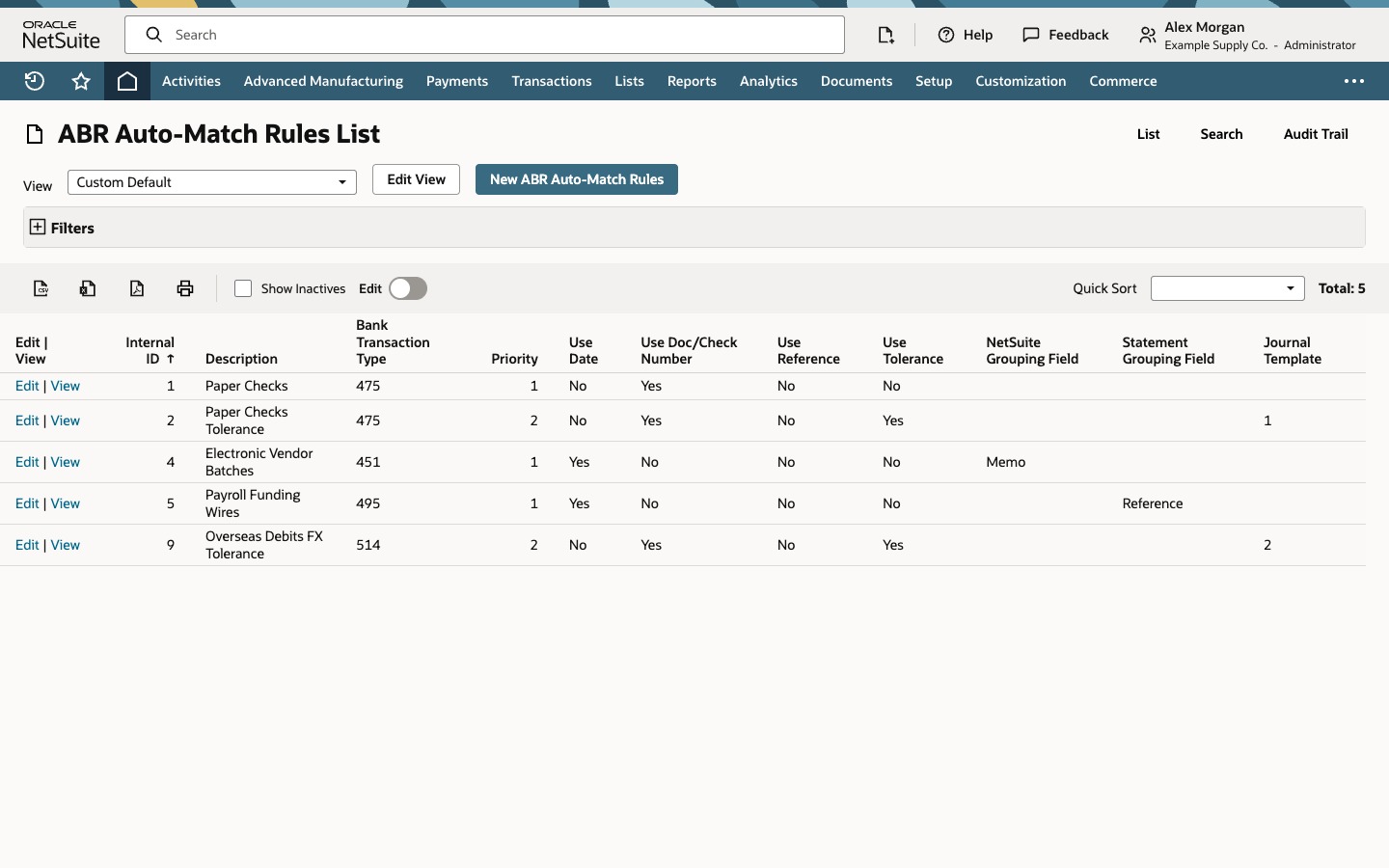
Open the ABR Auto-Match Rules List. It lists five rules ordered by Internal ID. Each is written for one Bank Transaction Type, so a rule for check lines (type 475) differs from one for ACH debits (451), wires (495) or foreign debits (514).
Read Priority. Paper Checks and Paper Checks Tolerance both use type 475, at priorities 1 and 2. Overseas Debits FX Tolerance uses type 514 at priority 2. That pattern is consistent with trying the exact rule first and the tolerance rule only when the exact one does not match. The list is sorted by Internal ID, which is not the order the rules run, and the screen does not show how ties between equal priorities are handled, so confirm ABR's priority convention before relying on it. Then read Use Tolerance. Only the two priority-2 rules are Yes.
03. Match the tolerance rules to their journal templates
Read the Journal Template column. Paper Checks Tolerance names template 1 and Overseas Debits FX Tolerance names template 2. The rules without a tolerance have no template. That ties the variance journals in matches 316 and 317 to these two rules, as an inference from the bank transaction types and the priorities. This walkthrough did not open the rules or the templates, so confirm the link there.
What to check next. The list shown here does not display how large a difference each tolerance allows. Open each rule to see whether it stores an amount or a percentage, and open templates 1 and 2 to see the accounts the variance journals post to. Open the bill payment and each journal separately and check the record type, posting status, posting period, subsidiary, currency and every journal line, including the offset account. Confirm that each rule is active and applies to this bank account, and look for a rule or process identifier on the journal. A journal can also have been created by hand or by another automation. Compare the combined signed amounts rather than reading a negative amount as an error, and check that each difference is within your policy. A variance that recurs can point to a bank or exchange-rate setup problem and not a one-off rounding difference. Do not edit or reverse a variance journal just to make a match balance.
Common questions
Why did a journal appear when my bank line cleared for a slightly different amount?
A journal may appear because an ABR rule that permits a tolerance creates an adjustment journal from its template. That is the likely reason in this example, because each match lists a payment, a journal and a bank line that add up. Confirm it from the journal's source, the rule and the template, because a journal can also be created by hand or by another automation.
Does the variance journal change the original payment?
Normally not. In both matches the bill payment shows its original amount, and the journal is a separate entry beside it. Open the bill payment and the journal's GL impact to confirm this for your ABR version.
How do I see which rules allow a tolerance?
Open the ABR Auto-Match Rules List and read Use Tolerance and Journal Template. In this example only two rules are Yes and have a template. The list identifies candidates and does not prove that a rule processed a particular match. It does not show the tolerance amount or percentage, so open each rule to read its value, conditions and account scope.
In what order does ABR apply the rules?
The list shows a Priority for each rule. In this example the exact check rule is priority 1 and the check tolerance rule is priority 2. Do not infer the execution order from the Internal ID sort. Confirm ABR's priority convention and its handling of equal priorities in your version or with a controlled test, and avoid giving a broad tolerance rule a priority that lets it take items an exact rule should match.
What does the ID column mean?
In this window it is the match number. ABR assigns one to each matched group, on both the NetSuite side and the bank side, so you can trace which items were matched together. It is not the bill payment number, the journal's internal ID, the bank line ID or the rule's Internal ID.