The quick answer
Open an eligible finance lease and check that its amortization schedule has an interest amount without a journal link. Use Fixed Assets → Leases → Record Lease Interest with a through date and the lease’s subsidiary. When the process completes, follow the new schedule link and check that the journal debits interest expense and credits the lease liability for equal amounts.
The screenshots are from a recorded example with fictional company, lease, and journal values. They illustrate one eligible interest row; your account may return a different journal count. The current production account exposed the Record Lease Interest form but had no saved leases at review time, so the saved lease and journal result are reconstructed from the source walkthrough.
Before you start
You need a lease marked Finance Lease in Asset Created status, with a linked initial recognition journal, asset proposal, and leased asset. Its generated amortization schedule should have calculated interest, principal, balance, and NPV values. The eligible interest row in this example has no existing journal link. Confirm the lease’s subsidiary and its Posting Reference Interest Expense and Lease Liability accounts. You also need permission to run Record Lease Interest and inspect journals. Lease FL-28 has one eligible row through May 31, 2026.
01. Check the schedule
Go to Fixed Assets → Leases → Lease, open the saved finance lease, and select Lease Amortization Schedule. The April 1 first-payment row has no interest. The May 1 row shows USD 1,946.91 interest and USD 6,553.09 principal, with no journal link yet. This is the row the process should recognize.
02. Record interest
Open Fixed Assets → Leases → Record Lease Interest. Set Date to May 31, 2026 and select the lease’s subsidiary under Subsidiaries. The date includes eligible payment rows dated on or before it. Where Include Children appears, leave it clear for this isolated example; selecting it may include other eligible leases in child subsidiaries. Click Record Interest.
On FAM Process Status, refresh until Recognize Lease Interest reads Completed. Open Details. In this example, the Recognize Lease Interests stage reports Journals created: 1. A completed process says the job ran; the schedule and journal provide the accounting result.
03. Verify the journal
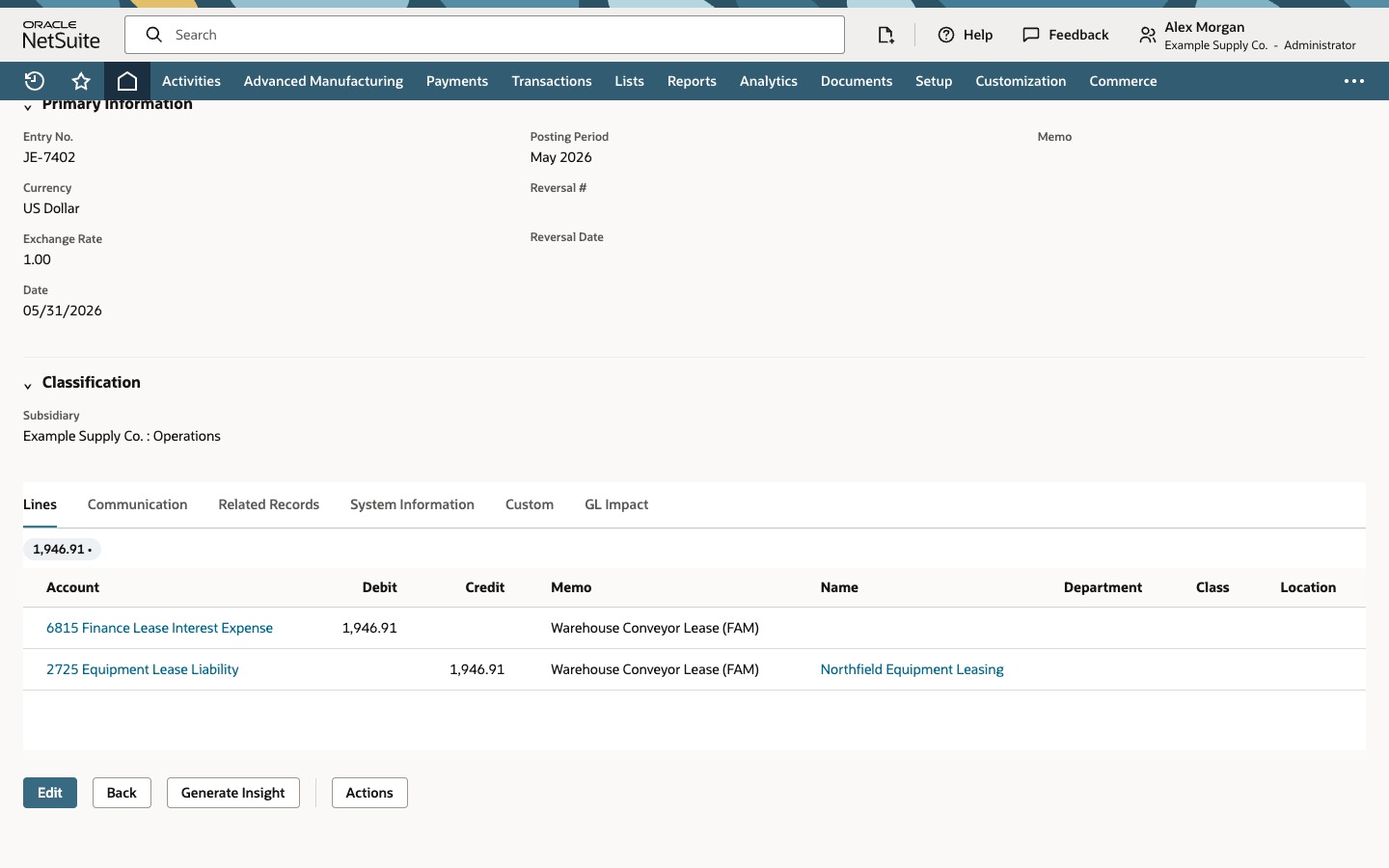
Return to the lease’s Lease Amortization Schedule. The May row now links Journal #JE-7402 next to its USD 1,946.91 interest amount. Open that link.
On the journal’s Lines subtab, check the two equal entries: debit 6815 Finance Lease Interest Expense for USD 1,946.91 and credit 2725 Equipment Lease Liability for USD 1,946.91. Confirm the journal’s subsidiary, date, accounting book, approval status, posting period, and GL impact in your account before treating it as posted. The source result shows the lines, but does not independently prove final approval or posting.
Check the result
- The May schedule row has a journal link.
- The linked journal debits interest expense and credits lease liability equally.
- The journal’s subsidiary, date, book, approval status, period, and GL impact are appropriate for your account.
Common questions
Why did the process create zero journals?
Check that the lease is in Asset Created status, the through date includes an unrecognized interest row, the selected subsidiary contains the lease, and the Posting Reference accounts are complete. The row may already have been recognized. Open process details for errors and inspect the schedule for a journal link.
Why did it create more than one journal?
The process may include multiple eligible payment rows, leases, subsidiaries, or accounting books; behavior can vary by account configuration and release. Inspect the linked schedule rows and resulting journals before treating a higher count as an error.
Does Completed mean the journal is posted?
No. Completed reports the recognition process status. Follow the schedule’s journal link and check the entry’s approval status, posting period, and GL impact in your account.