The quick answer
In the demonstrated NetLessor configuration, the 3,380.00 billed each month is a 3,200.00 lease payment plus a 180.00 maintenance charge entered as Non-Lease Payment 1. Only the lease payment is amortized: the schedule splits it into 790.37 of interest and 2,409.63 applied to the net investment in lease. The first amortization journal debits Lease Receivable Clearing 3,380.00 and credits interest, the net investment and maintenance revenue. The invoice carries the same two amounts as separate lines. Check that the journal debit, the invoice total and the schedule agree, and then confirm your account mapping.
This is an account-specific example of NetLessor, a third-party lessor SuiteApp used inside NetSuite. Its screens, labels, journal records and invoice behavior are configuration of that SuiteApp and can differ by version, account, role and settings. Native NetSuite invoices and journals, and the lessee right-of-use workflow in Fixed Assets Management, are separate. Person and operating-company names in the screenshots are fictional example data.
Before you start
You need the NetLessor SuiteApp installed with its account mapping configured, a Sales Type lease that has commenced, and a lease whose journals and invoices have already been generated for its first periods. This walkthrough only reads existing records. It does not run the Run Journals or Invoice actions, so it does not show how those records are created.
The example is lease LR0208 Skid Steer Loader for Harbor Ridge Construction. It starts on 3/1/2022, runs 60 months, and has a leased asset fair value of 180,000.00 and a carrying cost of 162,000.00.
01. Read the lease payments and schedule
Open the lease and confirm that it is a Sales Type lease with a 60-month term. Those fields sit in Primary Information and Schedule Information.
Open the Payments tab. The payment line shows a Lease Payment of 3,200.00 and a separate Non-Lease Payment 1 of 180.00, paid monthly. The 180.00 is a maintenance charge. It is not part of the lease payment.
Open Amortization Schedules and stay on Sales Type Schedule. The Initial Balance row comes first, then one row per period. Period 1 shows a Payment of 3,200.00 and Lease Interest Income of 790.37. The schedule works from the 3,200.00 lease payment only.
Scroll right. The Initial Balance row shows a net investment in lease of 180,000.00. In period 1, 2,409.63 is allocated to the net investment. With the 790.37 of interest, that equals the 3,200.00 payment, and the net investment falls to 177,590.37. The Journal Entry column links each posted row to its journal.
02. Open the initial balance journal
In the Journal Entry column, select NetLessor Initial Balance #41. On its Lines tab, the Net Investment in Lease account is debited 180,000.00. Inventory/Fixed Asset (Clearing) is credited 162,000.00 and Lease Revenue - Selling Profit is credited 18,000.00. The two credits add up to the debit, and 180,000.00 less the 162,000.00 carrying cost is the 18,000.00 selling profit.
03. Open the first amortization journal
Return to the lease and select NetLessor Amortization #218, the journal for period 1. The accounts below are the ones configured in this example, and your mapping may differ. On Lines, Lease Receivable Clearing is debited 3,380.00. That is the 3,200.00 lease payment plus the 180.00 maintenance charge. The credits are 790.37 to Lease Revenue - Interest, 2,409.63 to Net Investment in Lease and 180.00 to Maintenance Revenue. The interest and principal add up to the 3,200.00 lease payment, and the 180.00 is the maintenance charge.
04. Compare with Payments and Invoices
Return to the lease and open Payments and Invoices under Amortization Schedules. Each period lists the same Payment of 3,200.00 and Non-Lease Payment 1 of 180.00. An Invoice link appears on periods 1 to 4 and none after them, so only those four periods have been invoiced so far. That does not mean the rest of the schedule is billed.
05. Open the invoice and reconcile the total
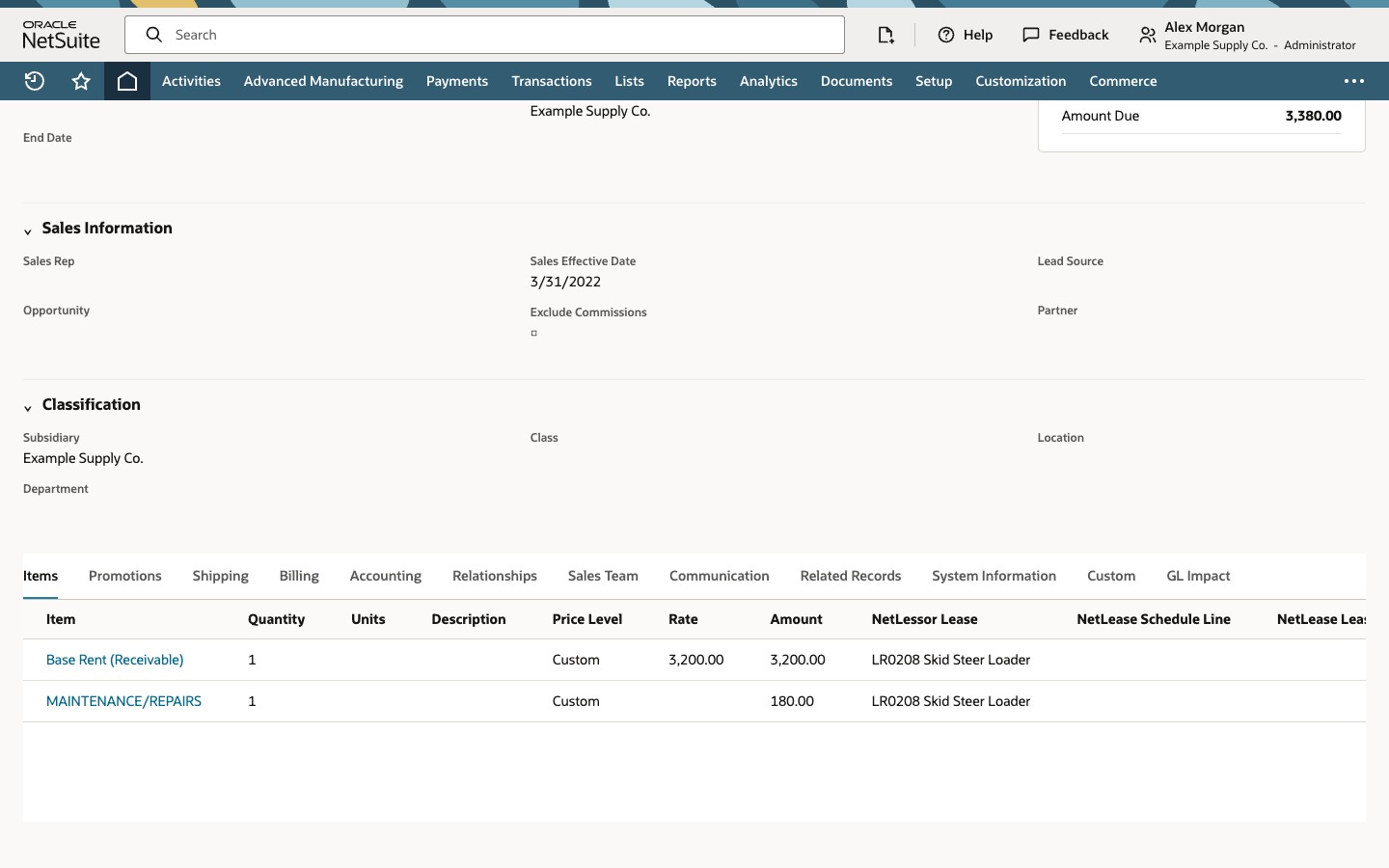
Select Invoice #31204 on period 1. The invoice for Harbor Ridge Construction is Open, with a total and amount due of 3,380.00. On the Items tab, Base Rent (Receivable) bills 3,200.00 and MAINTENANCE/REPAIRS bills 180.00, both tied to lease LR0208. Together they equal the 3,380.00 the amortization journal debited to Lease Receivable Clearing.
Matching totals are a reasonableness check, not proof that the invoice and the journal were posted as one event or that the revenue was recognized only once. The invoice status is Open, so an amount is still due on it. A customer payment, credit or other application is a separate transaction and is not shown here.
Verify before you conclude. This walkthrough did not open the following, so check them in your account. On each journal, confirm the status (approved, pending approval or voided), the posting date and period, the subsidiary and currency, and the exact accounts and amounts. On the invoice, open GL Impact to see the receivable debit and every credit, including any revenue, deferral or clearing account. Reconcile the clearing account for the same lease and period, and compare the source or reference fields to see whether the invoice and journal came from the same NetLessor process. Invoice links on periods 1 to 4 describe this example at the time it was recorded. Missing links can reflect billing timing, manual invoicing or configuration.
Common questions
Why does the amortization journal debit more than the lease payment on the schedule?
In this example, the journal debits Lease Receivable Clearing 3,380.00 because it includes the 3,200.00 lease payment and the 180.00 non-lease amount, shown here as maintenance. The schedule's interest and principal columns apply only to the 3,200.00 lease payment: 790.37 of interest and 2,409.63 applied to the net investment in lease. Confirm the treatment from the journal and invoice GL impacts, because it depends on your NetLessor configuration.
Where do I enter a non-lease payment in NetLessor?
In this example, it sits on the lease's Payments tab as Non-Lease Payment 1 next to the Lease Payment. The Payments and Invoices subtab then repeats it for every period. The field names, the number of non-lease fields and whether an amount is billable or revenue-bearing depend on your NetLessor version and setup. Do not add the same amount to the lease payment and to a non-lease field unless your configuration requires it.
Is the 180.00 maintenance revenue recognized by the journal or by the invoice?
In this example, the amortization journal includes a 180.00 credit to the configured Maintenance Revenue account. That shows the journal's classification, not final recognition. Check the journal status, whether the invoice also credits revenue, and whether a revenue schedule or deferral account is used, so you can tell whether the amount was recognized once, deferred or duplicated. How lease and non-lease components are separated and allocated is an accounting policy question, and the schedule does not decide it.
Does a matching invoice total prove the journal and invoice were posted together?
No. The 3,380.00 totals agree, but that is a reasonableness check. To confirm the posting, check the invoice's own GL impact, how the clearing account settles against receivables, and whether the invoice and journal came from the same NetLessor process, using the source or reference fields, creation dates and any process identifier. This walkthrough did not open those.
Does "Payment" on the schedule mean the customer paid?
No. It is the contractual or scheduled lease payment for the period. A customer payment, credit or other application is a separate transaction. Check the invoice's amount due and the customer's transaction history to see what has been settled.