The quick answer
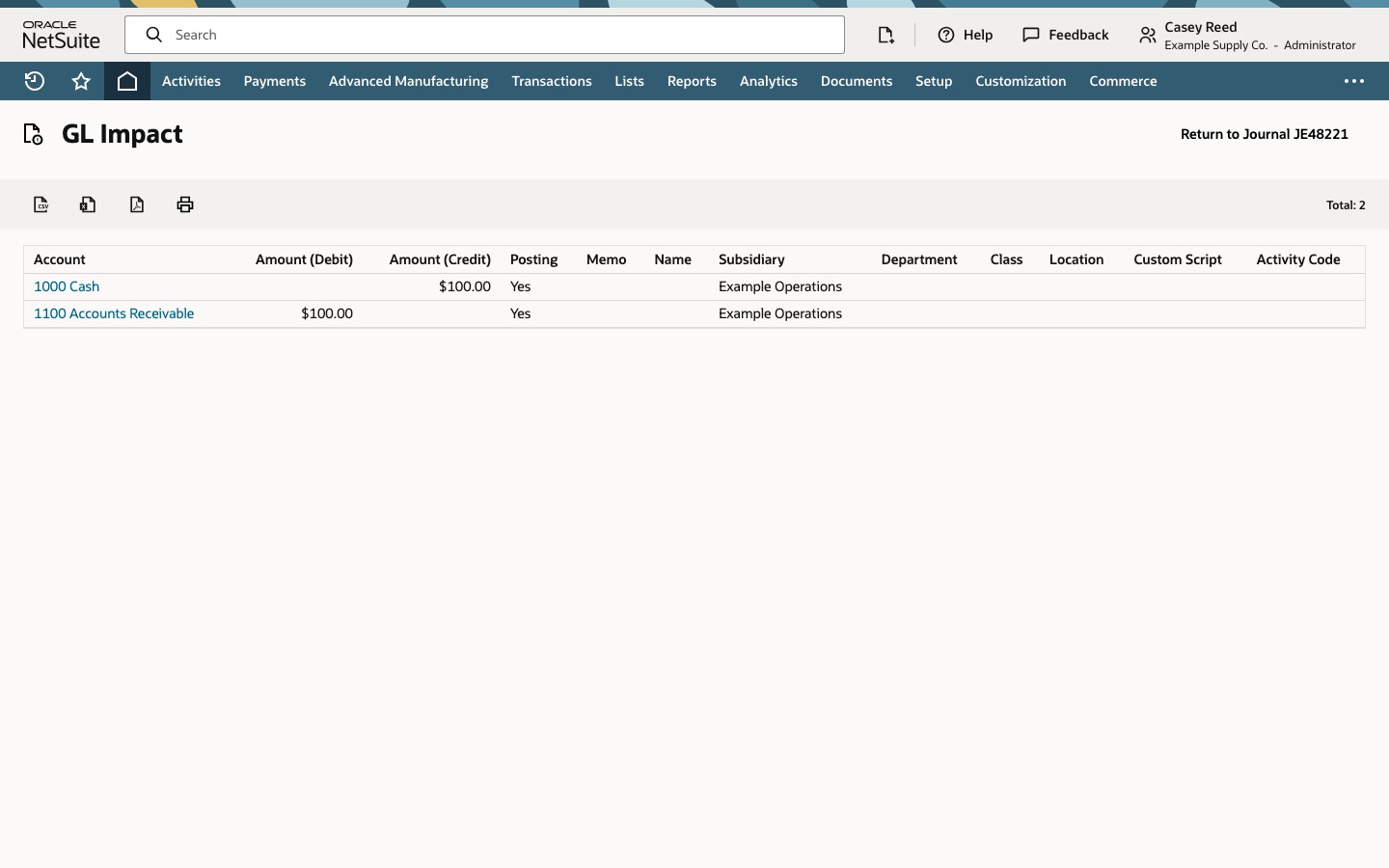
In this 2020.1 SuiteApprovals demonstration, a configured delegate approves one pending journal. Before that action, GL Impact already displays the accounting lines, with Posting: No. After the action, the same journal shows Approved for Posting and Approval Status: Approved. The same accounts and debit/credit amounts remain in GL Impact, now with Posting: Yes.
Before you start
Use an authorized test journal with the approval rule and employee delegation already saved. This guide follows a historical configuration. Current forms, roles, permissions and SuiteApp behavior can differ.
The illustrated values are substitutions: JE48221, Alex Morgan as the original approver, Casey Reed as the configured delegate, and 10/15/2026 in posting period Oct 2026. The two lines are a 100.00 credit to 1000 Cash and a 100.00 debit to 1100 Accounts Receivable. They preserve the source example’s amounts and direction. Rule creation, delegation setup, journal entry and submission are prerequisites.
01. Inspect the saved settings
Open the saved Journal Entry Approver rule. Match Record Name Journal Entry and the Specific Approver / Alex Morgan matrix row. Leave the rule unchanged.
On Alex’s employee record, open Human Resources > Approval Delegation. Read Delegate To: Casey Reed, the checked Delegate Approval field, and End Date: 10/31/2026.
Read Start Date: 10/01/2026 in the same panel. The illustrated approval date is inside the displayed range. This walkthrough does not test activation, expiration or time-zone boundaries.
02. Inspect the pending journal and GL lines
Open JE48221 and match its date and posting period. Verify Pending Approval, Approval Status: Pending Approval, and Next Approver: Alex Morgan.
Read Delegated Approvers: Casey Reed in Approval Information. This is the displayed assignment for the illustrated journal; it does not establish a general permission rule for other employees.
Choose Actions > GL Impact. Match the Cash credit of $100.00 and Accounts Receivable debit of $100.00. Both rows show Posting: No. Their presence in this view does not, by itself, prove a posting.
03. Approve the same journal once
Use Return to Journal JE48221. Recheck the entry number, date and posting period. In the recorded session, Casey Reed performs Approve once. The same journal then displays Approved for Posting and Approval Status: Approved. No accounting line is edited.
04. Compare the posting indicators
Choose Actions > GL Impact again. Compare both rows with the earlier view: 1000 Cash still has the $100.00 credit, and 1100 Accounts Receivable still has the $100.00 debit. Both now show Posting: Yes.
Common questions
Can a pending journal have GL lines?
Yes, in this demonstrated configuration. The pending journal already displayed the Cash and Accounts Receivable lines, with Posting: No on both. Do not equate visible GL lines with a completed posting.
What changed after approval?
The journal’s displayed approval statuses changed, and the two posting indicators changed from No to Yes. The displayed accounts and amounts remained the same.
Does this prove that any delegate can approve a journal?
No. It shows one action by the configured delegate for one rule and journal. The example does not test the original approver’s continued ability to act, a different role, or another delegate.
Does the date range prove boundary enforcement?
No. The illustrated date falls inside the displayed range. Dates on or outside either boundary are not tested.
Does Posting Yes verify a downstream ledger report?
No. This walkthrough compares the journal’s status and GL Impact display. It does not inspect a trial balance, account register, posting-period change or other downstream report.