The quick answer
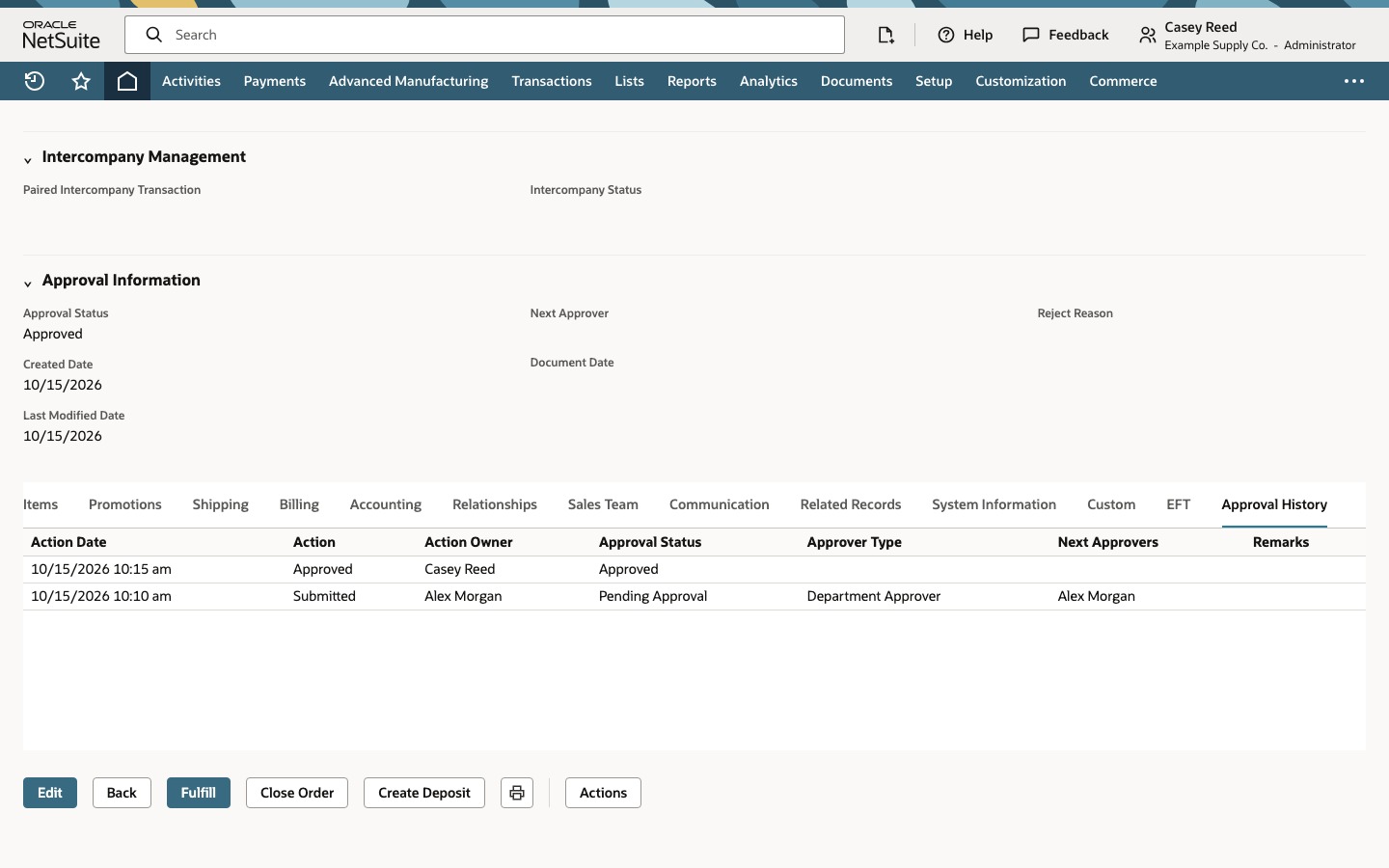
In this 2020.1 SuiteApprovals example, the pending sales order names Alex Morgan as Next Approver and Casey Reed under Delegated Approvers. Casey performs the recorded approval action once. The same order then shows Approval Status: Approved and Pending Fulfillment, while Approval History credits Casey with the recorded approval action. Read these results together with the saved delegation settings.
Before you start
Use an authorized test order with the rule, department assignment and employee delegation already saved. This walkthrough follows a historical training-account configuration with fictional names, dates and values. Current forms, permissions and SuiteApp behavior can differ.
The example is SO48220 for Example Customer, total 1,299.00, in the Sales department of Example Operations. Casey Reed is the signed-in test delegate. The illustrated transaction date, 10/15/2026, is within the fictional delegation period. Rule setup and delegation creation are prerequisites; this exercise leaves those settings unchanged.
01. Inspect the saved settings
Open the saved Sales Order Approval rule. Match Record Name Sales Order and its Department Approver matrix row. This example uses that custom chain; it does not test an amount-limit hierarchy.
Open Department Approver List and match Sales, Example Operations, and Alex Morgan. The crop isolates the approver; enlarge the original frame to compare all three columns in the same row.
On Alex Morgan’s employee record, open Human Resources > Approval Delegation. Read Delegate To: Casey Reed, End Date: 10/31/2026, and the checked Delegate Approval field.
Read Start Date: 10/01/2026 in the same panel. The two crops come from the same saved view. No activation, expiration or time-zone boundary is tested.
02. Match the pending assignment
As Casey Reed, open SO48220. Match the customer, total, Sales department and Pending Approval status. In Approval Information, the pending order’s Next Approver is still Alex Morgan.
The same pending view names Casey Reed under Delegated Approvers. Enlarge either crop to compare the two fields in the original frame. The pending Next Approver value is not a claim that the field stays unchanged after approval.
03. Approve once as the delegate
On the matched order, click Approve once as Casey Reed. Confirm that this same order shows Pending Fulfillment, that Fulfill is available, and that Approval Status is Approved.
Leave Fulfill untouched. The recorded approval, resulting Pending Fulfillment status and available Fulfill action are separate observations. This walkthrough demonstrates the approval and displayed post-action state only.
04. Reconcile Approval History
Open Approval History on SO48220. The newest row shows Action Owner: Casey Reed and Approval Status: Approved. The earlier Submitted row retains Department Approver and Alex Morgan as the earlier assignment. Enlarge the full image to compare action, route and next-approver columns.
Together, these observations show that Casey, who was listed under Delegated Approvers, performed the recorded approval action in this test case. They do not establish the complete permission model or independently prove which configuration granted approval capability.
Common questions
What does Next Approver showing Alex mean before Casey approves?
In this historical 2020.1 example, the pending-state display shows Alex as Next Approver and Casey separately under Delegated Approvers. The guide records that display; it does not establish why the field is populated that way or that the same display occurs in current releases.
Does this show that Alex could also approve during delegation?
It does not establish whether Alex could also approve during the displayed delegation period. The walkthrough performs one approval as Casey and does not test Alex’s approval capability.
Does Pending Fulfillment mean the order was fulfilled?
No. This order reaches Pending Fulfillment and exposes Fulfill, but no fulfillment action or fulfillment record is demonstrated.
How do I verify who acted?
Match the same sales order, then read the newest Approval History row’s action owner and approval status. Here the recorded actor is Casey Reed. Combine that with the saved delegation and the action sequence.
Does this test delegation dates, email delivery or other subsidiaries?
No. It shows an enabled delegation whose displayed start and end dates contain the illustrated transaction date. Boundary dates, time zones, email delivery and cross-subsidiary behavior need separate account-specific tests.