The quick answer
Look up the field in Setup > Records Catalog: on the Vendor record, isInactive is the Boolean that marks a vendor inactive. Then run SELECT COUNT(id) AS vendor_count FROM vendor WHERE isinactive = 'T' in a SuiteQL query tool. Change 'T' to 'F' to count the active vendors.
The example is a small finance team that wants answers a saved search makes awkward: how many vendors are inactive, which invoice lines posted after a date, and what status each transaction is in. Alex Morgan, an administrator at Example Supply Co., runs the queries. Both names are fictional example data.
Before you start
There's no general SuiteQL console that every NetSuite user gets out of the box. SuiteQL runs from SuiteScript through the N/query module, through SuiteTalk REST Query, or through SuiteAnalytics Connect. This walkthrough uses a query page called SuiteQL Query Tool, a Suitelet-style page with a SQL editor and a Run button that an administrator installed. Yours may sit under a different menu, have a different layout, or not exist. The queries are the part that carries over.
What a query returns depends on the execution channel, the role and permissions it runs under, subsidiary access, enabled features and the account's configuration. Treat a count as what that tool can see, not automatically as the account-wide total. You also need access to Records Catalog to do step 1.
01. Find the field name in the Records Catalog
Go to Setup > Records Catalog, open Vendor, and choose SuiteScript and REST Query API. On the Fields subtab, find isInactive, named Vendor is Inactive, with type BOOLEAN. That Field ID is the name you use in the query. The catalog prints it as isInactive, and SuiteQL accepts the lowercase form typed in the example. The real list is long, so type inactive in Search Fields to jump to it. A field listed in the catalog isn't guaranteed to be exposed the same way by every way of running SuiteQL.
02. Count the inactive vendors
Open the SuiteQL Query Tool, click in the editor and type the query. COUNT(id) counts the vendor rows that pass the WHERE condition. Boolean fields are compared with 'T' and 'F'. Click Run. The result grid shows one row with vendor_count 23 in the example account. COUNT(id) always returns one row, with 0 when nothing matches.
Now change 'T' to 'F' and click Run again. The count is 64 in the same account, so 64 vendors aren't marked inactive. The condition is what separates the two groups. SuiteQL doesn't add the "active only" filter a list or saved search often does, so add it yourself when you want active records.
03. List invoice details across three tables
Replace the query with a join. The transaction table has one row per transaction, transactionline has one row per line, and transactionaccountingline holds the accounting rows. Join a line to its transaction with tl.transaction = t.id, and join an accounting row to the same transaction and the same line with tal.transactionline = tl.id.
SELECT t.tranid, t.trandate, t.type, tl.item, tl.quantity, tal.amount
FROM transaction t
INNER JOIN transactionline tl ON tl.transaction = t.id
INNER JOIN transactionaccountingline tal ON tal.transaction = t.id AND tal.transactionline = tl.id
WHERE t.type = 'CustInvc' AND t.trandate > TO_DATE('03/01/2026', 'MM/DD/YYYY') AND tl.mainline = 'F' AND tal.posting = 'T'
ORDER BY t.trandate DESC
Click Run. Each row is one matching invoice line and posting accounting row, newest invoice first. The date condition uses >, so invoices dated 03/01/2026 are left out. Use >= if you want that day included.
Leave out the line condition and every line on a transaction gets paired with every accounting row on it, which inflates the row count. One line can also have several accounting rows (different accounts, accounting books, tax or discount), so an invoice line can show up more than once. tl.mainline = 'F' keeps detail lines and tal.posting = 'T' keeps posting rows. Neither means "revenue row". amount comes from the accounting row, so it's an accounting-impact amount, not necessarily the invoice line's commercial amount. In the example both quantity and amount show negative numbers, but the sign depends on the field, the transaction type and the account, so test it before you reverse a sign. If you have multiple accounting books, restrict tal.accountingBook or you'll see extra rows. Add an account condition, and aggregate at the level you need, before you total anything. For invoice totals, start from the transaction line amounts instead.
04. Turn status codes into labels with BUILTIN.DF
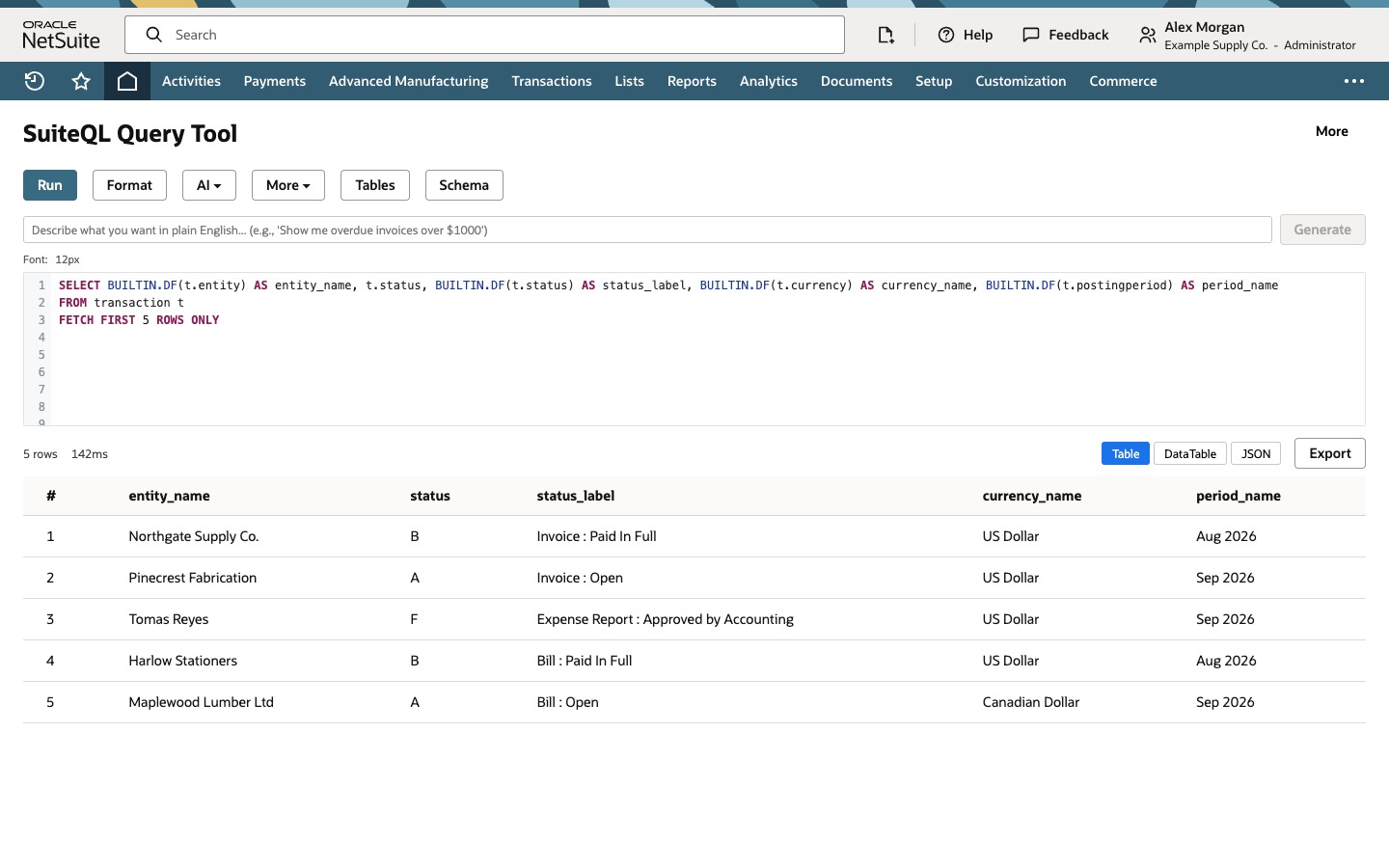
Replace the query with one that returns the raw status next to BUILTIN.DF(t.status), plus the currency and posting period names, and limit it to five rows with FETCH FIRST 5 ROWS ONLY. BUILTIN.DF returns the display value of a list or select field without a join to the list table.
SELECT BUILTIN.DF(t.entity) AS entity_name, t.status, BUILTIN.DF(t.status) AS status_label, BUILTIN.DF(t.currency) AS currency_name, BUILTIN.DF(t.postingperiod) AS period_name
FROM transaction t
FETCH FIRST 5 ROWS ONLY
Click Run. The status column holds the stored code, such as B or F. status_label holds the display value for that code. In the example it includes the record type, for example Invoice : Paid In Full, but the exact wording and format can vary with the record type, release and how you run the query.
Status letters are specific to the record type, so don't read a code on its own. Keep the raw column next to the label until you've confirmed what each one means in your account. entity, currency and posting period can be empty on some transaction rows. Check the results in your own account.
You're done when:
- you found the field ID in the Records Catalog instead of guessing it;
- the
'T'and'F'queries return an inactive and an active count you can explain; - the join returns one row per matching line and accounting row, and you know why an invoice can repeat;
- the status column and its label sit side by side for the record types you care about.
Common questions
Does NetSuite have a built-in SuiteQL query tool?
There's no general-purpose SuiteQL console available to every user. SuiteQL runs through SuiteScript with the N/query module, through SuiteTalk REST Query, or through SuiteAnalytics Connect, and the interface, permissions and limits depend on which you use. The Records Catalog helps you find table and field names, but it has no editor or Run button.
Why do I compare isinactive with 'T' and 'F'?
SuiteQL examples compare Boolean fields with the text T and F, so the condition is isinactive = 'T' for inactive records and isinactive = 'F' for records not marked inactive. Use the field ID the Records Catalog shows for that record. SuiteQL doesn't add the active-only filter the UI applies for you.
Why does my transaction join return too many rows?
The accounting line is probably joined to the transaction only, which pairs it with every line on that transaction. Join it to the line as well with tal.transactionline = tl.id. Even then, a line can have more than one accounting row, and multiple accounting books add more, so filter on the account, accounting book or posting flag you mean, and aggregate before you total amounts.
What does BUILTIN.DF do in SuiteQL?
It returns the display value of a supported list or select field, such as a status, currency or posting period, so you don't have to join the list table to read it. The text and availability can vary by field and by how you run the query. Keep the raw field beside it when the code matters.
Why is a count different from what I see in the UI?
The result depends on the permissions and execution context of the tool that runs the query. Role, subsidiary and accounting book visibility, field availability, and the UI's own default filters can all change a count. Compare like with like: the same population and the same filters.