The quick answer
Open the shipped transfer order and click Receive. On the Item Receipt, select Landed Cost per Line and click the Landed Cost icon on the item line. In the popup, choose a Cost Category, type the Amount, click Add and then OK, and save the receipt. The freight is added to the destination location's inventory value, so its average cost rises above the source location's. Check it on the item's Locations list.
This example moves 40 HT-45 Hydraulic Hose Kits from Tulsa Warehouse to Raleigh Warehouse on transfer order TO6143. A carrier charged 60.00 for the road haul. The company, user, locations, item and order numbers in the screenshots are fictional example data.
Before you start
You need Multi-Location Inventory and transfer orders, the Landed Cost feature (Setup > Company > Enable Features, Items & Inventory), and a role that can receive transfer orders and enter landed cost, with the accounting period open. You also need at least one landed cost category, such as Road Freight, set up under Setup > Accounting > Accounting Lists with its cost type and expense account. The item must have Track Landed Cost selected, or its line has no Landed Cost icon.
The rest of the example is setup chosen to make the arithmetic easy to follow. The order is fulfilled and shipped in full, the item uses average costing, Use Item Cost As Transfer Cost is selected so the stock travels at the source location's cost, and Raleigh Warehouse holds none of the item before the receipt. Other setups can show different figures.
If Landed Cost per Line is cleared on the receipt, use the receipt's Landed Cost tab instead. There you enter a cost category and amount and choose an allocation method, such as Quantity, Weight or Value. This guide uses the per-line icon. An estimated landed cost template, if your account uses one, can change what the receipt calculates, so check the amounts before you save.
Landed cost entered on the receipt does not create a vendor bill or a payment. If the same freight is also entered through a carrier bill that is sourced as landed cost, use only one of the two methods so it is not counted twice.
01 · Open the shipped transfer order
Open transfer order TO6143. Its status is Pending Receipt and Use Item Cost As Transfer Cost is selected. On the Items tab, the HT-45 Hydraulic Hose Kit line shows Fulfilled 40 and Received 0, so the whole shipment is still waiting to be received.
02 · Check the item's stock and cost
Click HT-45 Hydraulic Hose Kit in the Items list and open the Locations list. In the Inventory view, Tulsa Warehouse shows 360 on hand with a Value of 3,384 and 40 in transit. Raleigh Warehouse shows 0 on hand and 40 on order.
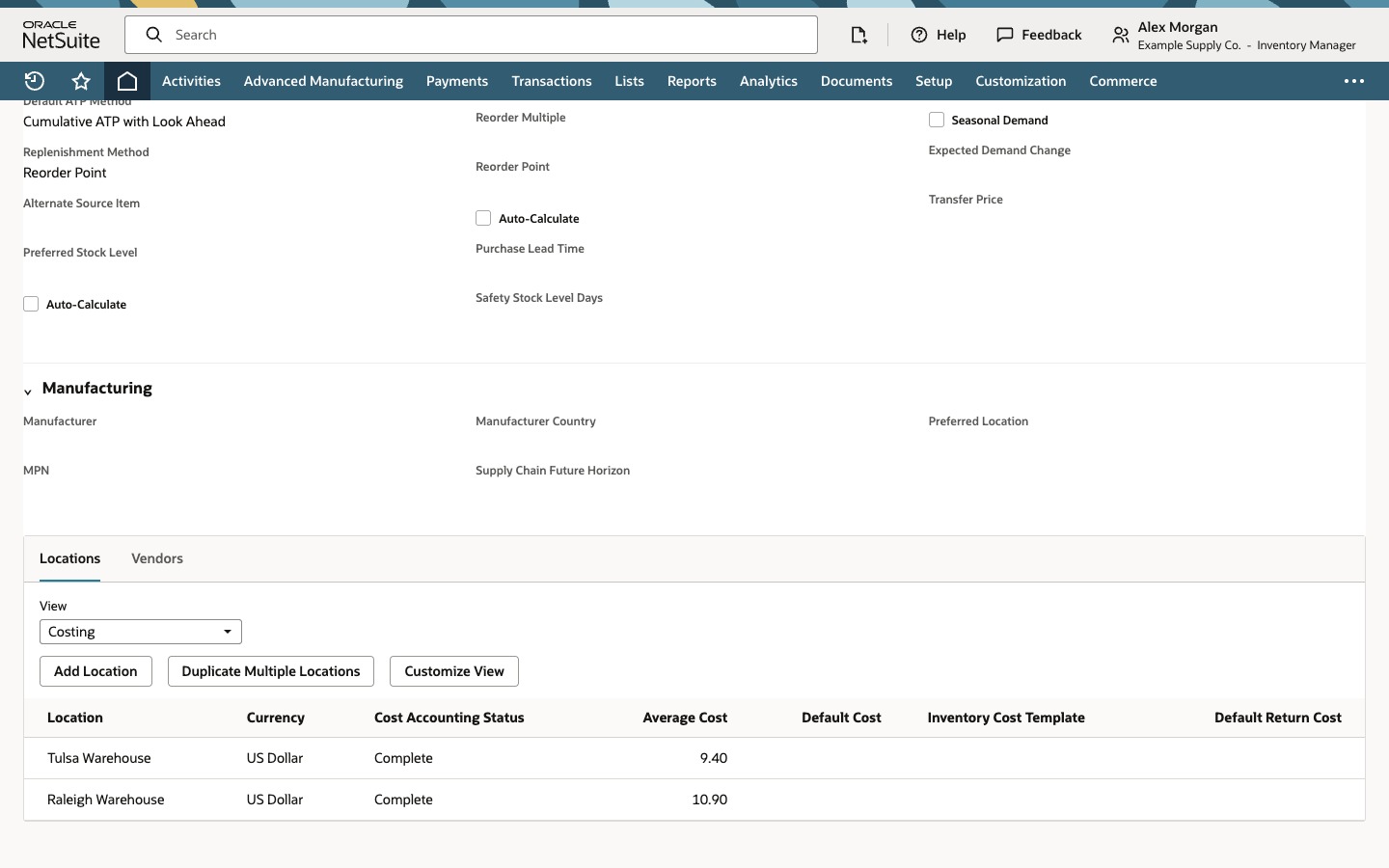
Change View to Costing. Tulsa Warehouse has an Average Cost of 9.40. Raleigh Warehouse has no cost yet because it holds nothing. These are the numbers to compare with afterwards. The 40 units are worth 40 x 9.40, which is 376, so that is what the destination starts with if the freight is left out. Click Back to return to the transfer order.
03 · Enter the freight as landed cost
Click Receive. The Item Receipt opens with the line marked to receive, To Location Raleigh Warehouse and Quantity 40. Select Landed Cost per Line, unless your account preselects it. A Landed Cost icon appears on the HT-45 line. Click it.
In the popup, choose Road Freight as the Cost Category, type 60.00 as the Amount and click Add. The row appears and the popup Total reads 60.00. Click OK.
04 · Save the receipt
Click Save. NetSuite creates item receipt IR7432 and shows the Transaction successfully Saved confirmation. The line shows 40 in Quantity and 40 On Hand.
Click the Landed Cost icon on the saved line to confirm the freight stayed on the receipt. It shows Road Freight 60.00. Click Close.
05 · Check the destination's value and average cost
Click HT-45 Hydraulic Hose Kit to open the item and open its Locations list. In the Inventory view, Raleigh Warehouse now shows 40 on hand and a Value of 436, with nothing on order or in transit. Tulsa Warehouse is unchanged at 360 and 3,384. The 436 is the 376 for the goods plus the 60.00 of freight.
Change View to Costing. Raleigh Warehouse shows an Average Cost of 10.90, which is its value of 436 divided by 40 units. Tulsa Warehouse still shows 9.40. If your account runs inventory costing on a schedule, the figures can take a short time to settle after the save, so check again before you treat them as final.
Check the result
- Receipt: IR7432 was created from TO6143 and carries Road Freight 60.00 on the HT-45 line.
- Value: Raleigh Warehouse holds 40 units worth 436, which is 40 x 9.40 plus 60.00.
- Average cost: Raleigh Warehouse reads 10.90, against 9.40 at Tulsa Warehouse.
Common questions
Can I add freight cost to a transfer order in NetSuite?
Yes, on the item receipt. Open the shipped transfer order, click Receive, select Landed Cost per Line and enter the freight in the Landed Cost popup on the item line. The cost is added to the destination location's inventory value, and the transfer quantity does not change.
Why is there no Landed Cost icon on my transfer order item receipt?
The Landed Cost feature has to be enabled, the item on the line needs Track Landed Cost selected, the line has to be marked to receive, and Landed Cost per Line has to be selected on the receipt. A custom item receipt form or the role's permissions can also hide the field. If Landed Cost per Line is cleared, use the receipt's Landed Cost tab instead.
Why is the destination's average cost different from the source's after a transfer?
With Use Item Cost As Transfer Cost selected and average costing, the stock arrives at the source location's cost, and the landed cost is added on top of it. Here the destination's value is 436 for 40 units, which averages 10.90, while the source stays at 9.40. If the destination already held stock, its existing value, the incoming units and the freight blend into one average: existing value plus received value plus freight, divided by existing quantity plus received quantity.
Does the source location's average cost change?
Not because of this receipt. Shipping removes units and their value at the source's average cost, so Tulsa Warehouse still reads 9.40, assuming no other transaction or costing adjustment touches it.
Where do I see average cost and inventory value by location?
Open the item and use its Locations list. In this example the Inventory view shows quantity on hand and Value for each location, and the Costing view shows Average Cost. The views and columns you see can depend on your account, role and customized view.