The quick answer
Go to Transactions > Inventory > Adjust Inventory, add the item, and change the line's Units to a smaller unit of the item's units type so the shortage is a whole number. Qty. On Hand, Adjust Qty. By and New Quantity are then read in that unit. Enter the shortage as a negative number, click Add and Save. NetSuite converts the change back to the item's stock unit.
This example corrects a liquid item stocked in liters. NetSuite shows 27.6 liters on hand at Harbor Depot and the shelf holds 27 liters, so 0.6 liter is missing. Entered in 100 mL units, the shortage is 6. This illustrated walkthrough uses synthetic example data. Person and operating-company names are fictional. Use your own item, location and accounts.
Before you start
Multiple Units of Measure must be enabled, and the item must have a units type with more than one unit. The units type is normally fixed once it is assigned, so do not plan on changing it to fix a count. The example item uses a units type called Liquid Volume with mL, 100 mL, 500 mL and L, and its Primary Stock Unit is Liter. The Units column on an adjustment line offers other units only for an item like this.
You also need permission to create Inventory Adjustments, an active adjustment account, a date in an open posting period you can post to, and a location where the item is stocked. In a OneWorld account the subsidiary must fit the location, item and account. If the item uses lots, serial numbers, bins or inventory status, the line needs Inventory Detail too, and your custom form may add columns such as Department or Class. This walkthrough does not cover them. Use an adjustment only when the shelf count is the right number and no other transaction explains the difference. If stock arrived and was never received, enter an Item Receipt. If it moved between locations, enter an Inventory Transfer.
01 · Check the stock on the item
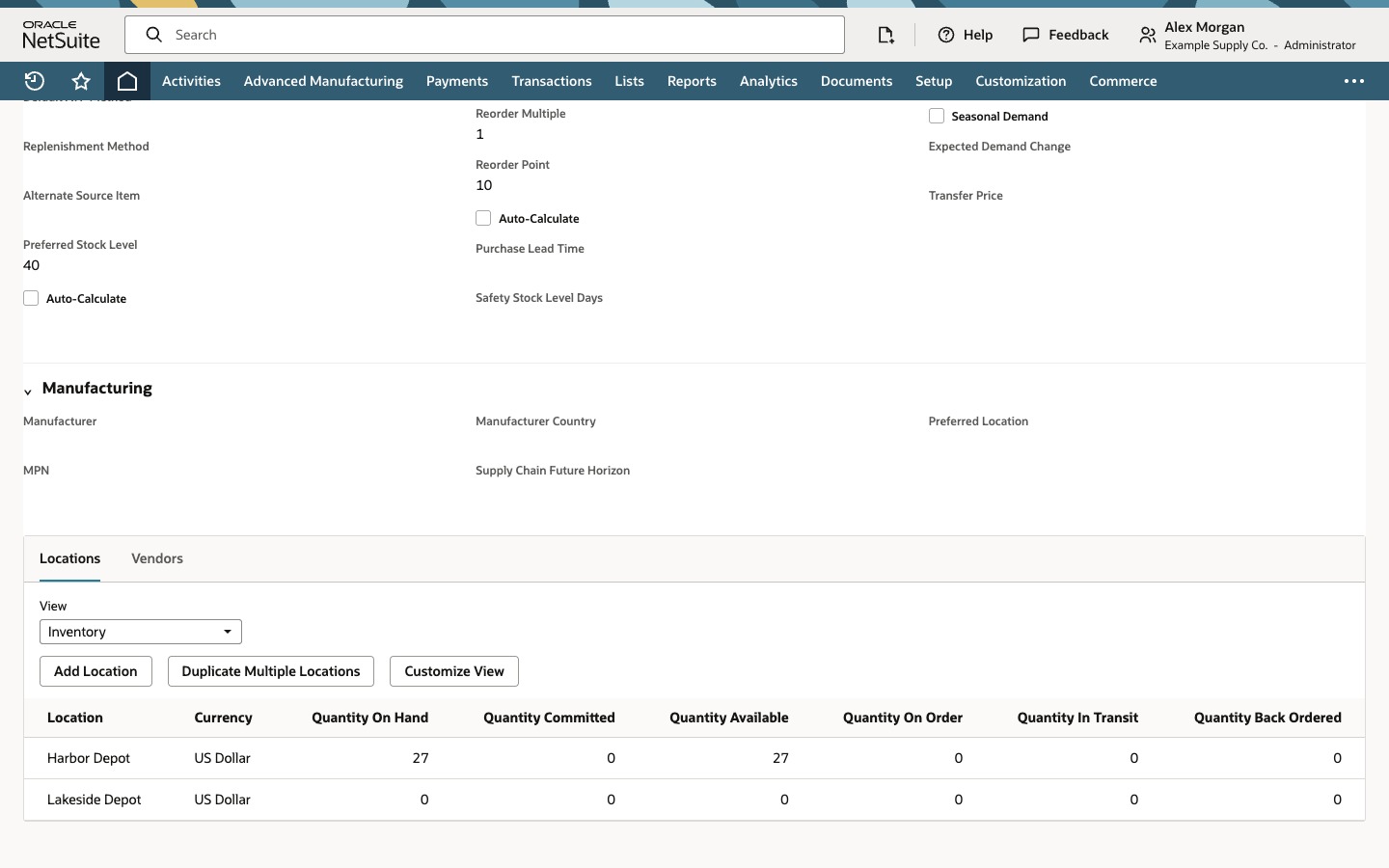
Open the item. Its Units Type is Liquid Volume and its Primary Stock Unit is Liter. On the Locations list, read Quantity On Hand for Harbor Depot: 27.6. The shelf count is 27 liters, so the record is 0.6 liter too high.
02 · Start the adjustment
Go to Transactions > Inventory > Adjust Inventory. Set Subsidiary to Example Supply US, Adjustment Account to 6500 Inventory Adjustments and Adjustment Location to Harbor Depot. Type a Memo that says why the stock changes, here Shelf count shortage after repacking. The adjustment account receives the offsetting entry, so use the account your finance team expects for count corrections.
03 · Add the item in liters
On the Adjustments subtab, choose the item DGR-20 Degreaser in Item. The line fills in Location Harbor Depot, Units L, Qty. On Hand 27.6, Current Value 115.92 and Est. Unit Cost 4.20, which is the cost of one liter. Enter -0.6 in Adjust Qty. By. New Quantity shows 27, the counted quantity.
04 · Re-enter the shortage in 100 mL
Open the Units list on the line. It offers every unit of the item's units type: mL, 100 mL, 500 mL and L. Choose 100 mL. The line is now read in 100 mL units. Qty. On Hand becomes 276 and Est. Unit Cost becomes 0.42, the cost of one 100 mL unit. In this walkthrough New Quantity reads 275.4, because the -0.6 you typed stays in Adjust Qty. By and is now read as 0.6 of a 100 mL unit. Your form may behave differently, so always check Adjust Qty. By and New Quantity after you change Units.
Replace the quantity with -6. New Quantity shows 270, which is the same 27 liters. Then click Add to put the line on the adjustment. Common mistakes are typing -0.6 while Units is 100 mL, which removes only 60 mL, or typing the counted quantity instead of the difference.
05 · Save the adjustment
Click Save. NetSuite confirms that the transaction was saved. Estimated Total Value shows -2.52: the change times the cost, -6 times 0.42, or -0.6 liter times 4.20 per liter. For a decrease, NetSuite debits the adjustment account and credits the inventory asset account. Actions > GL Impact shows the posting. The final amount can differ from the estimate when costing is not a simple average, for example with FIFO, lots or a backdated date.
The saved line keeps the unit you used: Units 100 mL, Qty. On Hand 276, Adjust Qty. By -6 and New Quantity 270.
06 · Confirm the item
Open the item again, for example from Recent Records. On the Locations list, Quantity On Hand for Harbor Depot shows 27. The item is still stocked in liters. Changing the unit on the adjustment line did not change the item's stock unit or its units type.
Common questions
Can I enter an Inventory Adjustment in a different unit than the stock unit?
Yes, when the item's units type has more than one unit. Change Units on the adjustment line. Qty. On Hand, Adjust Qty. By and New Quantity are read in that unit, and NetSuite converts the result to the stock unit when you save.
Why did Qty. On Hand change when I changed Units?
It shows the same stock in the new unit. 27.6 liters is 276 units of 100 mL. Est. Unit Cost changes the same way, from the cost of a liter to the cost of 100 mL.
Why does New Quantity look wrong after I change Units?
In this example Adjust Qty. By kept the number typed in liters, and the new unit then read it as 100 mL units. Check the field after choosing the unit and re-enter the shortage in that unit. For example, -0.6 liter is -6 in 100 mL units.
Is Adjust Qty. By the change or the final quantity?
It is the change. Enter a shortage as a negative number. New Quantity is the result of adding that change to Qty. On Hand.
How is the value of the adjustment calculated?
Adjust Qty. By times Est. Unit Cost, both in the line's unit. Six 100 mL units at 0.42 and 0.6 liter at 4.20 per liter give the same -2.52.