The quick answer
Go to Lists > Accounting > Items, click New Item and choose Kit/Package. Enter the item name, add each member on Purchasing/Inventory > Components with its quantity, enter the package price on Sales/Pricing, choose the Income Account and Tax Schedule on Accounting, then click Save. The kit sells as one line at its own price, and the stock stays on the member items.
The example is GK-100 Garden Starter Kit for four existing items: HT-110 Hand Trowel, PS-120 Pruning Shears, GG-130 Garden Gloves and ST-140 Seed Tray, one of each. The package price is 120.00. The screenshots use sample data and fictional person and operating-company names.
Before you start
Your role needs permission to create items and to pick the subsidiary, accounts and tax schedule. Kits normally need the Kits/Packages feature turned on in Setup > Company > Enable Features. The Subsidiary list appears in OneWorld accounts. Several price levels need Multiple Prices, and prices by currency need Multiple Currencies. A kit with one base price needs neither.
Create the member items first. Each one has to exist and be usable in the kit's subsidiary, and its stock has to be available where you will fulfill the kit. Members are usually inventory items. Non-inventory, service, other charge, assembly and kit items can also be members, depending on your features. Only inventory members have stock and cost effects.
A kit has no on-hand quantity or inventory asset of its own. When a kit is fulfilled, NetSuite relieves its inventory members and posts their cost, and the kit's own price doesn't depend on theirs. Members that use bins, lots or serial numbers need that detail entered at fulfillment, so test it before you rely on it. The form, the tab names and the confirmation wording depend on your role, release and custom form.
01. Start a new Kit/Package item
Open Lists > Accounting > Items and click New Item.
On the New Item page, choose Kit/Package.
02. Name the kit and choose its subsidiary
Enter Item Name/Number GK-100 and Display Name/Code Garden Starter Kit, then add a Description that tells your sales staff what is in the kit. In Subsidiary, select Example Supply US and check Include Children.
Include Children makes the kit available to the selected subsidiary's child subsidiaries. It doesn't reach unrelated subsidiaries, and the member items must also be usable in each subsidiary where you sell the kit. In an account without OneWorld there is no subsidiary list.
03. Add the member items
Open Purchasing/Inventory and its Components subtab. Check Display Components on Transactions. Then add one line for each member: choose the Item, enter Quantity 1 and click Add. The description, units and schedule come from the item.
Display Components on Transactions controls whether the members and their quantities show on applicable transaction forms and outputs. Whether they show on a given order, packing slip or invoice depends on the transaction and its form or template. The kit stays one priced item, and the setting doesn't make it an item group.
04. Enter the package price
Open Sales/Pricing. The price matrix lists the Base Price level and the other levels with their Default Discount %: Wholesale -12%, Trade -6%, Boutique +4% and Online -1%. In the Base Price row, enter 120.00. The other levels fill in: Wholesale 105.60, Trade 112.80, Boutique 124.80 and Online 118.80.
A level with a default discount calculates from the base price in the same currency and quantity column. A level without one takes a price you enter. Also review Cost Estimate Type in the Pricing section. In the example it is Derived From Member Items, which makes the kit's estimated cost follow its members. It is an estimate, and it doesn't set the selling price. Customer pricing, quantity breaks, promotions, currency and a manual rate on the transaction can still change what a sale uses. Review the calculated prices after you change the base price.
05. Choose the income account and tax schedule
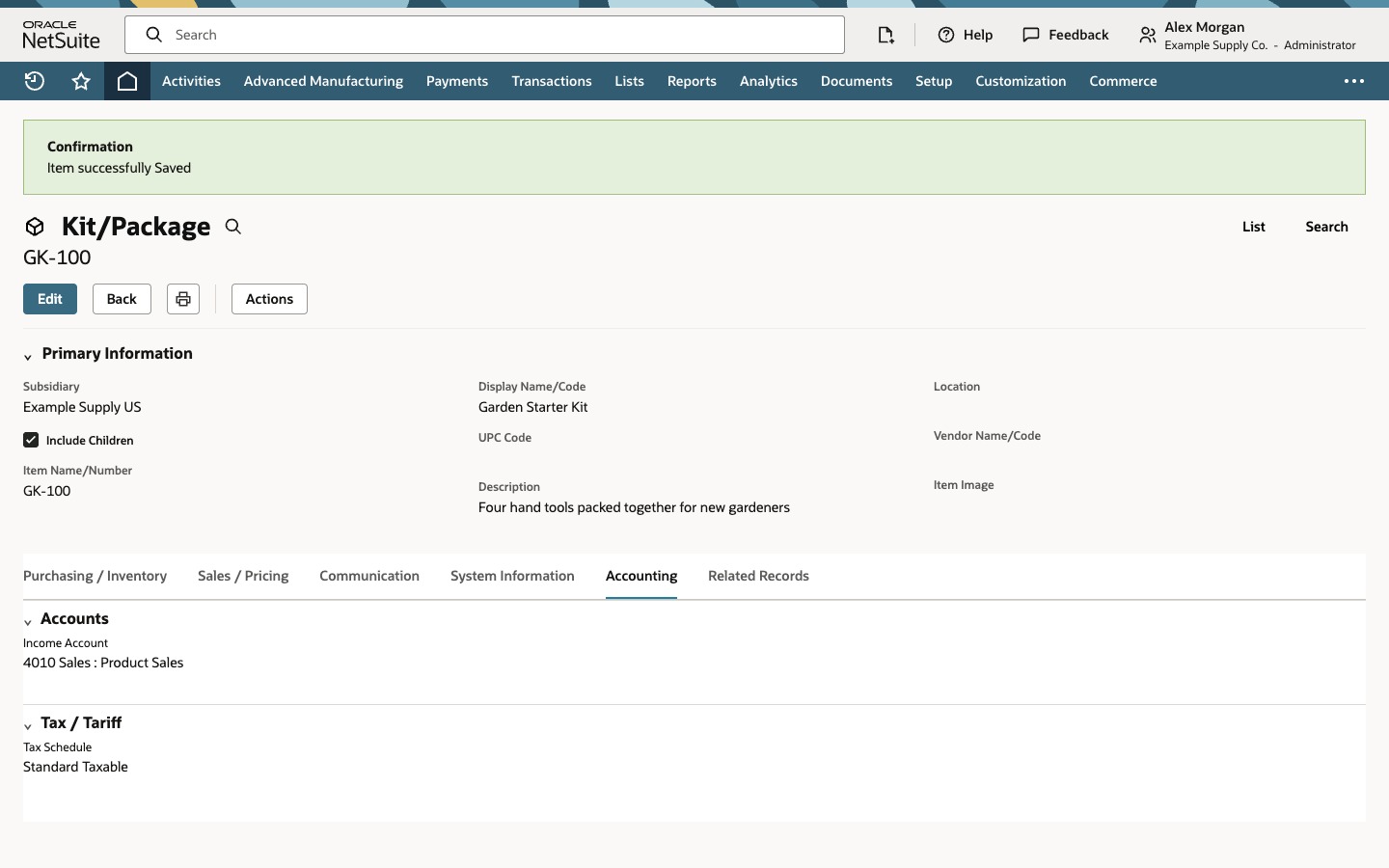
Open Accounting. Select the Income Account 4010 Sales : Product Sales and the Tax Schedule Standard Taxable. A kit doesn't use an inventory asset account, because it holds no stock. In accounts that use SuiteTax, tax is set up differently and this field can differ.
06. Save the kit and check it
Click Save. NetSuite opens the saved Kit/Package with a confirmation that the item was saved.
Check the saved record. On Purchasing/Inventory > Components the four members are listed, each with Quantity 1.
On Sales/Pricing the Base Price and the other levels are listed, and on Accounting the income account and tax schedule are on the record.
The confirmation wording can differ by release and form, so rely on the saved record: the members, the prices and the accounting should all be there. Changing a kit later doesn't rewrite old transactions, but it can affect open orders, so check them before you edit a kit that is already in use.
Common questions
What is the difference between a kit, an item group and an assembly?
A kit sells as one line at its own price, and the stock stays on the members. An item group expands into its members on a transaction, and each member brings its own price. An assembly is built from its components and is tracked as its own inventory.
Does a Kit/Package item have its own inventory or cost?
It has no on-hand quantity or inventory asset of its own. Its estimated cost can derive from its members when Cost Estimate Type is Derived From Member Items. Actual cost follows the member items: fulfilling a kit relieves the inventory members and records their cost.
Why do the other price levels change when I enter the base price?
Levels with a Default Discount % calculate from the base price in the same quantity column. A level without a default discount takes a price you enter. Check the calculated prices after changing the base price.
What does Display Components on Transactions do?
It controls whether the kit's members and quantities show on applicable transaction forms and outputs. Whether they appear on a particular order, packing slip or invoice depends on the transaction and its form or template. The kit remains one priced item, and members don't get separate selling prices.
Can a kit include service or non-inventory items?
Yes. Supported service, non-inventory, other charge, assembly, kit and inventory items can be members, subject to your features and record availability. Only inventory members have stock and cost effects. Check that each member is usable in the kit's subsidiary.