The quick answer
Create a landed cost template with one row for each cost category, set the allocation method to % Value and enter the percentages, then map the template to the item. Choose it in the Landed Cost Template column of the purchase order line. When you receive the order with Landed Cost per Line checked, NetSuite calculates the estimate for each line. Click the line's Landed Cost amount to see it by category, and open GL Impact to see the inventory debits and the expense credits.
The screenshots use sample data, including the vendor, item, amounts and order numbers, and fictional person and operating-company names. Page names, columns and accounts can differ by release, role, form and account setup.
Before you start
Landed cost templates and estimated landed costs come from the Supply Chain Management SuiteApp, so they are an add-on, not part of core landed cost. You need the Landed Cost feature, Estimated Landed Cost turned on in the Supply Chain Management preferences, and a role that can use estimated landed cost and the template records. Manual landed cost and landed cost from a separate bill do not need the add-on. The estimate also only works on transactions created through a supported entry method, so it may not apply to some imported or externally created orders.
This example assumes the cost categories Landed Cost - Freight and Landed Cost - Duties exist with expense accounts, the item is an inventory item with Track Landed Cost checked, the template is active and in the order's currency, and the posting period is open. The item uses average costing with no earlier stock only so that the average cost at the end is easy to calculate. Leave the line's option for calculating the estimated landed cost turned on if your form shows it, because selecting a template alone does not guarantee a calculated amount. The receipt needs Landed Cost per Line checked. The Landed Cost Allocation per Line accounting preference sets that box by default. The order here is PO1875, approved and pending receipt.
01. Check the template
Go to Lists → Accounting → Landed Cost Template and click View beside Import Freight and Duty Estimate. If your role has no menu entry, search for the record in Global Search. A template has a name, a currency and one row for each cost category. Each row has a Cost Allocation Method and a Cost Factor. This one has Landed Cost - Freight and Landed Cost - Duties, both % Value, with factors 5 and 25. With % Value the factor is a whole-number percentage of the line's value, which is the quantity times the rate, so this template estimates freight at 5% and duty at 25%. The method can also be Quantity, Weight or Flat Amount.
02. Check the item mapping
A template only applies to an item that maps it. Go to Lists → Accounting → Items and open CV-200 Control Valve. On the Landed Cost Templates subtab, Landed Cost Template Mappings lists the template in US dollars with Preferred set to Yes. The preferred template is the one a new order line normally gets by default when the order is created in NetSuite. It does not change a line that already exists, and another template mapped to the item can still be chosen on the line. The mapping must match the order's currency, and the item also needs Track Landed Cost checked.
03. Add the template to the order line
Go to Transactions → Purchases → Enter Purchase Orders → List and open PO1875 to Harbor Valve Supply: 40 CV-200 Control Valve at 180.00, 7,200.00 in total. Click Edit, open the line, and choose Import Freight and Duty Estimate in the Landed Cost Template column. Only templates mapped to the item are listed. Click OK, then Save. This line existed before the template, so it had to be set by hand. The order does not post, and the template stays on the line.
04. Receive the order and read the estimate
On the saved order, click Receive. Landed Cost per Line is checked, and the receipt line shows the template in the Landed Cost Template column. Click Save. The receipt is saved as IR1876, and the line's Landed Cost is 2,160.00. No freight or duty bill has been entered: the amount comes from the template. If the template shows on the line but no amount is calculated, check that Estimated Landed Cost is on for your role, that the item tracks landed cost, that the template is active, mapped and in the right currency, and that the line's calculate option is on. Click the amount to open the Landed Cost popup. It lists Landed Cost - Duties 1,800.00, which is 25% of 7,200.00, and Landed Cost - Freight 360.00, which is 5%, with a total of 2,160.00. Close the popup. The estimate follows the quantity received, so a partial receipt produces a smaller amount than the whole order would.
05. Check GL Impact and the item's value
Open the receipt's GL Impact subtab. The goods are 7,200.00: inventory is debited and Inventory Received Not Billed is credited. In this example, for each cost category there is a pair of lines. Landed Cost - Duties debits inventory 1,800.00 and credits 6320 Duty Expense, and Landed Cost - Freight debits inventory 360.00 and credits 6310 Freight Expense. The exact lines and labels depend on your account's configuration. The category's expense account works as a clearing account for the estimate. The actual freight or duty bill is a separate payable: enter it with a landed cost item in the same category, so that its debit offsets the estimate's credit, and any difference between the estimate and the bill stays in that account until you reconcile it. The template does not create a bill, and it does not change the quantity received.
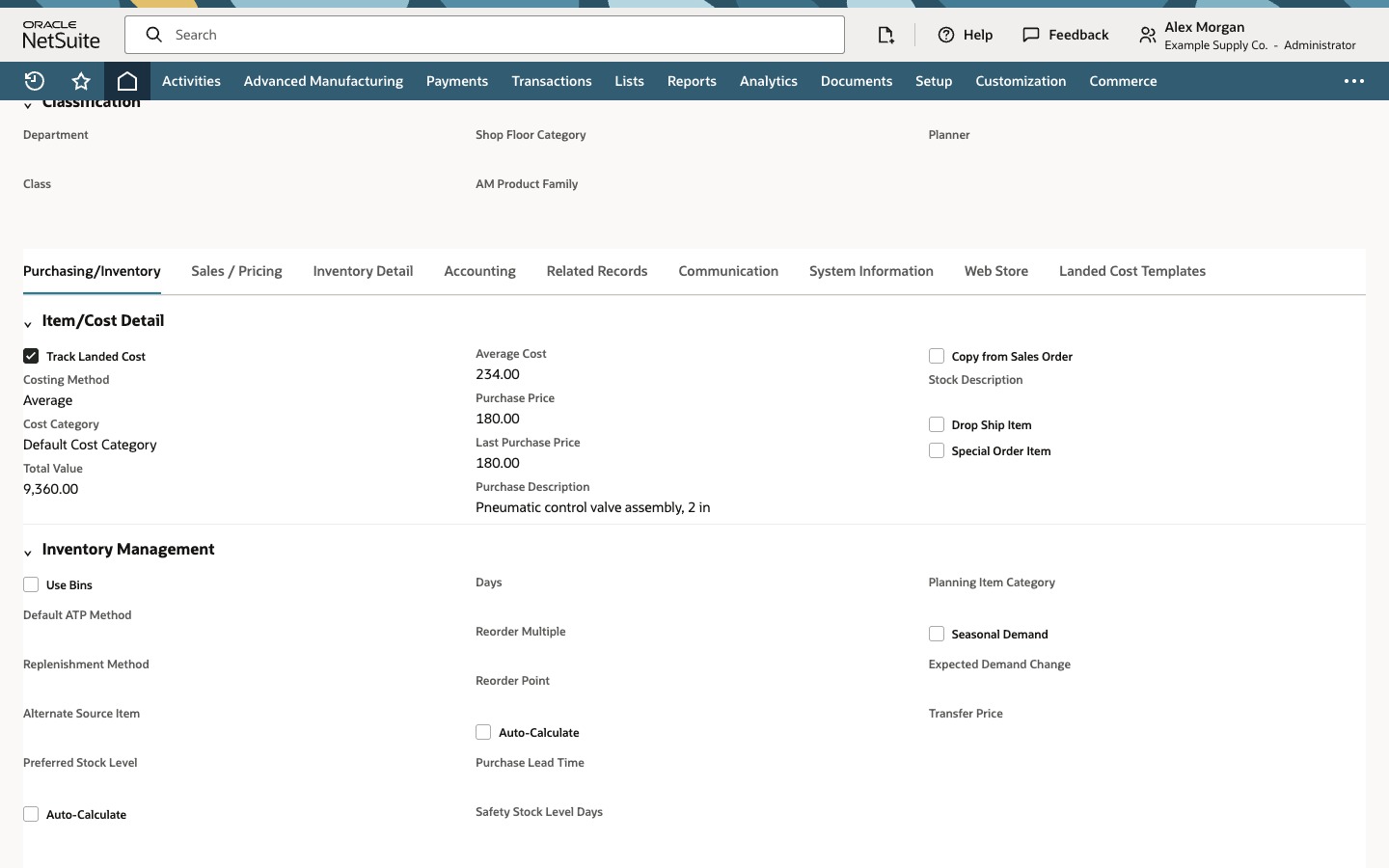
Back on the Items & Expenses subtab, open CV-200 Control Valve. With no earlier stock and no other costing activity, the item's Total Value under average costing is 9,360.00, which is 7,200.00 of goods plus 2,160.00 of estimated freight and duty. Average Cost is 234.00, which is 9,360.00 divided by 40. Existing stock would blend into that average. Last Purchase Price stays at 180.00 unless the Include Landed Cost in Last Purchase Price accounting preference is on.
Check the result
- The receipt line shows Landed Cost 2,160.00, and its popup lists Duties 1,800.00 and Freight 360.00.
- GL Impact has an inventory debit and an expense credit for each category, on top of the 7,200.00 of goods.
- The item shows Total Value 9,360.00 and Average Cost 234.00.
Common questions
Do I need the Supply Chain Management SuiteApp for a landed cost template?
Yes. Landed cost templates and estimated landed cost come from that add-on, with the Landed Cost feature and Estimated Landed Cost turned on. Entering landed cost by hand on the receipt, or sourcing a separate carrier bill, works without it.
How does the % Value method calculate the estimate?
It applies the cost factor, entered as a whole-number percentage, to the line's quantity times its rate. Enter 5 for 5%. On 40 units at 180.00, a factor of 5 gives 360.00 and a factor of 25 gives 1,800.00. Quantity rows multiply the quantity by the factor, Weight rows multiply the item weight, the quantity and the factor, and Flat Amount rows use the factor itself. Test Weight with your units of measure first.
What does Preferred do on the item mapping?
The preferred mapping is the template a new purchase order line normally gets by default for that item. It does not change existing lines, and you can still choose another template that is mapped to the item. A template that is inactive, in another currency or not mapped to the item is not calculated, and defaults may not apply to imported or externally created orders.
Why is Landed Cost per Line checked on the receipt?
Per-line landed cost is where the landed cost detail for each line is kept. The Landed Cost Allocation per Line accounting preference makes new receipts start with the box checked. It is separate from Estimated Landed Cost, which is what lets a mapped template calculate an amount. You can clear the box when you want to use the receipt's Landed Cost subtab with an allocation method instead.
Where do I see the estimate after I save the receipt?
Open Items & Expenses, find the line and click the Landed Cost amount. The popup lists each cost category with its amount. The receipt's GL Impact shows the same amounts as inventory debits and expense credits.