The quick answer
Open Reports > Inventory/Items > Inventory Valuation and compare the Total - rows. % of Inv. Value shows each group's share of the report total. Find any item with a negative On Hand, then open Inventory Activity Detail and set From early enough to see the item's opening quantity. Start from that quantity, add each transaction in date order, and the first row that leaves the running quantity below zero is where the item went negative. Click its Document Number to open the transaction.
The example is a medical equipment distributor with one warehouse. The Inventory Valuation Summary is as of 10/24/2026 and totals $805,080.00. Calibration probe PRB-410 shows an On Hand of -6. The screenshots use sample data, and the person and operating-company names are fictional.
Before you start
Your role needs access to both reports and permission to view the transactions behind them. The reports are under Reports > Inventory/Items. Which items, groups, columns and subsidiaries you see depends on your role, enabled features, item setup and report settings.
Grouping in Inventory Valuation depends on how items are set up and on the report's layout. In the example, items fall under the item types Assembly and Inventory Item, and the parent items Electronics, Housings & Plastics and Consumables appear as groups with sub-groups. Check that the groups in your account mean what you think they mean before you act on a percentage.
A negative On Hand only appears when the account's data contains one. Whether an account allows it depends on inventory and accounting preferences and any validation setup, so check them in the account you are working in.
01. Open Inventory Valuation
Go to Reports > Inventory/Items > Inventory Valuation. The Inventory Valuation Summary opens as of 10/24/2026 in the example, with the Subsidiary Context shown in the footer. The columns are Item, Description, Inv. Value, % of Inv. Value and On Hand. The starting date, filters and columns can differ with your role, saved customizations and earlier selections, so note the date, subsidiary and any other footer filters before you read the numbers.
02. Compare the group totals
Each group ends with a Total - row. % of Inv. Value is that row's value divided by the value of the whole report, so comparing the totals shows where the value is concentrated.
In the example, Total - Assembly is $273,700.00, or 34.00%. Total - Inventory Item is $531,380.00, or 66.00%. Inside Inventory Item, Total - Electronics is $382,830.00, or 47.55%, and inside Electronics, Total - Displays is $310,950.00, or 38.62%. DSP-10 alone is $212,400.00, or 26.38%.
Compare totals at the same level only. Total - Displays sits inside Total - Electronics, which sits inside Total - Inventory Item, so nested totals overlap and must not be added together. Total rows, indentation and group labels follow the report's layout.
Scroll to the bottom to check the groups add up. Total - Inventory Item plus Total - Assembly is the report Total: $805,080.00, or 100.00%.
The groups that hold the largest share are where a count error, a cost change or a slow-moving item would matter most. A share of the value is not a ranking of importance, so use it to decide where to look first.
03. Find the item with a negative On Hand
Type the item in Find at the bottom of the report and press Enter, or scroll down. Calibration probe PRB-410 shows an On Hand of -6, an Inv. Value of $0.00 and 0.00%.
On Hand is a quantity, not a value, and it is not quantity available. The report says the quantity is negative but not how it got there. The $0.00 and 0.00% are what the example account shows. They are not what every negative item shows. The value of a negative item can be zero, positive or negative depending on costing and history, and pending or deferred costing can change it, so read what your account shows instead of predicting it.
04. Open Inventory Activity Detail from an earlier date
Go to Reports > Inventory/Items > Inventory Activity Detail. In the example it opens on this month, 10/01/2026 to 10/31/2026. Your account may open on another range or on your last selection. Set the same subsidiary context and location scope you used in Inventory Valuation, and set both From and To yourself. Find PRB-410. Its heading row already shows -3, which is the quantity before the From date, and one transaction takes it to a Total of -6. The cause is earlier than this month.
Change From to 09/01/2026 and click Refresh. Changes in the footer do not apply until you refresh. Keep moving the date back until the heading row shows a quantity you can explain.
05. Add up the transactions
With From at 09/01/2026, the heading row for PRB-410 now shows 6, the quantity before that date. It is an opening balance, not a transaction. Add each transaction in date order. In the example a decrease is negative in the Qty. column. Check that sign against a receipt or fulfillment you know before you rely on it.
- IF3052 on 09/09/2026 is -4, which leaves 2.
- IF3059 on 09/18/2026 is -5, which leaves -3.
- IF3071 on 10/02/2026 is -3, which leaves -6.
Total - PRB-410 is -6, the same as On Hand in Inventory Valuation. IF3059 is the first transaction after which the quantity is below zero.
The two reports should match only when they use the same as-of date, subsidiary context, location scope and other filters. If they differ, check the scope and the timing before you assume the data is wrong.
The first negative row is a lead, not a verdict. Backdated receipts, transactions on the same day, other locations, bins, lots, serial numbers, inventory status, edited or voided transactions, transfers, assembly and work order activity, and pending costing can change the story.
06. Open the transaction from its Document Number
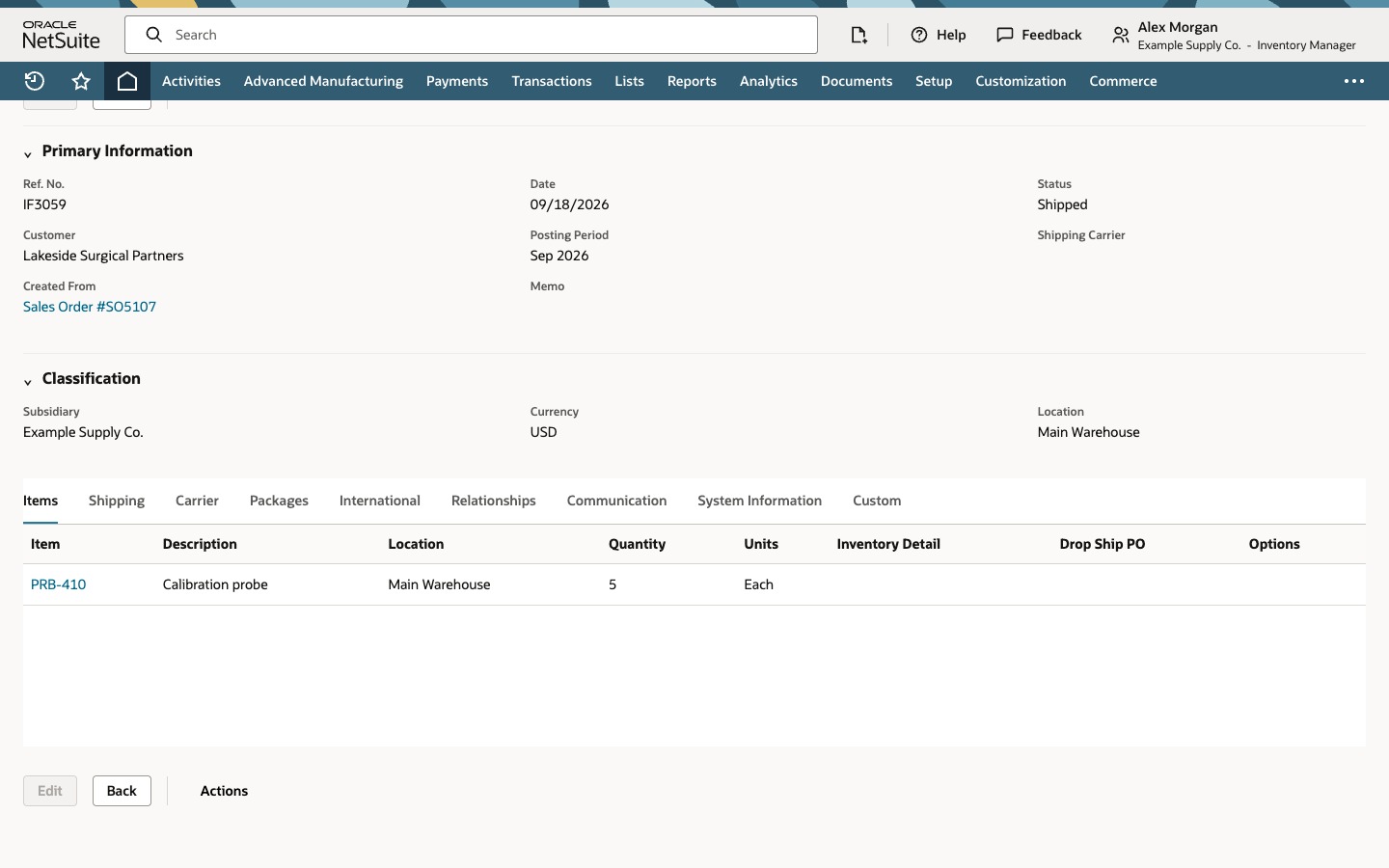
If the Document Number is a link and your role can view the record, click IF3059. Otherwise search for the document number. The Item Fulfillment opens, dated 09/18/2026, with the status Shipped and PRB-410 at a Quantity of 5. The running quantity in the report was 2 before this fulfillment, so it left the item at -3. The record alone does not prove that only 2 were physically there.
Check the transaction type, date, location, posting period and inventory detail, and whether the transaction was edited or voided. Then ask the inventory owner what happened before you change anything. A receipt may have been entered late, a count may have been wrong, or the shipment may have been posted too early. Enter a receipt only for goods that were actually received. Use a count or an inventory adjustment only from a verified quantity and your approval process. Costing consequences differ for lot, serial and FIFO or LIFO items, so the fix belongs to whoever owns inventory.
Common questions
What does % of Inv. Value mean on the Inventory Valuation Summary?
It is the row's Inv. Value divided by the report's total Inv. Value. Compare the Total rows of the groups to see where value is concentrated. The grouping depends on your item setup and report layout.
Why does an item show a negative On Hand in Inventory Valuation?
More units went out than the report shows coming in. Common causes are a receipt entered after the shipment, a backdated or same-day transaction, a transfer that has not been received, a location, bin, lot or status mismatch, a voided or edited transaction, or a count that differs from the recorded quantity. A negative quantity tells you to investigate. It does not name the transaction by itself. Open Inventory Activity Detail for the item to look for a lead.
Is the Inv. Value of a negative item always $0.00?
No. In the example it is $0.00 and 0.00%, but the value of a negative item can be zero, positive or negative depending on costing and history. Check that costing has finished before you interpret the amount.
Why does Inventory Activity Detail start at a negative quantity for the month?
The item's heading row shows the quantity before the From date under the report's filters. If the item went negative earlier, it already begins below zero. Backdated transactions and a different location or subsidiary scope can do the same. Move From back until the opening quantity makes sense.
Does the Inventory Activity Detail total match On Hand in Inventory Valuation?
Not always. Treat it as a reconciliation only when both reports use equivalent as-of dates, subsidiary context, location, inventory status, item scope and other filters. Costing state and transaction ordering can also produce differences. If they differ, check the scope and timing before you assume the data is wrong.