The quick answer
The alert means a line you are fulfilling has no usable Location. Click OK, open the Location field on that line of the Items tab, choose the location that ships the goods, and click Save again. The fulfillment is not created until every fulfilled line has a location. The item fulfillment then gets its own number and appears on the sales order under Related Records.
This example fulfills sales order SO4417 for 5 Canvas Utility Jackets - Large for Northgate Outfitters and ships them from Denver Warehouse. The company, user, customer, locations, item and order numbers in the screenshots are fictional example data.
Before you start
You need Multi-Location Inventory, an approved sales order that is Pending Fulfillment with a line left to ship, and a role that can create item fulfillments for the subsidiary and location involved. This example assumes an account where the fulfillment cannot be saved while an inventory line has no location. Whether that applies depends on your location preferences, line-level locations, the form and any customizations. In the example the item line on the sales order has no location, and Denver Warehouse is one of the locations the item can ship from.
A location in the sales order header and a location on an item line are separate fields, so do not assume the header value reaches every fulfillment line. Check the line itself. The item fulfillment form also has to show the line Location field for you to correct it there. If it is hidden on your form, ask an administrator to change the form.
Choose the location that is actually supplying the goods and is valid for the order line. It needs enough fulfillable stock, and lots, serial numbers, bins, inventory status or role restrictions can limit the choice. A fulfillment saved as Shipped takes the quantity out of that location's inventory, so the wrong choice moves the wrong warehouse's stock. If the order should always ship from one warehouse, correct the sales order line first, or use automatic location assignment if your account has it, so the line is not blank to begin with. The status choices on the fulfillment form (Picked, Packed, Shipped) also depend on your pick, pack and ship setup.
01 · Open the sales order and click Fulfill
Open sales order SO4417. Its status is Pending Fulfillment. Click Fulfill to open the Item Fulfillment form.
02 · Set the status and look at the line
Set Status to Shipped. In this example the form opened at Picked, and the choices you see depend on your pick, pack and ship setup. Select Shipped only when the goods have actually shipped. On the Items tab, the Canvas Utility Jacket - Large line is marked to fulfill with Quantity 5, but its Location field is empty. Nothing on the form marks Location as required, so it is easy to miss.
03 · Save and read the alert
Click Save. A browser alert appears: Please provide values for the following fields in the Items list: Location. It names the list, Items, and the field, Location. The save is rejected and no item fulfillment is created. Click OK to return to the form. The alert style can differ by release, form and customizations.
04 · Choose the location and save again
Open the Location field on the line and choose Denver Warehouse, then click Save. NetSuite creates item fulfillment IF4418 with the status Shipped and shows Transaction successfully Saved. The line now lists Denver Warehouse as its location.
05 · Check the sales order
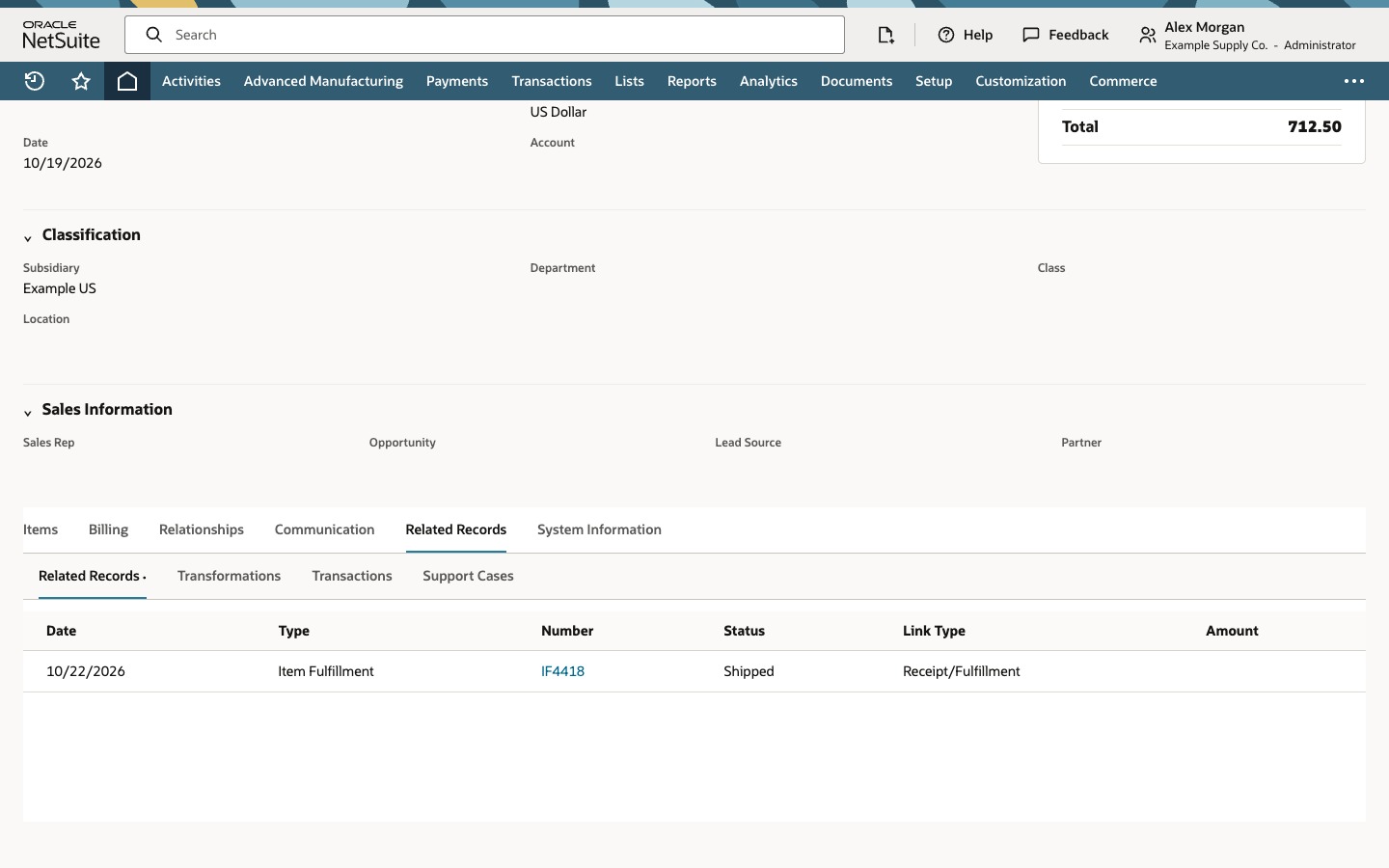
Click the Sales Order #SO4417 link next to Created From to go back to the order. Its status is now Pending Billing, because everything on the order has shipped and billing is a separate step in this account. The status you see can depend on billing, approval and any lines still open, and it does not mean an invoice exists.
Open the Related Records tab. IF4418 is listed as an Item Fulfillment with the status Shipped. The Created From link on the fulfillment is the reliable link between the two records.
Check the result
- Fulfillment: IF4418 was created with the status Shipped and Denver Warehouse on the line.
- Order: SO4417 is Pending Billing, so the whole order has shipped.
- Related Records: IF4418 is listed as an Item Fulfillment with the status Shipped.
Common questions
Why do I get "Please provide values for the following fields in the Items list: Location" on an item fulfillment?
NetSuite cannot save the fulfillment because the configuration requires a location and a line you are fulfilling has none. Multi-Location Inventory is usually part of that, but the requirement can also depend on location preferences, line-level locations, the form and custom validation. Choose a location on the line and save again.
Why is the Location blank when the sales order has a location?
The sales order header Location and the Location on each item line are separate fields. Depending on the account, the header may apply to the lines, fill them in, or stay separate from them, and a customized form, integration or workflow can leave a line blank. Look at the line location on the sales order and the fulfillment instead of relying on the header. Setting line locations on the order, or using automatic location assignment if your account has it, prevents the blank.
Why does the Location field not show as required?
A field can be required by validation that runs when you save, even when the form shows no red marker. The marker reflects the form, and it does not promise the record can be saved without the value. Read the alert, which names the list and the field.
Which location should I choose?
The location that is actually supplying the goods and is valid for the sales order line. Confirm it has enough fulfillable stock, and check lots, serial numbers, bins, inventory status and any role or subsidiary restrictions. Do not pick a location only because it has stock if the order line is sourced from another one. If the order should come from a different warehouse, fix the sales order line first.
What happens to inventory when the fulfillment is saved?
A fulfillment saved as Shipped generally takes the shipped quantity out of the chosen location and posts the cost of the goods for inventory items. Picked and Packed are earlier warehouse stages and may not have the same effect. Lots, serial numbers, bins, costing and workflows can change the result, so confirm the saved fulfillment and the item's inventory history.