The quick answer
Receive the first inbound shipment with its Receiving Location set to the contract manufacturer's location. NetSuite creates the item receipt and an assembly build for the 5 received, the work order stays In Process with Built 5, and the purchase order shows a partially received status. Then receive the second shipment with Receiving Location set to the other warehouse. That receipt creates a second assembly build and an inventory transfer that moves the 10 to the warehouse, the work order becomes Built with 15 built, and the purchase order moves to Pending Bill. You build nothing by hand.
The screenshots show sample data. Use your own records and values when following the steps.
Before you start
Outsourced Manufacturing buys the contract manufacturer's work on a purchase order for an outsourcing charge item, not for the finished goods. Receiving that purchase order is what makes NetSuite post the assembly build on the linked work order, at the work order's location, which is the contract manufacturer's location. This example assumes a non-WIP outsourced work order that is firmed and released (a Planned work order leaves Receive unavailable), an approved purchase order created from it, and components on hand at the contract manufacturer's location.
You also need two inbound shipments created from the purchase order and marked In Transit. Here shipment 5201 expects 5 and shipment 5202 expects 10 of the 15 on the order, and each line has a Receiving Location. You need permission to receive inbound shipments and to see item receipts, assembly builds, inventory transfers and work orders, and an open posting period. This walkthrough receives through inbound shipments, as the source demonstration did. Receiving the same purchase order from its own Receive button is the other route and produces the same kind of item receipt, build and transfer. Which route your account and release support can differ, so check the results on the receipt rather than assuming them. Status names and button labels can differ by release and by form. The finished goods are not billed or sold in this walkthrough.
01. Review the first inbound shipment
Open inbound shipment 5201. Its status is In Transit and its one line is the purchase order's powder coat charge, with a Quantity Expected of 5. The purchase order is for 15, so this shipment carries only the first part.
02. Receive the first 5 at the contract manufacturer
Choose Receive. On Receive Inbound Shipment, leave the line selected and check that its Receiving Location is the contract manufacturer's location, Contract Manufacturer : Marlow Finishing, and that Quantity to be Received is 5. Choose the open posting period and Save.
On Process Status, choose Refresh until the status reads Complete, then open it. Complete does not by itself prove every line succeeded, so check the processed record and its errors. It links the item receipt, here IR6101.
03. Check the receipt, purchase order and work order
Open item receipt IR6101. Its line was received at Contract Manufacturer : Marlow Finishing and links Assembly Build ASSYB901. The Inventory Transfer column is empty, because the receipt location is the work order's own location and there is nothing to move.
Open the Created From purchase order, PO5301. Its status is Pending Billing/Partially Received: 5 of 15 are received.
Go back to the receipt, open Assembly Build ASSYB901 and then its Created From work order, WO1850. Its status is In Process and Built is 5, not 15.
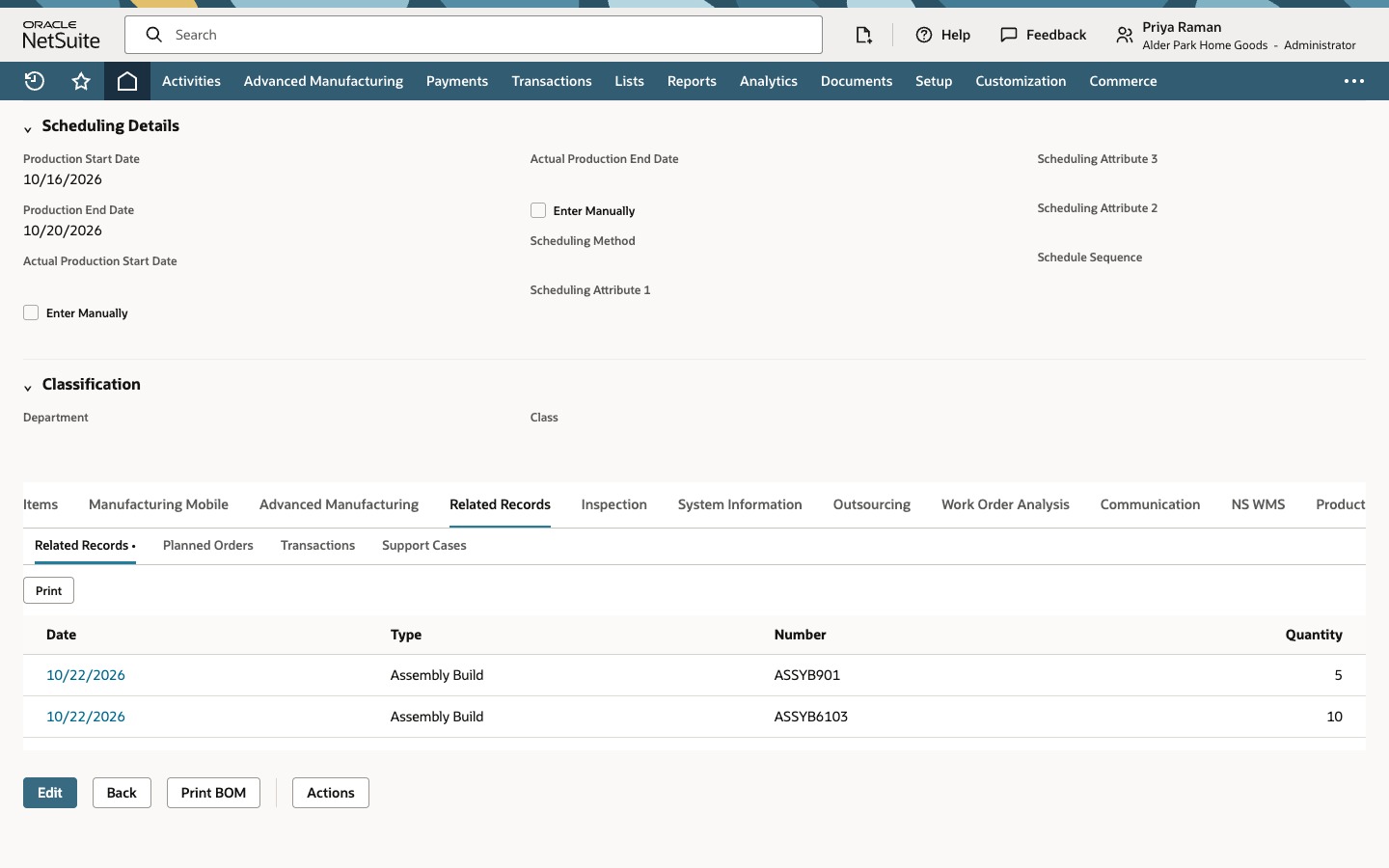
On Related Records, the only record is Assembly Build ASSYB901 for 5. No inventory transfer exists yet.
04. Receive the other 10 at a different location
Open inbound shipment 5202. Its one line expects 10, and its Receiving Location is Reno 3PL Warehouse rather than the contract manufacturer. Choose Receive.
On Receive Inbound Shipment, confirm the line's Receiving Location is Reno 3PL Warehouse and change it from the list if it is not. Check that Quantity to be Received is 10, choose the open posting period and Save. This location decides what NetSuite creates next, so check it before you save.
Refresh Process Status until it reads Complete, then open it and follow the processed record to the new item receipt, here IR6102.
05. Confirm the transfer and the finished order
On IR6102, the line's To Location is Reno 3PL Warehouse and it links Assembly Build ASSYB6103 and Inventory Transfer IT412. The build is still posted at the work order's location. The transfer then moves the 10 finished planters from Contract Manufacturer : Marlow Finishing to Reno 3PL Warehouse. The first 5 stay where they were built.
Open the Created From purchase order, PO5301. Its status is now Pending Bill: all 15 are received and nothing is billed. Do not bill the vendor in this walkthrough.
Go back to the receipt, open Assembly Build ASSYB6103 and then its Created From work order, WO1850. Its status is Built and Built is 15.
Check the result
- Each receipt created its own assembly build: ASSYB901 for 5 and ASSYB6103 for 10, both listed on the work order's Related Records.
- Only the second receipt, received at a location other than the work order's, created an inventory transfer, and it covers only the 10 received on that receipt.
- The work order is Built with 15 built and the purchase order is Pending Bill. The item receipts are against the outsourcing charge, so they record the vendor's charge, not stock; the planters are stocked by the builds and the transfer.
Common questions
Do I have to build the assembly myself after receiving an outsourced purchase order?
No. Receiving the purchase order for the outsourcing charge makes NetSuite post the assembly build on the linked work order, at the work order's location. The receipt quantity sets the build quantity.
Why is the work order In Process and not Built after the first receipt?
Only 5 of 15 were received, so only 5 were built. The work order stays In Process with Built at 5 until the rest of the quantity is received.
When does NetSuite create an inventory transfer for an outsourced receipt?
When the receipt's location is different from the work order's location. The build is posted at the work order's location, and the transfer moves the received quantity from there to the receiving location. If the two locations match, as on the first receipt here, no transfer is created.
Does the transfer move all 15 planters?
No. It moves only the quantity on the receipt that created it, 10 here. Planters from an earlier receipt at the work order's location stay where they were built.
What does the item receipt record if it is against a service charge item?
It records the contract manufacturer's charge. The finished planters are stocked by the assembly builds and, when the receipt location differs, by the inventory transfer.