The quick answer
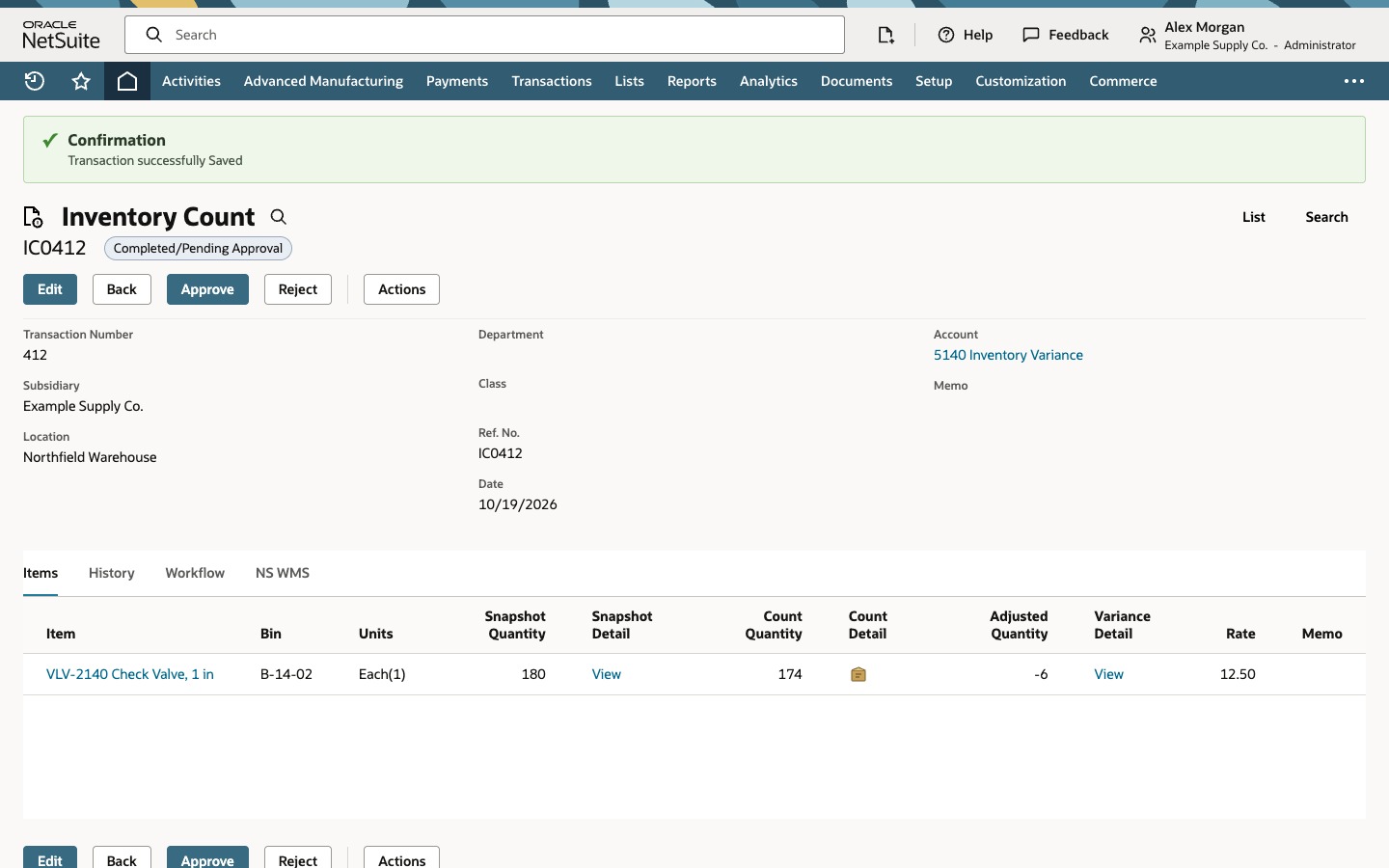
Open the Inventory Count that is Completed/Pending Approval and click Reject. The count returns to Started. Click Edit, enter the physical quantity in Count Quantity and click Save, then click Complete Count again. The count goes back to Completed/Pending Approval, and Adjusted Quantity now shows the variance. Neither Complete Count nor Reject creates an inventory adjustment. That happens only when someone clicks Approve.
The screenshots show sample data. Person, company, item, bin and quantity values are fictional. Use your own records and values when following the steps.
Before you start
You need an Inventory Count that is Started and has a line with no Count Quantity. In this example it is IC0412 for Northfield Warehouse, with one line for VLV-2140 Check Valve, 1 in, in bin B-14-02. This guide covers the native Inventory Count record. WMS Cycle Count and Smart Count use different menus, statuses and review pages. You need role access to complete, edit and reject Inventory Counts. The permission split between counting and approving depends on your roles and features, and many companies give approval to a different person than the counter.
A blank Count Quantity means nobody entered a quantity. It is not the same as an entered 0. When a bin is really empty, the counter should enter 0. Do not assume that a blank line is treated as zero when the count is approved.
Items tracked by bin, lot, serial number or inventory status can need Count Detail that adds up to the Count Quantity. Your page layout, tabs and buttons depend on your release, role and whether WMS features are installed.
01. Complete the count
Open Inventory Count IC0412. It is Started, and the Count Quantity cell is empty. The snapshot columns are not shown while the count is Started.
Click Complete Count. NetSuite does not check that a quantity was entered. The status becomes Completed/Pending Approval, and Approve and Reject appear. The line now shows Snapshot Quantity 180, but Count Quantity and Adjusted Quantity are empty, so there is nothing real to approve.
02. Reject the count
Click Reject. The count returns to Started, so the counter can enter the quantity on the same record. In this example the snapshot columns are hidden again, although what a Started count displays depends on your form and count settings. Reject posts nothing and reverses nothing, because the count never posted anything. Before you recount, check for receipts, fulfillments or transfers since the snapshot, because they make it stale.
03. Enter the missing quantity
Click Edit. In the Items sublist, type 174 in Count Quantity for VLV-2140 Check Valve, 1 in, then click Save. Some forms show an OK button on the line editor, and then you click OK before Save. If the item is tracked by bin, lot, serial number or inventory status, enter Count Detail that adds up to the Count Quantity. The count stays Started and now holds the quantity.
04. Complete it again and read the variance
Click Complete Count. The count is Completed/Pending Approval again. Read the line: Snapshot Quantity 180, Count Quantity 174 and Adjusted Quantity -6. Adjusted Quantity is Count Quantity minus Snapshot Quantity, so a negative number is a shortage and a positive number is an overage. At the displayed rate of 12.50, the shortage is worth about 75.00. That is an estimate. The generated adjustment's GL Impact is the accounting result.
Check the result
- The status is Completed/Pending Approval and the same count number, IC0412, is still on the page.
- Count Quantity shows 174 and Adjusted Quantity shows -6.
- No inventory adjustment exists yet. Click Approve only if you are the approver and the variance is acceptable.
- Check Snapshot Quantity again after a rejection. Depending on your count settings, NetSuite can refresh the snapshot, and a different snapshot changes the variance.
Approving creates inventory adjustments for lines with a nonzero variance, and a count with both shortages and overages can produce separate adjustments. A missing permission, a closed accounting period, invalid item or inventory detail, or negative resulting inventory where it is not allowed can block it.
Common questions
What does Reject do on an Inventory Count?
It returns a Completed/Pending Approval count to Started so quantities can be entered or corrected. Reject does not create an inventory adjustment and does not reverse one, because a count that has not been approved has not posted anything.
Can a count be completed without a Count Quantity?
Yes, in the native Inventory Count workflow a count can often be completed while a line has no Count Quantity. WMS and Smart Count settings can add rules. The count then waits for approval with that line blank. Approvers should read the Count Quantity column before they approve.
Is a blank Count Quantity the same as zero?
No. Blank means no quantity was entered. Zero means someone checked the bin and found nothing. Enter 0 for an empty bin, and do not rely on a blank line being treated as zero when the count is approved.
How is Adjusted Quantity calculated?
Adjusted Quantity is Count Quantity minus Snapshot Quantity. In this example, 174 minus 180 is -6. The snapshot is the on-hand quantity captured for the count, so it can differ from the quantity on hand when you approve.
Does Reject keep the original Snapshot Quantity?
It depends on your count settings, so check the column after a rejection. Depending on the account, NetSuite can refresh the snapshot, and then the same physical count can produce a different Adjusted Quantity.