The quick answer
On the item receipt, open the Landed Cost subtab, set Source to Other Transaction for Landed Cost - Duties and choose the carrier bill in Transaction. NetSuite adds up only the bill's item lines whose Landed Cost Category is Landed Cost - Duties. Here that is 190.00 plus 260.00, so the receipt shows 450.00 and not the 1,020.00 bill total. Freight and storage lines on the same bill stay out of inventory cost unless you source them too.
The screenshots show sample data. Person and operating-company names are fictional. Use your own records and values when following the steps.
Before you start
This walkthrough uses body-level landed cost on a receipt with Advanced Receiving, so Landed Cost per Line is cleared. You need Landed Cost turned on, a Landed Cost - Duties category, and receiving items that have Track Landed Cost checked. The items here are not standard-cost items. The carrier or broker bill must be its own bill, not the Bill action on the purchase order. Its Items lines must use a landed cost item or an inventory item that tracks landed cost, and each line needs a Landed Cost Category that matches the receipt's category. That column can be hidden on the bill form, so add it to the form under Customization > Forms > Transaction Forms if you do not see it.
The bill and the receipt need compatible subsidiary and currency settings, and the bill must not already be allocated to another receipt. A sourced bill is generally allocated to one item receipt. This example has no estimated landed cost template, so the sourced duty is the only landed cost the receipt adds, and it posts in an open October 2026 period.
01. Read the category on each bill line
Open bill CCF-71306 from Coastline Customs and Freight. Its amount is 1,020.00. On the Items tab, read Landed Cost Category on each of the six lines. Two lines are Landed Cost - Duties (190.00 and 260.00), two are Landed Cost - Freight (210.00 and 140.00) and two are Landed Cost - Storage and Handling (125.00 and 95.00). The lines are not in category order, so read the category column and not the row position.
02. Start the item receipt from the purchase order
Open purchase order PO8420 from Summit Rim Components. It is Pending Receipt for 20 Each of TF-310 Trail Fork at 64.00 and 10 Each of HB-220 Handlebar at 52.00, 1,800.00 in all.
Click Receive. On the receipt, both lines are checked for Bellingham Warehouse at 20 and 10, and Landed Cost per Line is cleared. That leaves the body-level Landed Cost subtab in charge of the allocation.
03. Source the duty amount from the bill
Open the Landed Cost subtab and set Cost Allocation Method to Quantity. For Landed Cost - Duties, change Source to Other Transaction and choose CCF-71306 in Transaction. The amount field fills with 450.00 and locks, because it now comes from the bill.
The amount is 190.00 plus 260.00, the two Landed Cost - Duties lines, and not the 1,020.00 on the bill. Other Transaction takes the whole matching category amount, so there is no field for part of it. Leave the Landed Cost - Freight and Landed Cost - Storage and Handling amounts empty with Source Manual. They add no landed cost to this receipt. Anything you type in either one would be allocated separately.
A bill with tax on it can bring that tax into the amount. If the tax should not become inventory cost, the Source list also offers Other Transaction (exclude tax). How it behaves depends on whether the account uses legacy tax or SuiteTax.
04. Save the receipt and check GL Impact
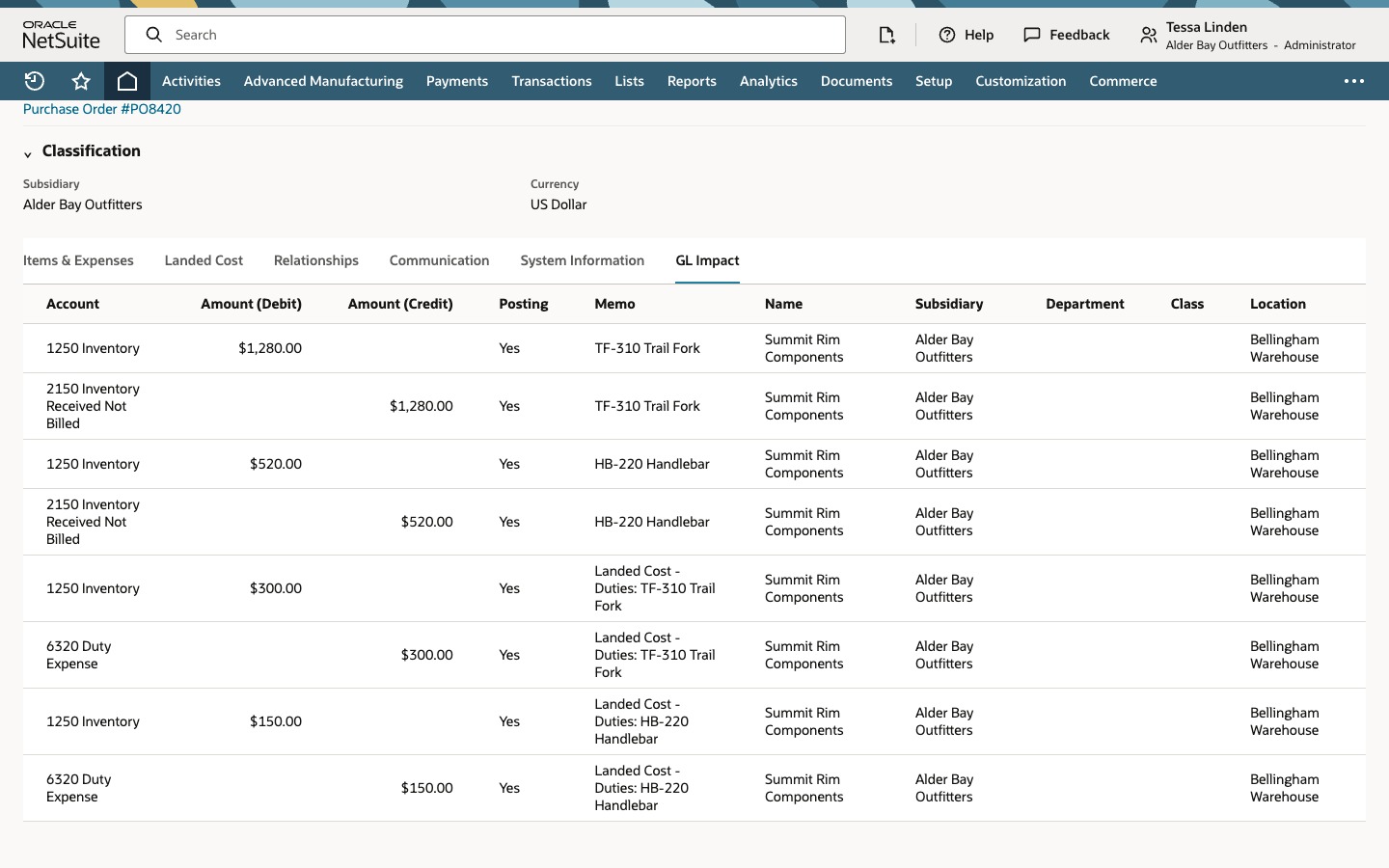
Click Save. The receipt is saved as IR8423. Open GL Impact. In this example the goods debit inventory 1,280.00 and 520.00 and credit Inventory Received Not Billed. The duty comes in as a pair for each item: 300.00 for TF-310 Trail Fork, which is 20 of the 30 eligible units, and 150.00 for HB-220 Handlebar, 10 of 30. Both are credited to 6320 Duty Expense. The two shares add up to the 450.00 you sourced. Account names and row order depend on your item, category and accounting setup, so check the carrier bill's GL Impact too.
Check the result
- The Duties amount read 450.00 after you chose CCF-71306, not 1,020.00.
- Landed Cost - Freight and Landed Cost - Storage and Handling were still empty.
- GL Impact on the saved receipt shows duty of 300.00 and 150.00 against 6320 Duty Expense.
Common questions
Why does Landed Cost - Duties show less than the bill total?
NetSuite filters the bill's item lines by their Landed Cost Category and adds only the lines that match the receipt's category. A 1,020.00 bill with 450.00 of duty lines gives 450.00 for Landed Cost - Duties. The other lines are not capitalized by that source.
Where do I set the category on each bill line?
On the Items sublist of the bill, in the Landed Cost Category column. The column can be hidden on a custom bill form. Add it under Customization > Forms > Transaction Forms. Expense-only bill lines are not an eligible source.
Can I use the same bill for the freight on this receipt?
You could source the Landed Cost - Freight row from the same bill on this receipt. It would add the two freight lines, 350.00, to inventory cost, which this example leaves out on purpose. What a sourced bill cannot do is supply a second item receipt, because it is generally allocated to one receipt. For another receipt, use its own carrier bill or enter the amount as Manual.
Does sourcing from the bill change the carrier bill?
No. Sourcing reads the matching amount from the bill. It does not edit, reclassify or pay the bill, which stays posted to the accounts on its lines, 1,020.00 in all. The receipt separately moves 450.00 into inventory value and credits the duty category's account. That credit offsets the bill's debit only when the landed cost item's account and the category's account are the same.
What decides how the duty is split across items?
The Cost Allocation Method: Quantity, Weight or Value. It applies to the whole receipt when Landed Cost per Line is off. Quantity splits 450.00 by units, so 20 of 30 gives 300.00 and 10 of 30 gives 150.00. Only eligible lines, those whose item has Track Landed Cost checked, count toward the 30 and take a share.